What an ABAP developer builds in an MDG project: data model extensions (new fields and entity types), UI extensions in Floorplan Manager, validations and derivations with BRF+ and the rule-service BAdIs, workflow enhancements for the rule-based workflow, replication enhancements and programs that create change requests with the MDG APIs – plus complete custom objects in flex mode. Everything here is classic mode; cloud-ready mode extensibility and clean core are on page 06. General techniques: CORE ABAP › 10 Enhancements (BAdIs), 12 Workflow, 13 BRF+. Concepts used here: data models and reuse / flex mode (page 02), processes and rule-based workflow (page 03), DRF (page 04).
Part 1 – Where to extend MDG
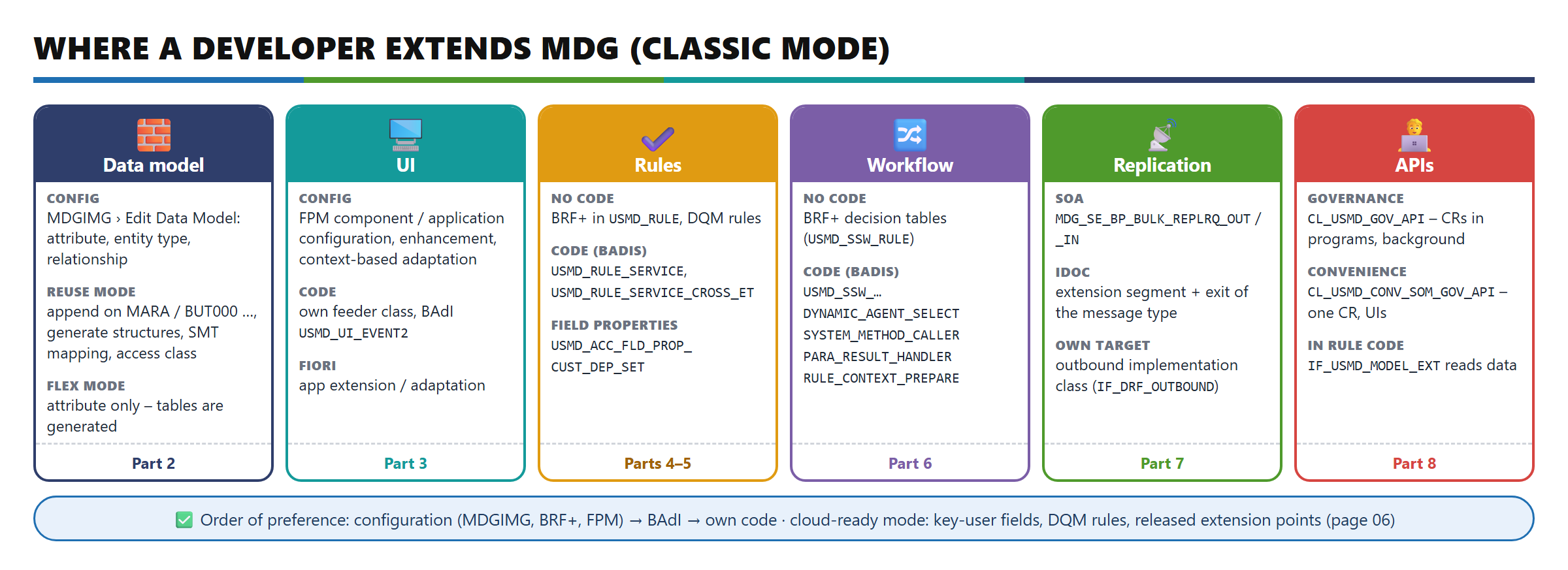
Requirement | Technique | Where |
|---|---|---|
New field on the material or BP, governed and replicated | Data model extension (reuse mode) + UI + replication mapping | Part 2, 3, 7 |
New object MDG does not deliver (e.g. location, Z reference data) | Custom data model in flex mode | Part 9 |
"Field X is mandatory when …" readable by business | BRF+ validation or DQM rule | Part 5, page 03 |
Check across entity types or against external data | BAdI USMD_RULE_SERVICE / USMD_RULE_SERVICE_CROSS_ET | Part 4 |
Field read-only / mandatory depending on data | Field property BAdI USMD_ACC_FLD_PROP_CUST_DEP_SET | Part 4.4 |
Approver depends on data (e.g. plant manager of the plant) | BRF+ decision table or BAdI USMD_SSW_DYNAMIC_AGENT_SELECT | Part 6 |
Background step calls own logic | Process pattern 02 + BAdI USMD_SSW_SYSTEM_METHOD_CALLER | Part 6 |
Change outgoing BP message | BAdI MDG_SE_BP_BULK_REPLRQ_OUT | Part 7 |
Create change requests from a program or interface | Governance API | Part 8 |
- Order of preference: configuration (MDGIMG, BRF+, FPM configuration, DQM) → BAdI → own code. Configuration survives upgrades and stays visible to the business.
- Copy SAP objects into your namespace before you change them (CR types, UI configurations, BRF+ rules) – SAP content is overwritten by upgrades and BC set activation.
Part 2 – Data model extension
Extension | Reuse mode (MM, BP) | Flex mode (0G, custom) |
|---|---|---|
New attribute | Append the field to the application table, add the attribute, generate structures, map with SMT, adjust UI | Add the attribute and activate – MDG generates the tables |
New entity type (e.g. a Z table per material) | Entity type with own Z table, access class logic to read / write it, SMT mapping, UI | Entity type (type 4 under its type-1 parent) – tables generated |
New relationship / qualifying key | Possible, needs matching application key fields | Possible |
Effort | High – several layers must match | Low |
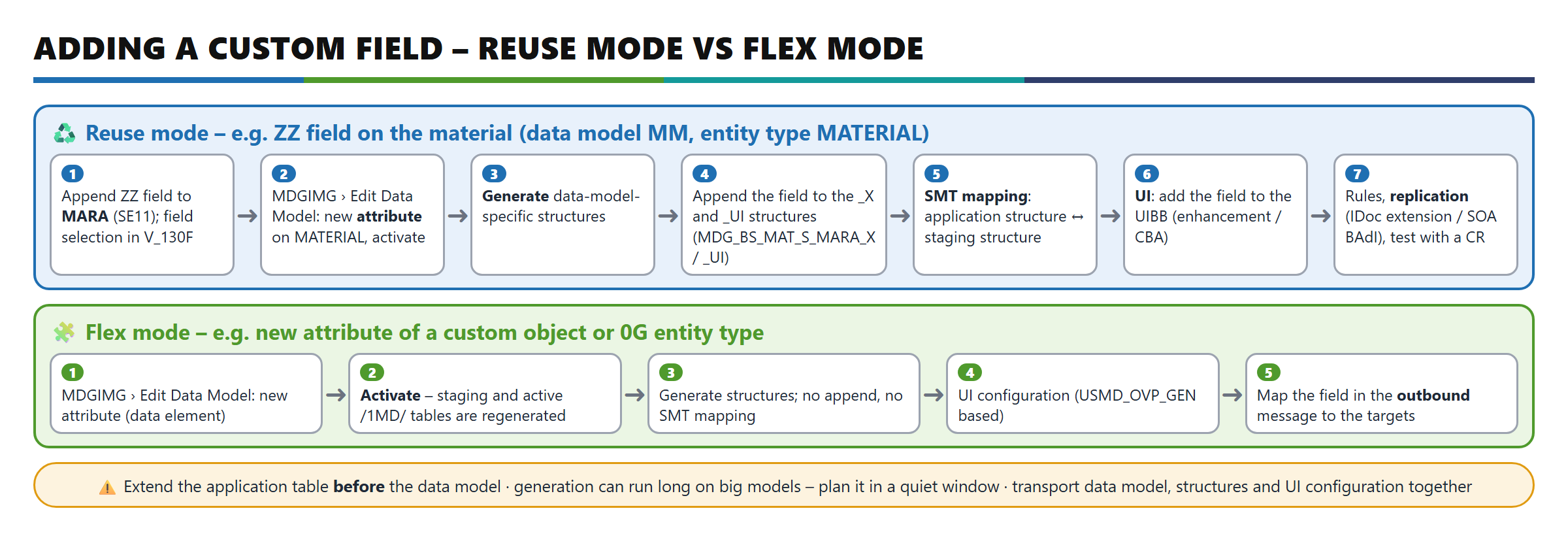
2.1 Reuse mode step by step (ZZ field on the material)
# | Step | Detail |
|---|---|---|
1 | Extend the application table | Append structure with the ZZ field on MARA (SE11); field selection entry (table T130F, field attributes) so that the material master knows the field |
2 | Extend the data model | MDGIMG › Data Modeling › Edit Data Model: data model MM, entity type MATERIAL, new attribute with the same data element; activate |
3 | Generate structures | Generate the data-model-specific structures; the API structure (e.g. MDG_BS_MAT_S_MARA) picks up the append automatically |
4 | Extend helper structures | Append the field to the change-indicator and UI structures (MDG_BS_MAT_S_MARA_X, MDG_BS_MAT_S_MARA_UI) – the _UI structure carries field properties |
5 | SMT mapping | Map application structure ↔ staging structure in MDGIMG › Create and Edit Mappings (read and write direction) |
6 | UI | Add the field to the form UIBB – component configuration enhancement or context-based adaptation (Part 3) |
7 | Rules and replication | Validations (Part 4 / 5); add the field to the outbound message – IDoc extension or SOA BAdI (Part 7); test a full CR |
- The BP model works the same way with the BP tables (e.g. BUT000) and, for customer / supplier fields, the CVI tables (KNA1, LFA1 …) plus the CVI mapping (Part 7.3).
- Generation can run for a long time on large models – plan it outside business hours and transport data model, generated structures, mappings and UI configuration together.
- Never write to the generated /1MD/ tables yourself; activation, SMT mapping and the access class do that.
- Cloud-ready mode: fields are added with key-user extensibility (Custom Fields app) instead (page 06).
Part 3 – UI extension
Classic MDG UIs are Web Dynpro ABAP with Floorplan Manager (FPM) on BOL / genIL. Most UI changes are configuration, not code.
Need | How |
|---|---|
Add, hide, move or relabel a field | Enhance the component configuration of the form / list UIBB (FPM configuration editor) – no modification of the SAP configuration |
Different layout per CR type or step | Context-based adaptation (CBA) of the application configuration, e.g. per CR type or step |
Field read-only / mandatory per step | Change request step properties; BAdI for dynamic properties (Part 4.4) |
Own logic on a UI event (button, value change) | Own feeder class (subclass the delivered one) or the UI event BAdI USMD_UI_EVENT2 |
UI for a custom data model | Generic application USMD_OVP_GEN with your configuration (parameter USMD_OTC); genIL adapter for the model (Part 9) |
Fiori apps | UI adaptation by key users or an adaptation project; OData extension only where the app offers extension points |
- For data models in the SAP namespace you create genIL adapter classes inheriting from
CL_USMD_GENERIC_GENIL_ADAPTER(single object) andCL_USMD_GEN_MC_GENIL_ADAPTER(multi-record) and a transaction handler inheriting fromCL_MDG_BS_BOL_TRANSACTION; customer-namespace models need no own transaction handler. The genIL model is maintained in GENIL_MODEL_BROWSER.
Part 4 – Validations, derivations and field properties with BAdIs
When a BRF+ rule is not enough – logic across entity types, external lookups, complex loops – implement the rule-service BAdIs. MDG calls them whenever it checks the change request data, like the BRF+ rules (page 03 Part 3).
4.1 BAdI USMD_RULE_SERVICE
- Interface IF_EX_USMD_RULE_SERVICE; IMG: MDGIMG › General Settings › Data Quality and Search › BAdI: Define Validations/Derivations.
- Filter-dependent with filters MODEL (data model) and ENTITYTYPE – one implementation per data model / entity type combination.
- All methods receive IO_MODEL (
TYPE REF TO IF_USMD_MODEL_EXT) to read further data of the model; checks return messages in ET_MESSAGE (USMD_T_MESSAGE: MSGID, MSGTY, MSGNO, MSGV1–4, ROW, FIELDNAME) or write to the application log handle.
Method | Called | Main parameters |
|---|---|---|
CHECK_ENTITY | Check one master record (single and mass processing, upload) | ID_CREQUEST, ID_EDITION, ID_ENTITYTYPE, IT_DATA ( |
DERIVE_ENTITY | Derive (fill / change) data of a record | CT_DATA ( |
CHECK_CREQUEST | Checks of the whole change request that must block activation | ID_CREQUEST, IT_DATA, ID_LOG_HANDLE |
CHECK_EDITION_START / CHECK_EDITION / CHECK_EDITION_FINAL | Same for an edition (0G) | ID_EDITION, IT_DATA, ID_LOG_HANDLE |
CHECK_ENTITY_HIERARCHY, CHECK_CREQUEST_HIERARCHY, CHECK_EDITION_HIERARCHY | Hierarchy changes | IT_DELTA (hierarchy delta) |
4.2 Example – validation in CHECK_ENTITY
Rule: a finished product (material type FERT) must have a material group. Implementation of USMD_RULE_SERVICE with filter MODEL = MM, ENTITYTYPE = MATERIAL. IT_DATA is typed ANY TABLE: each row has the key field MATERIAL and the entity type's attributes (MTART material type, MATKL material group …), so the fields are read with ASSIGN COMPONENT. The class implements all interface methods; the ones not needed stay empty.
|
- A derivation works the same way in DERIVE_ENTITY, but changes the values in CT_DATA instead of returning messages.
- Keep checks fast – they run on every round trip. Read other entity types through IO_MODEL, not with SELECTs on the /1MD/ tables.
4.3 Cross-entity derivations – USMD_RULE_SERVICE_CROSS_ET
- BAdI Derivations Across Entity Types (USMD_RULE_SERVICE_CROSS_ET): derive or check data of several entity types together, e.g. default plant data from basic data, or delete dependent type-4 entities. Use it when one entity type's rule needs another's data.
4.4 Dynamic field properties – USMD_ACC_FLD_PROP_CUST_DEP_SET
- BAdI Access to Customer-Dependent Field Property Settings (interface IF_EX_USMD_ACC_FLD_PROP_CDS, methods MODIFY_FLD_PROP_ATTR and MODIFY_ENTITY_PROPERTIES; example class CL_USMD_ACC_FLD_PROP_EXAMPLE) sets fields to read-only, required or optional at runtime.
- It cannot make a field editable that the CR status or step properties already set to read-only.
Part 5 – BRF+ rules
BRF+ is the no-code rule engine for validations and derivations (transaction USMD_RULE, MDGIMG › Data Quality and Search › Define Validation and Derivation Rules) and for the rule-based workflow (USMD_SSW_RULE, page 03 Part 2). BRF+ itself is taught in CORE ABAP › 13 BRF+.
Element | MDG convention |
|---|---|
Application | Generated per data model in the namespace FMDM_MODEL_<data model> with a catalog; own applications may be created in that namespace |
Trigger function nodes | CHECK_<entity type> for validations (e.g. CHECK_ACCOUNT), DERIVE_<entity type> for derivations – at most one per entity type and event |
Events | CHECK_ENTITY, CHECK_CHANGE_REQUEST, CHECK_EDITION, the hierarchy variants (…_HRY) and DERIVATION |
Context data objects | Entity structure plus predefined objects such as SAPFMDM_CREQUEST, SAPFMDM_EDITION, SAPFMDM_PROCESS, SAPFMDM_WORKITEM_ID, SAPFMDM_HRY_DELTA |
Type-4 entities | 1:1 – fields are added to the type-1 structure (derived via DERIVE_<type-1>); 1:N – own structure and own trigger |
Results | Validation: messages whose type controls processing; derivation: change context action sets attribute values |
- A BRF+ procedure call expression can call an ABAP function module or static method – a middle way when one step of a rule needs code but the rule should stay visible in BRF+.
- BRF+ vs BAdI: BRF+ for rules the business can read and change; BAdI for loops, cross-entity logic, external calls and performance-critical checks.
Part 6 – Workflow enhancements
The rule-based workflow (template WS60800086) is configured in BRF+ decision tables; the BAdIs of enhancement spot USMD_SSW_SERVICE_PROCESSOR add logic where the tables are not enough. They are filtered by a service name defined in MDGIMG › Define Service Names for Rule-Based Workflow and entered in the decision tables.
BAdI | Method | Use |
|---|---|---|
USMD_SSW_DYNAMIC_AGENT_SELECT | GET_DYNAMIC_AGENTS | Determine agents at runtime from the CR data (e.g. approver per plant); SAP example CL_MDG_BS_MAT_SELECT_AGENT |
USMD_SSW_SYSTEM_METHOD_CALLER | Called for process pattern 02 | Synchronous system step: own checks, enrichment, setting the action that drives the next step |
USMD_SSW_PARA_RESULT_HANDLER | HANDLE_PARALLEL_RESULT | Merge the results of parallel work items into one (merge type B with the handler's service name in the decision table) |
USMD_SSW_RULE_CONTEXT_PREPARE | – | Add own context values (e.g. material type, company code) so that the decision tables can route on them |
- Process pattern 03 starts a sub-workflow – a normal SAP Business Workflow template (SWDD) for steps the generic template cannot model (CORE ABAP › 12 Workflow).
- Debugging background steps: class CL_USMD_WF_SSW (methods CALL_SYNCH_SYST_METHOD, FIND_PATH_PROCESSOR) is where the workflow calls the BAdIs; SWIA / SWI1 show the work items.
- Prefer BRF+ conditions (via rule context preparation) to hard-coded routing in the agent BAdI – routing should stay visible in the decision tables.
Part 7 – Replication enhancements
7.1 SOA messages
- MDG_SE_BP_BULK_REPLRQ_OUT – change the outgoing BP bulk replication message (e.g. fill a custom field, clear segments a target must not receive).
- MDG_SE_BP_BULK_REPLRQ_IN (enhancement spot MDG_SE_SPOT_BPBUPA, method INBOUND_PROCESSING) – inbound processing in the receiver or hub, e.g. create a change request and key mapping (page 04 Part 6).
- Business function CA_BP_SOA activates the BAdIs for BP and relationship request / confirmation mapping. A custom field also needs an enhancement of the service structure (enterprise service extension) on both sides.
7.2 IDocs and custom targets
- IDoc: add the field in an extension segment, fill it in the message type's exit or BAdI in the sender and read it in the receiver – technique in CORE ABAP › 07 Interfaces.
- Own target or format: write an outbound implementation class implementing IF_DRF_OUTBOUND, register it in DRFIMG › Define Outbound Implementations (BO type, channel, filter objects) and use it in a replication model.
7.3 CVI for custom fields
- Custom fields that must travel between business partner and customer / vendor tables (BUT000 ↔ KNA1 / LFA1) are mapped in BAdI CVI_CUSTOM_MAPPER – needed in MDG and in every receiving S/4HANA.
Part 8 – MDG APIs for change requests
API | Class / interface | Use |
|---|---|---|
Governance API |
| Whole governance process in programs and background services (loads, interfaces): create change requests, lock, write, check, save, start the workflow; several CRs at a time; one instance per data model |
Convenience API |
| Optimised for single-object processing and UIs: one CR per data model at a time, set the environment (CR type or number), read and write entity data, save; calls the governance API internally |
External model API | IF_USMD_MODEL_EXT | Read data of a data model (staging or active) – the IO_MODEL of the rule-service BAdIs |
Change request API | IF_USMD_CREQUEST_API | Change request attributes and status |
Application context | CL_USMD_APP_CONTEXT | Runtime context: data model, CR, CR type, step, work item |
- Do not use the governance API and the convenience API together for the same data model in one session.
- The convenience API's WRITE_ENTITY_DATA writes into the CR buffer; only SAVE persists it.
- Typical uses: an interface that turns incoming data into change requests, a mass job that opens change requests for flagged records, a custom Fiori app on top of MDG. For pure reading in reports use the released CDS views of your release or the APIs – never join USMD and /1MD/ tables.
Part 9 – Custom objects and typical RICEFW
9.1 A custom object in flex mode from scratch
# | Step | Where |
|---|---|---|
1 | Create the data model (two-character Z ID), entity types (type 1 root, type 4 dependent, type 2 / 3 value lists), attributes, relationships; reuse area MDG (flex); activate | MDGIMG › Edit Data Model |
2 | Generate the data-model-specific structures | MDGIMG |
3 | Assign a business object type (object type code) so that key mapping, DRF and the generic UI (USMD_OTC) can address the object | MDGIMG |
4 | UI: configuration of USMD_OVP_GEN for the object; role in PFCG | FPM editor, PFCG |
5 | Business activities, CR type, steps and rule-based workflow decision tables | MDGIMG › Process Modeling, USMD_SSW_RULE |
6 | Validations and derivations | USMD_RULE, BAdI |
7 | Replication: custom outbound implementation (IF_DRF_OUTBOUND) or file | DRFIMG |
8 | Authorisations: data model (USMD_DM), change requests (USMD_CREQ) | PFCG |
9.2 Typical RICEFW objects in MDG projects
Type | Example | Technique |
|---|---|---|
Report | Open change requests per steward with age and SLA; changes of bank details per month | Process analytics apps first; custom report via APIs or released CDS views |
Interface | Custom fields replicated to S/4HANA; supplier portal creates CRs in MDG | Data model extension + SOA BAdI / IDoc extension; inbound BAdI + governance API |
Conversion | Initial load of 200,000 materials into the hub | Consolidation or mass processing with file import; DRF initialization to the clients |
Enhancement | Tax number check per country, default values from material type, approver per plant | BRF+ / USMD_RULE_SERVICE, DERIVE_ENTITY, USMD_SSW_DYNAMIC_AGENT_SELECT |
Form | Rarely – notifications by e-mail at workflow steps | Workflow notifications / own step in a sub-workflow |
Workflow | Extra legal approval for one country, parallel approval by finance and purchasing | Decision tables, parallel agent groups, USMD_SSW_PARA_RESULT_HANDLER, sub-workflow |
Part 10 – Interview questions
Q1. How do you add a custom field to the material in MDG?
Reuse mode: append the field to MARA (and T130F), add the attribute to entity type MATERIAL of data model MM, activate and generate the structures, extend the _X / _UI structures, maintain the SMT mapping, add the field to the UI configuration, then rules and replication. In flex mode only the attribute is added and activated.
Q2. Which BAdI implements validations and derivations?
USMD_RULE_SERVICE (interface IF_EX_USMD_RULE_SERVICE), filtered by data model and entity type: CHECK_ENTITY for checks, DERIVE_ENTITY for derivations, CHECK_CREQUEST for the whole change request. USMD_RULE_SERVICE_CROSS_ET handles logic across entity types.
Q3. How do you return an error message from CHECK_ENTITY?
Append a line of type USMD_S_MESSAGE (MSGID, MSGTY = 'E', MSGNO, MSGV1–4) to ET_MESSAGE. An error prevents submitting or activating the change request.
Q4. How do you read data of another entity type inside the BAdI?
Through IO_MODEL (IF_USMD_MODEL_EXT), the external model API – it reads staging or active data consistently. Never SELECT from the generated /1MD/ tables.
Q5. BRF+ or BAdI – how do you decide?
BRF+ for rules business can understand and maintain (mandatory fields, simple value checks, derivations from a value); BAdI for cross-entity logic, external calls, loops or performance. A BRF+ procedure call can wrap a small piece of ABAP.
Q6. How do you make a field mandatory only in a certain situation?
Statically per step in the CR step properties; dynamically with BAdI USMD_ACC_FLD_PROP_CUST_DEP_SET (MODIFY_FLD_PROP_ATTR), or a validation that raises an error when the field is empty.
Q7. How do you determine the approver from the data of the change request?
Either add the data to the rule context (USMD_SSW_RULE_CONTEXT_PREPARE) and route in the user agent decision table, or implement USMD_SSW_DYNAMIC_AGENT_SELECT (GET_DYNAMIC_AGENTS) and reference its service name in the decision table.
Q8. What is process pattern 02 used for?
A synchronous system method in a background step: the workflow calls BAdI USMD_SSW_SYSTEM_METHOD_CALLER with the service name from the non-user agent decision table, e.g. for an external check or enrichment before the next step.
Q9. How do you replicate a custom BP field to S/4HANA?
Extend the BP data model in MDG and the BP tables in both systems, extend the SOA message (enterprise service enhancement) and fill / read it in MDG_SE_BP_BULK_REPLRQ_OUT / _IN – or extend the IDoc – and map it between BP and customer / vendor with CVI_CUSTOM_MAPPER where needed.
Q10. How do you create change requests from a program?
With the governance API (CL_USMD_GOV_API): create the CR, lock and write entity data, check, save and start the workflow. The convenience API is meant for single-object UIs.
Q11. What do you need for a completely new object in MDG?
A custom data model in flex mode with entity types and attributes, generated structures, a business object type, a USMD_OVP_GEN UI configuration, business activities, CR type and rule-based workflow, rules, a replication approach (custom outbound implementation) and authorisations.
Q12. Which RICEFW objects are typical in an MDG project?
Validations and derivations (BRF+ / BAdIs), dynamic agent and parallel approval logic, data model and UI extensions for custom fields, replication of custom fields, inbound interfaces creating change requests, mass loads via consolidation, and reports on change requests.
🏠 Start Here · ◀ 04 · Replication · 06 · S/4HANA & Architect ▶ · Sections: CORE ABAP | OOPS ABAP | ABAP on HANA | Clean Core | RAP | ABAP Points | SAP Fiori | SAPUI5 | Mobile Development (MDK) | BTP Foundations | BTP Development | CAP | SAP Build | ABAP on BTP | Integration Suite | SAP Business AI | SAP BASIS | Security | SAP SDLC
Functional: FICO ABAP | TRM ABAP | VIM | SAP BIS | SD ABAP | MM ABAP | PP ABAP | QM ABAP | PM ABAP | PS ABAP | EWM | TM ABAP | GTM ABAP | EHS ABAP | HR ABAP | BW | SAP Datasphere | SAP Business Data Cloud | SAP MDG | SAP Analytics Cloud | SAP Ariba | SAP CX | SAP IBP