Every piece of work in an SAP project is written down somewhere before it is built, and every change is tracked until it is live. As a developer you meet three kinds of tools: a planning tool for the team's backlog (Azure DevOps or Jira), an ITSM tool for tickets from the business (usually ServiceNow) and SAP-side change management that moves your code (transport requests, often controlled by ChaRM, SAP Cloud ALM or a customer's own tool). This page explains each of them and how they link together. The Scrum framework itself – roles, events, artifacts – is on page 02.
Part 1 – The work-item hierarchy
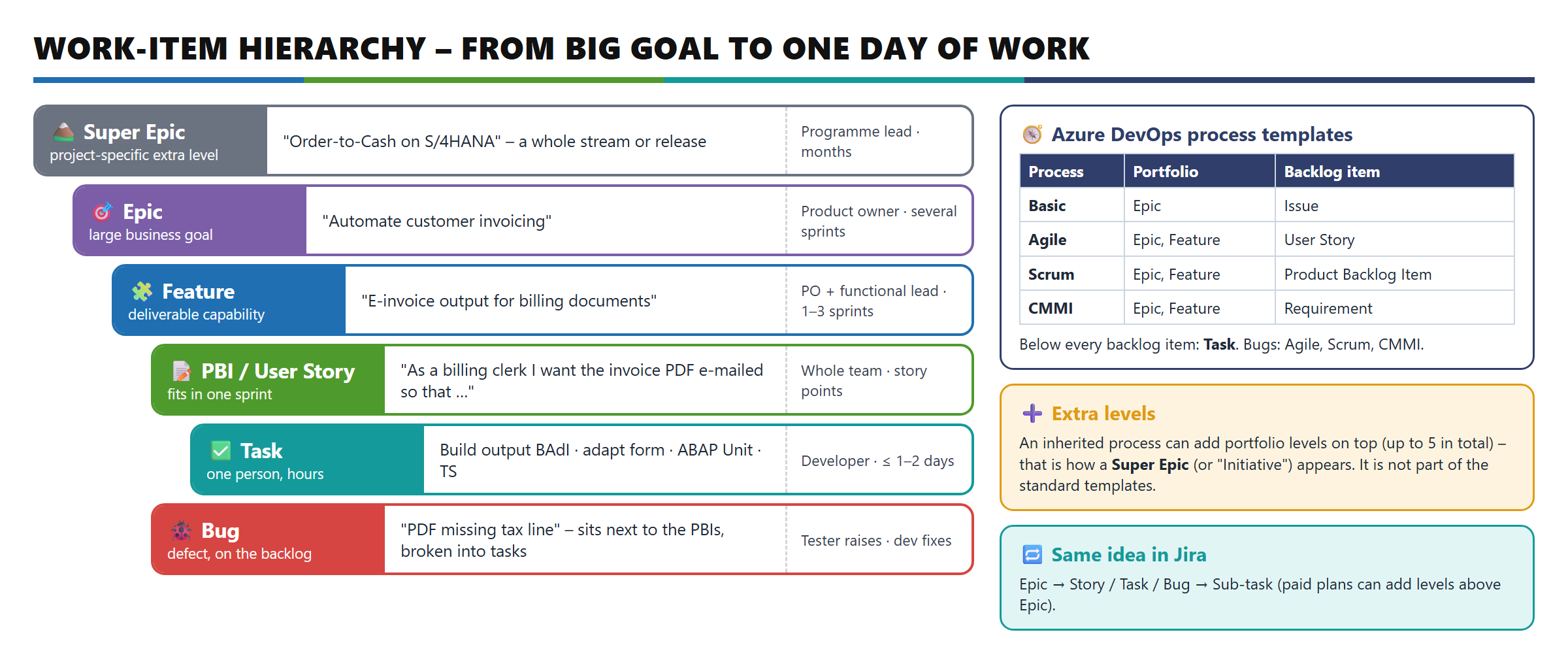
Big goals are broken down step by step until each piece is small enough for one person to finish in a day or two. A typical SAP project in Azure DevOps uses: Super Epic → Epic → Feature → PBI → Task. Epic, Feature, Product Backlog Item (PBI) and Task are the standard levels of the ADO Scrum process; the Super Epic is an extra level the project added on top.
Level | What it is | SAP example | Size |
|---|---|---|---|
Super Epic | Project-specific top level: a whole stream, release or wave | Order-to-Cash on S/4HANA | Months |
Epic | A large business goal, too big for one release step | Automate customer invoicing | Several sprints |
Feature | A capability that can be delivered and shown to the business | E-invoice output for billing documents | 1–3 sprints |
PBI / User Story | One valuable piece the team can finish in one sprint | E-mail the invoice PDF to the payer | Story points |
Task | A technical step for one person | Implement the output BAdI; write ABAP Unit tests | Hours |
Process templates in Azure DevOps
When an ADO project is created it gets a process that defines the work item types and backlog levels:
Process | Portfolio backlogs | Backlog item | Other types |
|---|---|---|---|
Basic | Epic | Issue | Task |
Agile | Epic, Feature | User Story | Task, Bug, Issue |
Scrum | Epic, Feature | Product Backlog Item | Task, Bug, Impediment |
CMMI | Epic, Feature | Requirement | Task, Bug, Change Request, Issue, Review, Risk |
- An inherited process can add custom portfolio levels on top of Epic (up to five portfolio backlogs in total) – that is where levels such as Super Epic or Initiative come from.
- PBI (Scrum process) and User Story (Agile process) play the same role; teams often say "story" for both.
Part 2 – User stories, acceptance criteria, tasks and bugs
2.1 User stories
A user story describes a need from the user's point of view, not a technical solution:
As a <role> I want <capability> so that <business benefit>.
- Example: As a billing clerk I want the invoice PDF e-mailed to the payer automatically so that customers receive invoices on the day of billing without manual work.
- The story is a promise of a conversation: the details come from refinement with the product owner and the functional consultant (page 02).
A good story follows INVEST:
Letter | Meaning | What it means for an SAP story |
|---|---|---|
I | Independent | Can be built and tested without waiting for another story |
N | Negotiable | Scope can still be discussed; it is not a frozen contract |
V | Valuable | Delivers value to a user or the business, not just "create table ZXYZ" |
E | Estimable | The team understands it well enough to size it |
S | Small | Fits in one sprint; otherwise split it (by process step, document type, country …) |
T | Testable | Has acceptance criteria someone can check |
2.2 Acceptance criteria and definition of done
Acceptance criteria say when this one story is accepted. A common format is Given – When – Then (from behaviour-driven development):
|
- The definition of done (page 02) applies to every story: e.g. code reviewed, ATC without errors, unit tested, documentation updated, transport released to QAS.
2.3 Tasks, estimates and bugs
- Tasks are created by the developers during sprint planning: TS update, build, ABAP Unit, unit test, fix review comments. Each has an owner and remaining hours, which feed the sprint burndown.
- Stories are sized in story points (relative effort), tasks in hours – story points and velocity on page 02 Part 6, estimation techniques on page 04 Part 6.
- A bug (defect) is a deviation from expected behaviour found in testing or after go-live. In ADO a bug can live on the backlog like a PBI or be tracked with tasks – a team setting. The defect lifecycle is on page 04 Part 4.
Part 3 – Azure DevOps (ADO)
Azure DevOps is Microsoft's application lifecycle platform (cloud: Azure DevOps Services; on-premise: Azure DevOps Server). Many SAP projects use only its Boards for Scrum, because ABAP code lives in the SAP system, not in Git.
Service | What you use it for |
|---|---|
Boards | Work items, backlogs, Kanban boards, sprints, queries, dashboards – the daily tool |
Repos | Git (or TFVC) repositories – for UI5, CAP, BTP code or abapGit projects |
Pipelines | CI/CD builds and deployments – e.g. building and deploying a Fiori app or CAP service |
Test Plans | Manual and exploratory test cases, test runs and results |
Artifacts | Package feeds (npm, Maven, NuGet) for shared libraries |
Boards in detail
- Backlogs – the ordered product backlog (PBIs) and portfolio backlogs (Features, Epics); drag to re-prioritise, map items to parents.
- Sprints – each sprint is an iteration: sprint backlog, taskboard (To Do → In Progress → Done), capacity per person, sprint burndown.
- Iteration path – the time box (e.g.
Release 1\Sprint 07); area path – the team or product area (e.g.S4\OTC\Billing). Together they decide which team sees an item in which sprint. - Boards (Kanban) – columns per state with work-in-progress limits; swimlanes for expedite items.
- Queries – saved filters in a query editor (e.g. "my open bugs in OTC", "items without estimate"); can feed charts and dashboards.
- Dashboards – widgets for burndown, velocity, cumulative flow, query results; used in sprint review and status meetings.
- Typical states: PBI New → Approved → Committed → Done; Task To Do → In Progress → Done; User Story (Agile process) New → Active → Resolved → Closed.
Part 4 – Jira
Jira (Atlassian) is the other common planning tool; Atlassian now calls its issues work items. The concepts map one to one to ADO:
Jira | Azure DevOps equivalent | Note |
|---|---|---|
Epic | Epic / Feature | Groups stories; higher levels (e.g. Initiative) need premium planning features |
Story | PBI / User Story | Story points field, acceptance criteria in the description |
Task | Task (or a non-user-facing PBI) | Work that is not a user story |
Bug | Bug | Defect with its own workflow |
Sub-task | Task under a PBI | Split of a story or task for one person |
Scrum board / Kanban board | Sprint taskboard / Kanban board | Sprints, backlog, columns per status |
JQL | Queries (WIQL) | e.g. |
- Jira Service Management is Atlassian's ITSM product – the counterpart to ServiceNow for incidents and requests.
Part 5 – ITSM with ServiceNow and ITIL
Planning tools track project work. Requests and problems from users of a live system arrive through an IT service management (ITSM) tool, most often ServiceNow, whose processes follow ITIL (the common framework of IT service management practices).
Record | ITIL meaning | ServiceNow | SAP example |
|---|---|---|---|
Incident | Unplanned interruption or loss of quality of a service – restore service fast | INC… (table incident) | Billing job ends with a short dump |
Problem | The cause (or possible cause) of one or more incidents – find and remove the root cause | PRB… (table problem) | Dump comes from a missing check in a custom BAdI |
Change request | Adding, changing or removing anything that can affect a service – controlled and approved | CHG… (table change_request) | Transport with the fix goes to PRD |
Service request | A predefined request from a user: access, information, standard item | REQ… → RITM… → SCTASK… | "Please give me role Z_SD_BILLING" |
REQ, RITM and SCTASK
- When a user orders from the service catalog, ServiceNow creates a REQ (the request – like an order number, table sc_request), one RITM – Requested Item – for each catalog item ordered (table sc_req_item), and one or more SCTASK catalog tasks (table sc_task) for the teams who fulfil it.
- So a RITM is the line you work on: e.g. "new field on the sales order screen" ordered through the catalog, which may then become a CR in the project's change process (Part 8).
Change types and the CAB
Change type | Meaning | Approval |
|---|---|---|
Standard | Low risk, repeatable, pre-authorised (e.g. a routine user role assignment) | None per change – the template is approved once |
Normal | Planned change that needs risk assessment (most SAP transports to PRD) | Change authority, often the CAB (Change Advisory Board) for bigger changes |
Emergency | Must go in as fast as possible, e.g. to fix a P1 incident | Fast-track: skips the peer / group review and goes straight to CAB authorization |
- ITIL 4 calls this practice change enablement; the approver is the change authority, which can be a person, a board (CAB) or an automated rule, depending on risk.
Priority and SLAs
- Priority = impact × urgency. ServiceNow's default incident priorities are 1 Critical, 2 High, 3 Moderate, 4 Low, 5 Planning; projects often speak of P1–P4 (page 04 Part 5).
- An SLA (service level agreement) sets target times per priority: response (someone starts working) and resolution (service restored). The clock pauses in states such as "awaiting user info". Internal agreements between teams are OLAs.
Part 6 – SAP transport requests
Whatever tool tracks the ticket, the actual change travels in a transport request (TR): created in DEV, released, then imported into QAS and PRD along the transport route. Full Basis detail – routes, STMS, import queue, tp – is in SAP BASIS › 03 Clients, Users & Transport Management (Parts 6–9).
Topic | What a developer must know |
|---|---|
Workbench request | Repository objects (programs, classes, CDS, DDIC) and cross-client customizing; created when you save an object in a transportable package (SE09) |
Customizing request | Client-specific customizing (SPRO settings) recorded automatically when the client is set to record changes (SE10) |
Request and tasks | A request has one task per user. You work in your task; objects are locked in the request until it is released |
Number | <SID>K9nnnnn, e.g. |
Release | Release all tasks first, then the request: the objects are exported and a version is stored. Released = frozen; a fix needs a new request |
Import | Basis or an automated job imports into QAS / PRD (STMS); return code 0 = OK, 4 = warning, 8 = errors, 12 and higher = fatal |
Transport of copies | Copy of objects to test in QAS before the real request is released (SE01) |
Sequence | Requests are imported in release order; a request that needs objects from an unreleased one causes errors or dumps in QAS / PRD |
Example – find all requests for one ticket
Most projects require the ticket number (CR, PR, RITM) in the request description. Requests and tasks are in E070 (header), E07T (short text) and E071 (object list):
|
- Tasks have the parent request in STRKORR; the objects of a request and its tasks are in E071 (PGMID, OBJECT, OBJ_NAME).
Part 7 – SAP change management tools: ChaRM and SAP Cloud ALM
On their own, transport requests do not record why a change was made or who approved it. Change management tools wrap the transports in an approval workflow.
7.1 ChaRM in SAP Solution Manager
Change Request Management (ChaRM) is part of SAP Solution Manager 7.2. The flow is: a Request for Change (transaction type SMCR) is approved by the change manager / CAB, then one or more change documents are created; the developer creates and releases transport requests from the change document, and the imports follow its status.
Change document | Transaction type | Use |
|---|---|---|
Normal change | SMMJ | Regular development, imported with the project or maintenance cycle |
Urgent change | SMHF | Fast fix that can go to PRD on its own, outside the cycle |
Defect correction | SMTM | Fixes a defect found while testing a normal change in the same cycle |
Administrative change | SMAD | Administrative activities that do not follow the normal development path |
General change | SMCG | Changes that are tracked in ChaRM but not as ABAP transports |
- Customers usually copy the standard types into Z-types (e.g. ZMCR, ZMMJ) and adapt status and approval steps.
- Extra functions: cross-system object lock (the same object cannot be changed in two open changes), downgrade protection (warns before an older version overwrites a newer one), retrofit for dual landscapes (Part 9).
- SAP Solution Manager 7.2 mainstream maintenance ends on 31 December 2027; SAP recommends moving to SAP Cloud ALM (see SAP BASIS › 04 Communication, Output & Monitoring, Part 9).
7.2 SAP Cloud ALM
SAP Cloud ALM is SAP's cloud application lifecycle tool, included with SAP cloud subscriptions and Enterprise Support. Its implementation part covers project tasks, requirements, user stories, testing and change and deployment management:
- Feature – the unit of change and deployment. It is linked to requirements / user stories and collects the transports that implement it.
- Deployment – features are approved and deployed to QAS and then PRD; all transports assigned to the feature are imported together. Works with CTS for S/4HANA private cloud and on-premise ABAP systems, and with SAP Cloud Transport Management for BTP content.
- Retrofit for dual landscapes is now also offered in SAP Cloud ALM (Part 9).
ChaRM (Solution Manager) | SAP Cloud ALM |
|---|---|
Request for Change | Requirement / user story |
Change document (normal, urgent …) | Feature |
Transports created from the change document | Transports assigned to the feature |
On-premise, configured by Basis | SaaS, run by SAP; managed systems are connected to it |
Part 8 – A customer change process: CR, PR, RR and CT
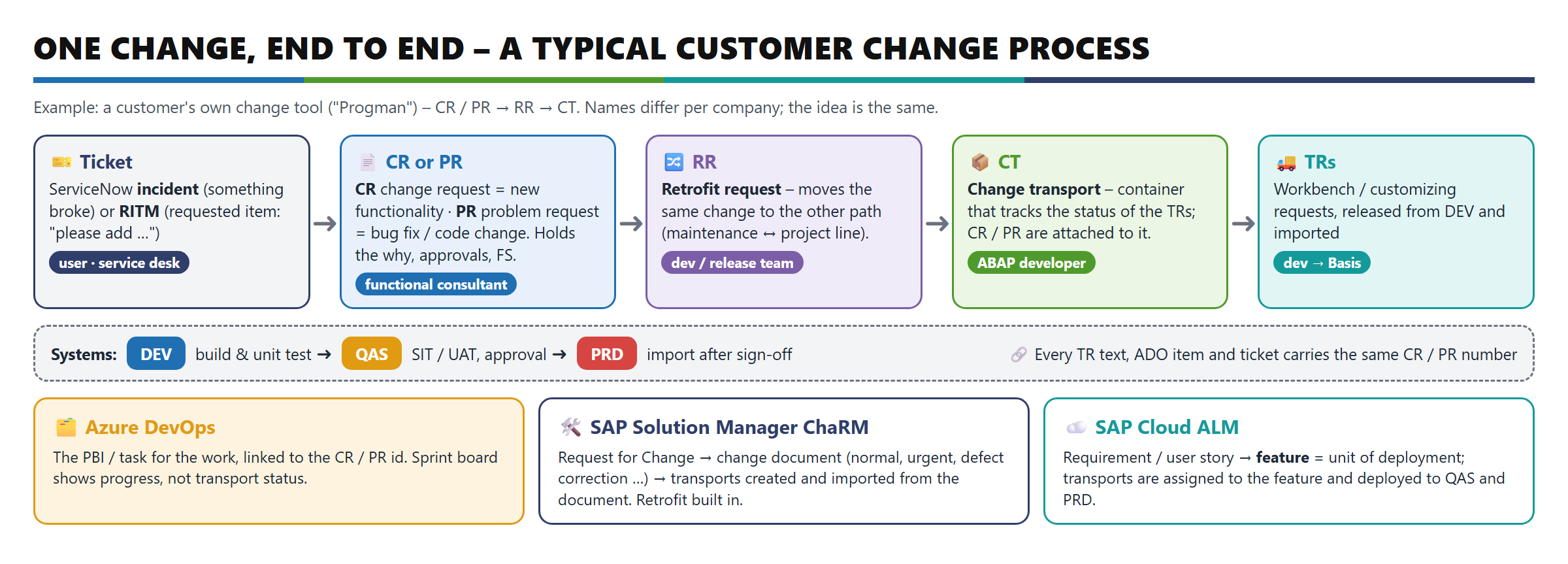
Many customers build their own change tool on top of transports instead of using ChaRM. The terms below come from one such tool, Progman – they are not SAP standard names, but the pattern is typical and helps you explain the change process of any project.
Term | Meaning | Created by | Purpose |
|---|---|---|---|
CR – Change Request | Request for new functionality | Functional consultant | Describes the requirement, links the FS, collects approvals |
PR – Problem Request | Request to fix a bug or change existing code | Functional consultant | Describes the error, steps to reproduce, business impact |
RR – Retrofit Request | Request to move a change between paths (e.g. from the maintenance line to the project line) | Developer / release team | Keeps both lines in sync (Part 9) |
CT – Change Transport | Tracking object for the transport requests; the CR / PR is attached to it | ABAP developer | Shows which TRs belong to the change and their status in DEV, QAS, PRD |
The flow in Progman: CR / PR → RR → CT. A functional consultant raises the CR or PR; if the change has to exist in more than one path, a retrofit request is linked; the developer creates the CT, attaches the CR / PR and adds every TR to it, so the status of each TR is visible in one place.
How the tools fit together in such a project
- ServiceNow – the business request (RITM) or the production incident (INC) that starts the change.
- CR / PR (Progman) – the formal change with its approvals; the functional side owns it.
- Azure DevOps – the team's plan: the PBI and tasks in the sprint, referencing the CR / PR number.
- CT and TRs – the technical side: which transports carry the change and where they are.
Customer tool term | ITIL / ServiceNow | ChaRM | SAP Cloud ALM |
|---|---|---|---|
CR (new functionality) | Change request (normal) | Request for Change + normal change | Requirement / user story + feature |
PR (bug fix) | Incident / problem → change | Urgent change or defect correction | Defect + feature |
CT (transport tracking) | Change task / implementation | Change document with its transports | Feature with its transports |
RR (retrofit) | – | Retrofit | Retrofit |
Part 9 – Retrofit in dual landscapes
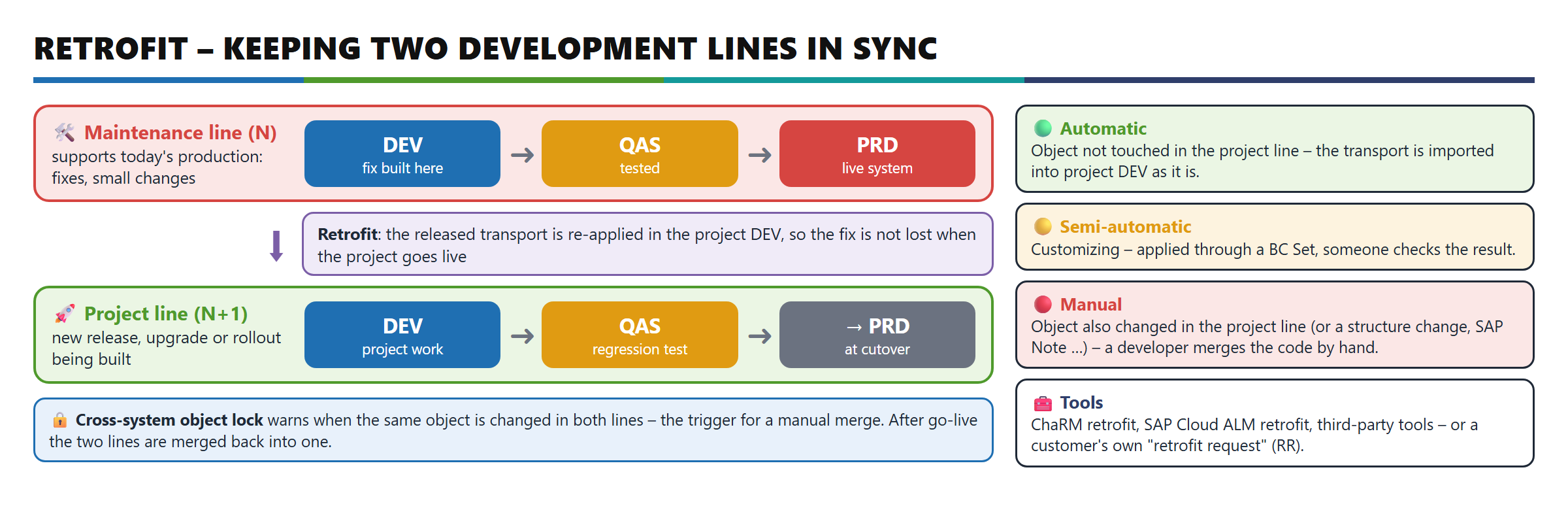
During a big project (new release, S/4HANA conversion, rollout) production must still be supported. The customer then runs a dual-track or N+1 landscape: a maintenance line (DEV → QAS → PRD) for fixes to today's production, and a project line (DEV → QAS) where the next release is built. Every fix made in the maintenance line must also reach the project line – otherwise it disappears at go-live. Copying it over is called retrofit.
Retrofit category | When | What happens |
|---|---|---|
Automatic | The object was not changed in the project line | The transport is imported into project DEV unchanged |
Semi-automatic | Customizing | Applied through a BC Set, then checked |
Manual | The object was also changed in the project line, or a structure change / SAP Note is involved | A developer merges the two versions by hand (split screen editor, version comparison) |
- Tools: ChaRM retrofit (with cross-system object lock to detect conflicts), SAP Cloud ALM retrofit, third-party tools – or a customer's own retrofit request (RR) with manual steps.
- Developer rules: retrofit soon after the fix (conflicts grow with time), retest in the project QAS, and note the retrofit transport on the original ticket.
- After go-live the two lines are merged again and the project systems take over (or the maintenance systems are refreshed).
Part 10 – Traceability, approvals and audit
Auditors (and every production incident analysis) ask the same question: who changed what, why, who approved it and when did it reach production? The answer is a chain of links:
Link | How it is made |
|---|---|
Business need → ticket | RITM / INC in ServiceNow, CR / PR or requirement |
Ticket → plan | PBI / task in ADO or Jira with the ticket number |
Ticket → transports | Ticket number in every TR description, or TRs created from the change document (ChaRM) / assigned to the feature (Cloud ALM) |
Transport → code | E071 object list; version management of each object (version created at release) |
Approvals | FS sign-off, code review, test evidence, UAT sign-off, CAB / change authority approval before PRD import |
Production import | STMS import history and logs; change record closed in ServiceNow |
- Segregation of duties: the developer who builds a change must not import it into production or approve it; developers have no change access in PRD.
- Never fix directly in QAS or PRD – always DEV and transport, so all systems stay identical and the change is traceable.
- Emergency fixes still need the full trail: CAB authorization, retrofit, post-implementation review.
Part 11 – Interview questions
Q1. Explain the work-item hierarchy you used in your project.
Super Epic → Epic → Feature → PBI → Task in Azure DevOps. Epic, Feature, PBI and Task are the standard levels of the ADO Scrum process; the Super Epic was a project-specific level on top for a whole stream. Features are delivered over a few sprints, PBIs fit in one sprint and are estimated in story points, tasks are hours of work for one developer.
Q2. What is the difference between an epic, a feature, a user story and a task?
An epic is a large business goal; a feature is a deliverable capability that can be demonstrated; a user story (PBI) is a small piece of user value finished in one sprint; a task is a technical step for one person, estimated in hours.
Q3. What makes a good user story?
The format "As a … I want … so that …", the INVEST qualities (independent, negotiable, valuable, estimable, small, testable) and clear acceptance criteria, often written as Given – When – Then scenarios that testers can check.
Q4. What is the difference between an incident, a problem, a change and a service request?
An incident is an unplanned interruption – restore service fast. A problem is the root cause of one or more incidents. A change adds, modifies or removes something that can affect the service and needs approval. A service request is a predefined user request; in ServiceNow it is a REQ with one RITM (requested item) per catalog item and SCTASKs for fulfilment.
Q5. What are standard, normal and emergency changes?
Standard: low-risk, pre-authorised and repeatable. Normal: assessed and approved by the change authority or CAB before implementation. Emergency: must go in immediately, e.g. for a P1 incident, skips the peer / group review and goes straight to CAB authorization.
Q6. What is the difference between a workbench and a customizing request?
A workbench request carries repository objects and cross-client customizing; a customizing request carries client-specific customizing. Each user has a task under the request; tasks are released first, then the request, which exports the objects for import into QAS and PRD.
Q7. What is ChaRM and which change document types does it have?
Change Request Management in SAP Solution Manager: a Request for Change is approved and then change documents carry the transports – normal change (SMMJ), urgent change (SMHF), defect correction (SMTM), administrative (SMAD) and general change (SMCG). Transports are created and imported from the change document, which gives approval control and an audit trail.
Q8. How does SAP Cloud ALM handle changes compared with ChaRM?
Cloud ALM uses features as the unit of change and deployment: requirements and user stories link to a feature, transports are assigned to it, and the feature is approved and deployed to QAS and PRD. It is SaaS and SAP's recommended successor, since Solution Manager 7.2 mainstream maintenance ends in 2027.
Q9. What is retrofit and when is it needed?
In a dual landscape (maintenance line and project line) every fix made in the maintenance line must be copied to the project line so it is not lost at go-live. Objects untouched in the project line are imported automatically, customizing via BC Sets, and objects changed in both lines are merged manually.
Q10. Describe the change process in your last project.
Example answer: a functional consultant raised a CR for new functionality or a PR for a bug in the customer's change tool; if the change was needed in both paths a retrofit request (RR) was linked; I created a change transport (CT), attached the CR / PR and added my transport requests, so their status through DEV, QAS and PRD was tracked in one place. The work itself was a PBI with tasks in Azure DevOps.
Q11. How do you make a change traceable from requirement to production?
Put the ticket number in every transport description and work item, keep FS, TS, test evidence and approvals on the ticket, and use the change tool (ChaRM, Cloud ALM or the customer's tool) for approvals before the PRD import. E070 / E07T / E071 and version management show which objects changed.
Q12. A transport fails in QAS with return code 8. What do you do?
Read the import log in STMS: typical causes are syntax or activation errors, or objects that depend on a request not yet imported. Fix in DEV with a new request (or ask for the missing request to be imported first), never by editing in QAS, and tell the testers and the release manager.
🏠 Start Here · ◀ 02 · Scrum Framework · 04 · Developer's Day ▶ · Sections: CORE ABAP | OOPS ABAP | ABAP on HANA | Clean Core | RAP | ABAP Points | SAP Fiori | SAPUI5 | Mobile Development (MDK) | BTP Foundations | BTP Development | CAP | SAP Build | ABAP on BTP | Integration Suite | SAP Business AI | SAP BASIS | Security | SAP SDLC
Functional: FICO ABAP | TRM ABAP | VIM | SAP BIS | SD ABAP | MM ABAP | PP ABAP | QM ABAP | PM ABAP | PS ABAP | EWM | TM ABAP | GTM ABAP | EHS ABAP | HR ABAP | BW | SAP Datasphere | SAP Business Data Cloud | SAP MDG | SAP Analytics Cloud | SAP Ariba | SAP CX | SAP IBP