What does an ABAP developer in an S/4HANA project actually do all day? This page walks through a typical day, follows one requirement from the functional spec to production, and covers testing, defects, production support, estimation, teamwork and tools. The project phases are on page 01, the Scrum events on page 02 and the tickets and transports on page 03.
Part 1 – A typical day
No two days are the same, but most days in a Scrum team follow this rhythm:
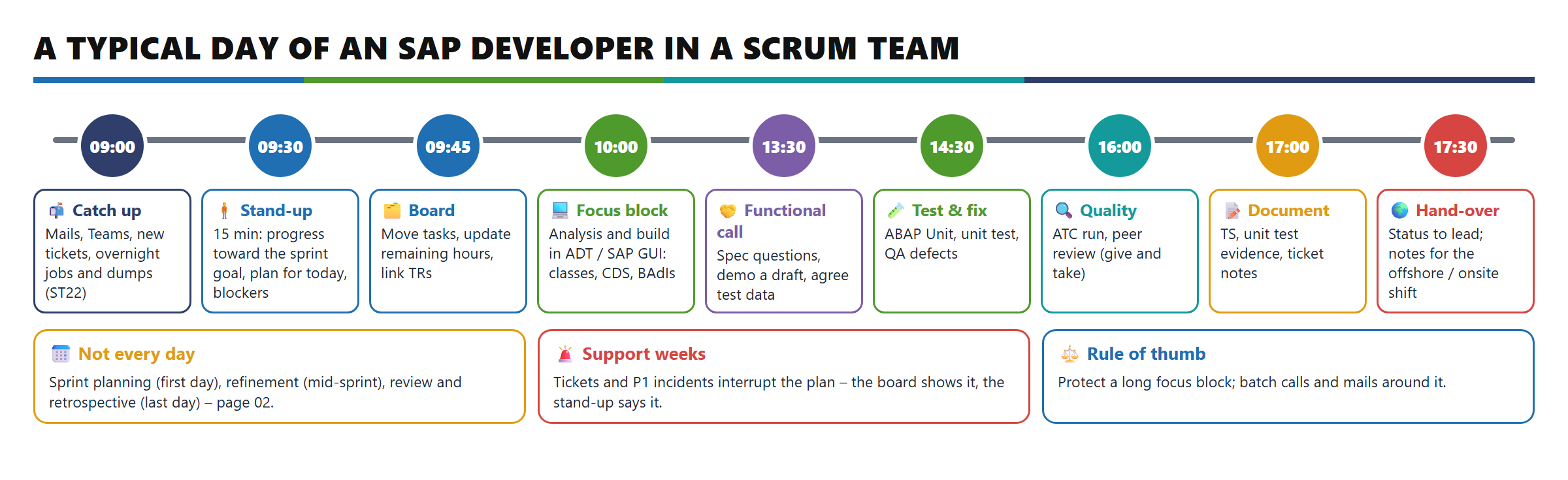
Activity | What you actually do |
|---|---|
Catch up | Read mails and Teams messages, check new tickets and defects assigned to you, look for overnight short dumps (ST22) or failed jobs (SM37) in your area |
Daily stand-up | 15 minutes with the team: progress toward the sprint goal, what you will do today, anything blocking you (page 02) |
Board update | Move your tasks on the sprint board, update remaining hours, link transports and comments to the work item |
Analysis | Read the FS, debug the standard process, find tables, BAdIs, released APIs and CDS views |
Development | Build in ADT or SAP GUI: classes, CDS views, RAP objects, enhancements, forms, interfaces |
Unit test | ABAP Unit tests and manual tests with your own test data in DEV |
Code review / ATC | Run ATC on your objects, review a colleague's code, fix review comments |
Documentation | Technical spec, unit test document, notes on the ticket |
Meetings | Spec walkthroughs with functional consultants, refinement, demos, defect triage |
- Sprint-cycle days are different: sprint planning on the first day, refinement in the middle, sprint review and retrospective on the last day (page 02).
- In support or hypercare periods, tickets and incidents interrupt the plan – say so in the stand-up and show it on the board.
Part 2 – One requirement from functional spec to production
Every object you build – report, interface, enhancement, form, workflow, conversion (RICEFW, see CORE ABAP › 01 SAP & ABAP Basics, Part 5) – goes through the same steps:
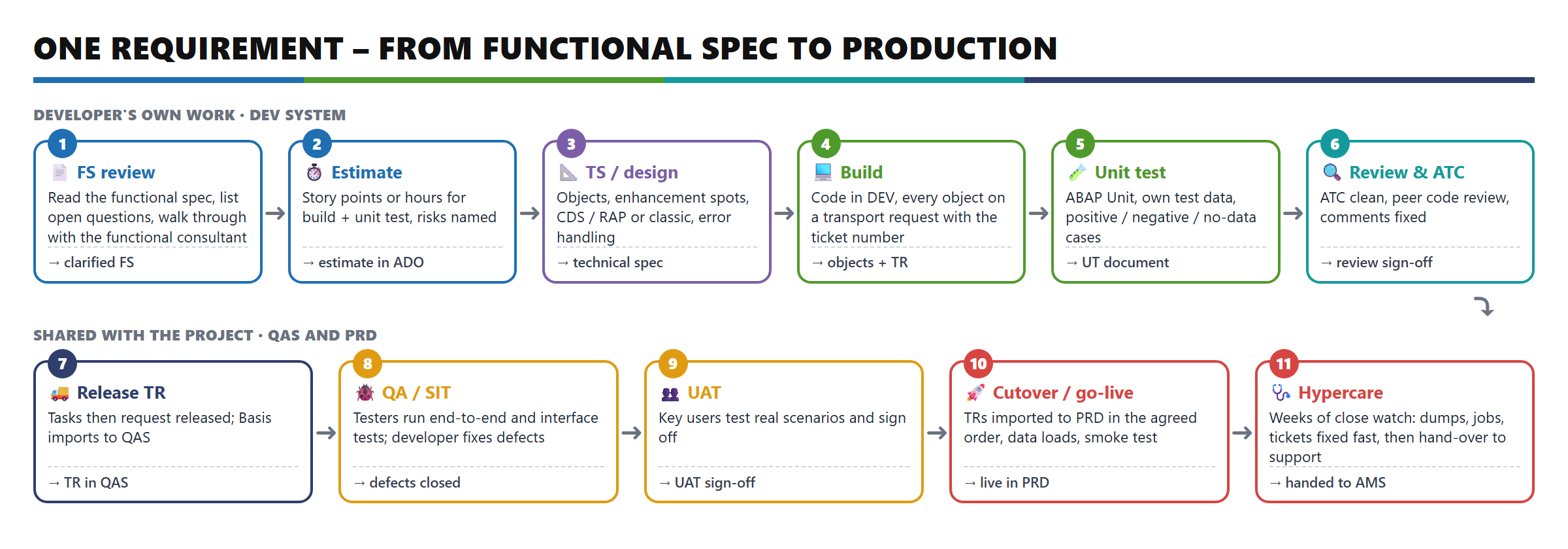
Step | Who | Your part as developer | Output |
|---|---|---|---|
1 FS review and questions | Functional + developer | Read the functional spec, list open points, walk through it with the functional consultant | Clarified FS |
2 Estimation | Developer, team | Size it (story points or hours), name risks and dependencies | Estimate on the work item |
3 Technical spec / design | Developer | Objects, enhancement points, data model, error handling, performance, authorizations; review with the lead | TS |
4 Build in DEV | Developer | Code on a transport request whose text holds the ticket number | Objects + TR |
5 Unit test | Developer | ABAP Unit, positive / negative / no-data cases, own test data | Unit test document |
6 Code review / ATC | Peer, lead | ATC without errors, peer review, naming and clean-code rules | Review sign-off |
7 Release transport | Developer, Basis | Release tasks and request; import into QAS | TR in QAS |
8 QA / SIT | Testers | Fix defects quickly, explain behaviour, support interface tests | Defects closed |
9 UAT | Key users | Support the key users, fix last defects | UAT sign-off |
10 Cutover / go-live | Release manager, Basis | Give the correct transport sequence, run or check data loads and jobs, smoke test | Live in PRD |
11 Hypercare | Whole project | Watch dumps, jobs, interfaces; fix tickets fast; hand over to support | Handed to support (AMS) |
Questions worth asking at the FS review
- Which business process, transaction or app starts this, and how often (volume, peak times)?
- Which org units, document types and countries are in scope – and which are not?
- Where does each field come from (table, CDS view, API) and what happens when it is empty?
- What should happen on error: message, log (SLG1), e-mail, retry?
- Who may run it (authorizations), online or in background, and what output is expected?
- How will it be tested, with which test data, and what are the acceptance criteria?
Part 3 – Testing levels
Level | Who | Where | Purpose |
|---|---|---|---|
Unit test | Developer | DEV | One object works as specified – automated with ABAP Unit where possible |
Integration / SIT | Testers, functional team | QAS | System integration test: end-to-end processes across modules and interfaces |
Regression test | Testers, test automation | QAS | Nothing that worked before is broken by the change, an SAP Note or an upgrade |
UAT | Key users | QAS | User acceptance: the business confirms it supports their work; formal sign-off |
Performance test | Testers, Basis, developers | QAS / pre-production | Volumes and runtimes with production-like data |
Mock cutover / dress rehearsal | Whole project | Copy of PRD or pre-production | Practise transports, data loads and timing before go-live |
- Plan positive, negative and no-data cases, authorizations, background runs and big volumes. ABAP Unit and testing technique: CORE ABAP › 04 Modularization & Debugging (Part 10) and OOPS ABAP › 03 Exceptions, Events & Advanced OO (Part 10).
- Keep test evidence: screenshots or logs of input, result and the document numbers created – testers and auditors will ask for it.
Part 4 – Defects: lifecycle, severity and priority
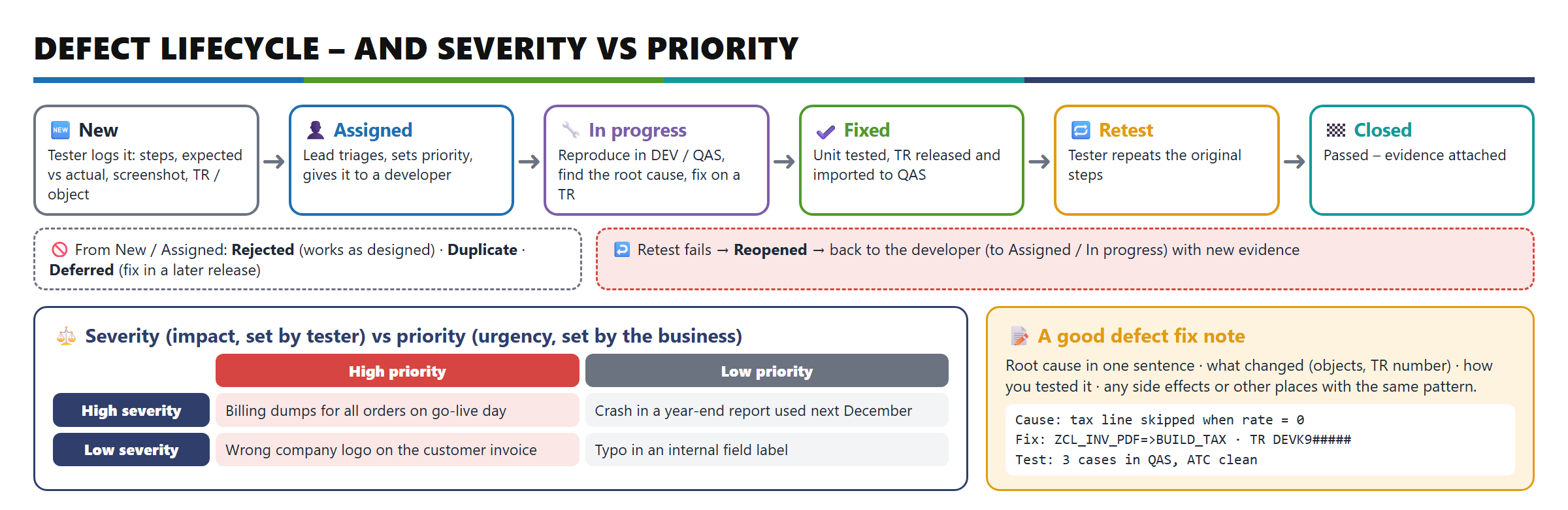
Status | Meaning |
|---|---|
New | Logged by a tester with steps, expected vs actual result, screenshots, test data |
Assigned | Triaged by the test or development lead and given to a developer |
In progress | Developer reproduces it, finds the root cause, fixes it on a transport |
Fixed / ready for retest | Fix unit tested, transport released and imported into QAS |
Retest | Tester repeats the original steps |
Closed | Retest passed |
Reopened | Retest failed – back to the developer with new evidence |
Rejected / duplicate / deferred | Works as designed, already logged, or moved to a later release |
Severity vs priority
- Severity = how badly the system is affected (technical impact), usually set by the tester.
- Priority = how soon it must be fixed (business urgency), set by the business or test lead.
- They can differ: a crash in a report used once a year is high severity but low priority; a wrong logo on the customer invoice is low severity but high priority.
When you fix a defect, write a short note on it: root cause, what changed (objects, transport number), how you tested, and whether the same pattern exists elsewhere.
Part 5 – Production support
After go-live (and in support projects, often called AMS – application management services) work arrives as tickets in the ITSM tool (page 03 Part 5) and is handled in levels:
Level | Who | Typical work |
|---|---|---|
L1 | Service desk | Takes the call or ticket, collects details, solves known issues (password reset, how-to), routes the rest |
L2 | Functional / application support | Analyses the process, reproduces the issue, fixes data or configuration, finds workarounds |
L3 | Developers (ABAP), Basis, specialists | Code analysis and fixes, root cause of dumps and performance issues, transports |
Vendor (often L4) | SAP support | Errors in SAP standard: SAP Notes, or an incident to SAP via SAP for Me with priority Very High, High, Medium or Low |
Incident priorities – example
Every contract defines its own SLA times; the values below are only a typical example:
Priority | Example | Response | Resolution / workaround |
|---|---|---|---|
P1 Critical | Production down, billing or goods issue impossible for everyone | 15–30 minutes | 4 hours, work around the clock |
P2 High | Important process blocked for a group, no workaround | 1 hour | 1 business day |
P3 Medium | Process disturbed but a workaround exists | 4–8 hours | 3–5 business days |
P4 Low | Cosmetic issue, question, minor report error | 1 business day | Planned release |
From incident to root cause
- Restore first: for a P1 the goal is to get the business running (workaround, restart a job, manual posting) – the clean fix can follow.
- Collect facts: user, time, transaction, document numbers, screenshot, the exact message.
- Analyse: short dumps in ST22, system log SM21, application logs SLG1, jobs SM37, update errors SM13, IDocs WE02, OData errors /IWFND/ERROR_LOG, SQL trace ST05. Monitoring t-codes: SAP BASIS › 04 Communication, Output & Monitoring (Part 7); debugging and dump analysis: CORE ABAP › 04 Modularization & Debugging (Part 9).
- Root-cause analysis: ask "why?" until you reach the real cause (5 whys); record it in a problem record so the incident does not come back.
The hotfix path
- Fix in DEV (never in PRD) on a new transport → short test in QAS with the user → emergency / urgent change approved → import of just that transport into PRD → user confirms.
- Afterwards: check that the transport does not depend on unreleased objects, retrofit to the project line if a dual landscape exists (page 03 Part 9), and complete the documentation.
Part 6 – Estimating your work
Technique | How it works | Used for |
|---|---|---|
Story points | Relative size (effort, complexity, risk) on a Fibonacci-like scale 1, 2, 3, 5, 8, 13 – compared with a known reference story | User stories / PBIs; velocity (page 02) |
T-shirt sizes | XS, S, M, L, XL – quick and rough | Epics and features in early planning |
Hours / days | Ideal hours for a concrete task | Tasks in the sprint; fixed-price RICEFW estimates |
Planning poker | Everyone shows a card at once, the highest and lowest explain, then vote again | Team estimates without anchoring on one voice |
Complexity matrix | Simple / medium / complex per RICEFW type with agreed effort ranges | Waterfall and hybrid SAP projects |
- Include everything: analysis, TS, build, unit test, review fixes, defect support and documentation – not just coding time.
- Unknown area? Say so and propose a short spike (time-boxed investigation) before committing.
- If you are going to miss an estimate, say it as soon as you know, with the reason and a new date.
Part 7 – Communication and teamwork
Status reporting
- Short and factual: done, next, blockers, risks. Example: "Billing output BAdI done and unit tested; today the PDF attachment; blocked on the e-mail address field – waiting for the functional decision; risk: QAS e-mail settings not configured."
- Raise a blocker the same day – in the stand-up, on the board and to the person who can remove it.
Onsite and offshore
- Use the overlap hours for calls; leave a written hand-over (what was done, open questions, where the objects and transports are) so the other time zone can continue.
- Confirm agreements made in calls in writing on the ticket.
Asking good questions
- Show what you checked already, give the exact object, document number and message, and propose an answer: "For document type ZOR the field is empty in VBAK – should we take it from the sold-to party or leave it blank?"
- Teams and e-mail: subject with the ticket number, one topic per mail, a clear ask and a date; in chat write the question in the first message instead of just "hi".
Part 8 – Tools of the trade
Tool | Use |
|---|---|
ABAP Development Tools (ADT) in Eclipse | Main IDE for modern ABAP: classes, CDS, RAP, AMDP, ABAP Unit, ATC, debugger; the only IDE for ABAP Cloud development |
SAP GUI | Classic transactions: SE80, SE38, SE11, SE24, SE09 / SE10, ST22, SM37, SPRO, plus the business transactions for testing |
ATC (ABAP Test Cockpit) | Static checks for errors, performance, security and ABAP Cloud readiness; often blocks transport release on errors |
abapGit | Open-source tool (MIT licence) to store ABAP objects in Git repositories |
gCTS | git-enabled Change and Transport System from SAP (see SAP BASIS › 03 Clients, Users & Transport Management, Part 10) |
Azure DevOps / Jira | Sprint board, work items, queries (page 03) |
ServiceNow | Incidents, requests (RITM), changes (page 03) |
ChaRM / SAP Cloud ALM | Change and transport control (page 03) |
SAP for Me / SAP Notes | Search SAP Notes, implement them with SNOTE, open incidents with SAP |
Microsoft Teams / e-mail | Daily communication, meetings, screen sharing for debugging sessions |
Part 9 – Talking about your project experience (STAR)
When you are asked about your project or a difficult task, answer in STAR order – it keeps the answer short, concrete and about your own contribution:
Letter | Meaning | Example – slow billing report |
|---|---|---|
S | Situation – context in one or two sentences | Greenfield S/4HANA project, OTC stream, 2-week sprints in Azure DevOps. The daily billing due-list report took 40 minutes and timed out. |
T | Task – what you had to achieve | I owned the PBI to bring it under 5 minutes without changing the output. |
A | Action – what you did (the longest part) | Traced it with ST05 and SAT, found nested SELECTs in a loop, moved the logic into a CDS view with the aggregation pushed to HANA, displayed it with ALV IDA, added ABAP Unit tests and ran ATC. |
R | Result – measurable outcome and what you learned | Runtime 2 minutes, accepted in UAT, the pattern was reused for two other reports. |
Describing the project itself
- Type and scope: greenfield / brownfield, S/4HANA release, private or public cloud, modules.
- Team and method: team size, onsite / offshore, Scrum with sprint length, tools (ADO, ServiceNow, ChaRM / Cloud ALM).
- Your role and objects: how many RICEFW objects of which kind, one or two examples you know in detail.
- Lessons learned: one thing that went well and one you would do differently.
Part 10 – Interview questions
Q1. Walk me through a typical day in your project.
Check mails, tickets and overnight dumps; daily stand-up; update my tasks on the ADO board; then a focus block for analysis and development in ADT; a call with the functional consultant on open spec points; unit testing or QA defect fixes in the afternoon; ATC and peer review; documentation and a status update or hand-over to the offshore team.
Q2. Describe the lifecycle of a development from FS to go-live.
FS review and questions → estimate → TS / design → build in DEV on a transport → unit test → code review and ATC → release the transport → SIT in QAS with defect fixing → UAT and sign-off → cutover and go-live → hypercare and hand-over to support.
Q3. What do you do when the functional spec is unclear?
List the open points with concrete examples, check what I can find myself (tables, standard behaviour), then clarify them with the functional consultant in a short call and confirm the answers in writing on the ticket or in an updated FS. I do not build on assumptions.
Q4. What is the difference between unit test, SIT, regression test and UAT?
Unit test: the developer tests one object in DEV. SIT: testers check end-to-end processes and interfaces in QAS. Regression: proves existing functions still work after a change. UAT: key users confirm the solution meets business needs and sign off.
Q5. What is the difference between severity and priority?
Severity is the technical impact, priority is the business urgency. A crash in a rarely used year-end report is high severity but low priority; a wrong logo on customer invoices is low severity but high priority.
Q6. What is the lifecycle of a defect?
New → assigned → in progress → fixed (transport in QAS) → retest → closed; if the retest fails it is reopened. It can also be rejected (works as designed), marked duplicate or deferred to a later release.
Q7. What are L1, L2 and L3 support?
L1 is the service desk that logs tickets and solves known issues; L2 is functional support that analyses, reproduces and fixes data or configuration; L3 are developers and specialists who fix code and find root causes. Errors in SAP standard go to SAP support.
Q8. A P1 incident is raised: billing dumps in production. What do you do?
Join the incident call, collect facts, analyse the dump in ST22 (error, program, line, variables) and related logs, propose a workaround to restore business, then fix in DEV, test quickly in QAS, get emergency approval and import only that transport. Afterwards: root-cause note, retrofit if needed, and a problem record.
Q9. How do you estimate a development?
Stories in story points relative to a reference story, using planning poker in the team; tasks in hours covering analysis, TS, build, unit test, review and defect support. Unknowns get a time-boxed spike, and I flag risks with the estimate.
Q10. What do you do if you cannot finish your task in the sprint?
Raise it as soon as I know – in the stand-up and to the product owner – with the reason and a new estimate. The team then decides: get help, split the story, or move part of it back to the backlog. Unfinished work is never shown as done.
Q11. Which tools do you use as an ABAP developer?
ADT in Eclipse for development, SAP GUI for classic transactions and testing, ATC for quality checks, abapGit or gCTS where Git is used, Azure DevOps or Jira for the sprint, ServiceNow for tickets, and ChaRM or Cloud ALM for transports and approvals.
Q12. Tell me about a challenging development you delivered.
Use STAR: situation (project and problem), task (your goal), action (what you did – analysis, design, tools), result (measured outcome). Example: a 40-minute billing report reduced to 2 minutes by replacing nested SELECTs with a CDS view and ALV IDA, accepted in UAT.
🏠 Start Here · ◀ 03 · Tools & Change Mgmt · 05 · SAP Methodologies ▶ · Sections: CORE ABAP | OOPS ABAP | ABAP on HANA | Clean Core | RAP | ABAP Points | SAP Fiori | SAPUI5 | Mobile Development (MDK) | BTP Foundations | BTP Development | CAP | SAP Build | ABAP on BTP | Integration Suite | SAP Business AI | SAP BASIS | Security | SAP SDLC
Functional: FICO ABAP | TRM ABAP | VIM | SAP BIS | SD ABAP | MM ABAP | PP ABAP | QM ABAP | PM ABAP | PS ABAP | EWM | TM ABAP | GTM ABAP | EHS ABAP | HR ABAP | BW | SAP Datasphere | SAP Business Data Cloud | SAP MDG | SAP Analytics Cloud | SAP Ariba | SAP CX | SAP IBP