Page 01 gave the short version: the SDLC, the six SAP Activate phases and the three ways to S/4HANA. This page goes one level deeper – the level an interviewer reaches with "tell me how your project was run". It covers where SAP's methods come from (ASAP), how SAP Activate really works phase by phase, the three transition approaches, RISE with SAP and GROW with SAP, rollout strategies, cutover, the governance around a programme and the tools that support it – always with the developer's part in it.
Part 1 – From ASAP to SAP Activate
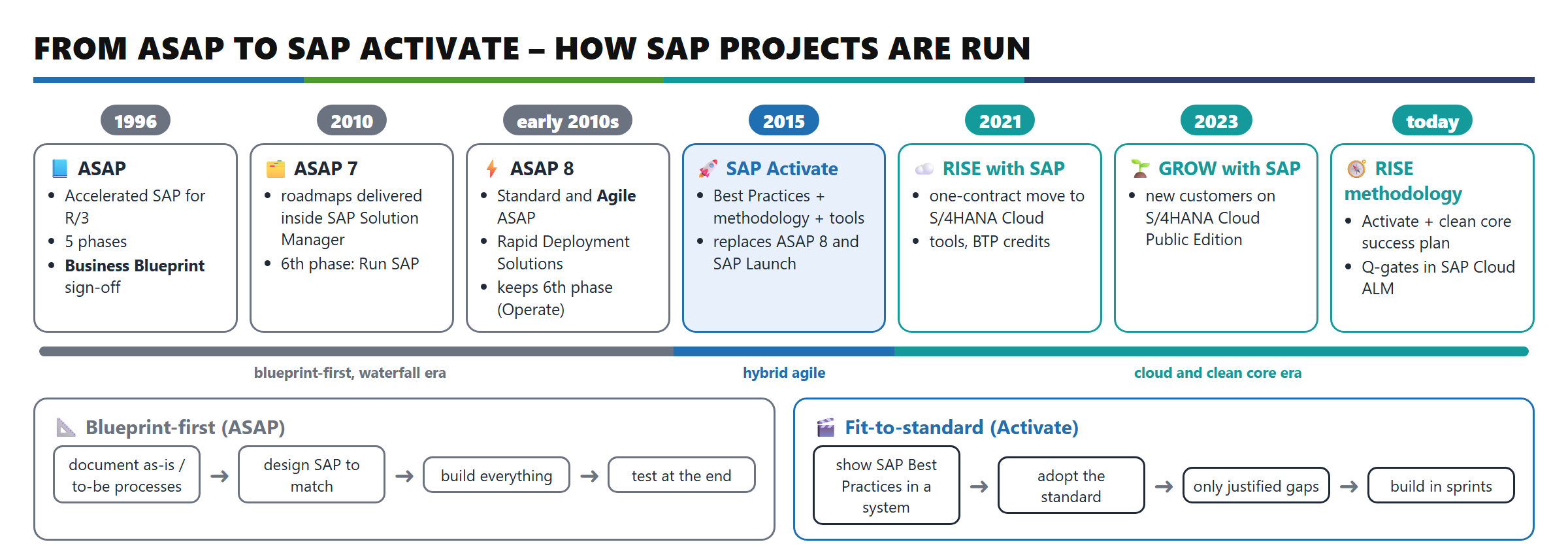
1.1 ASAP – Accelerated SAP (1996)
SAP launched ASAP in 1996 to shorten R/3 implementations, which often ran for a year or more. It was a phased, waterfall roadmap with templates, checklists and accelerators. Its heart was the Business Blueprint: a complete, signed-off description of how the company would run its processes in SAP, written before any build started.
ASAP phase | What happened | Key deliverables |
|---|---|---|
1 Project Preparation | Scope, goals, team, standards, project plan, kick-off | Project charter, plan, organisation, system landscape plan |
2 Business Blueprint | Workshops per process: current situation (as-is) and target design (to-be), organisational structure, gaps | Business Blueprint document, signed off by the business – the frozen basis for the build |
3 Realization | Baseline configuration, then final configuration in cycles; developments (RICEFW); unit and integration tests | Configured system, developments, test results, end-user training material |
4 Final Preparation | System and stress tests, end-user training, cutover planning and rehearsal, go-live check | Cutover plan, trained users, go/no-go decision |
5 Go-Live & Support | Production start, intensive support, hand-over to the support organisation | Live system, support model, project closure |
- Blueprint sign-off was the big milestone: after it, every change of scope needed a formal change request. The developer received functional specifications derived from the blueprint and wrote the technical specifications.
1.2 ASAP 7, ASAP 8 and Solution Manager roadmaps
- ASAP 7 (2010) was delivered as roadmap content inside SAP Solution Manager: a project was assigned a roadmap, which opened with transaction RMMAIN and linked tasks to accelerators and documents. It added a sixth phase after go-live for operations (Run SAP, later called Operate).
- ASAP 8 came in variants – Standard ASAP, Agile ASAP (Realization split into time-boxed iterations building releases) and a variant for Rapid Deployment Solutions (RDS: pre-packaged, pre-configured scope for a fixed price and short time). It kept the sixth phase, Operate, after go-live.
- For cloud products SAP had a separate, lighter method, SAP Launch.
1.3 SAP Activate (2015) and why SAP changed
SAP Activate succeeded both ASAP 8 (on-premise) and SAP Launch (cloud) in 2015, at the time S/4HANA was launched. No further content is added to ASAP; all new methodology content is in SAP Activate.
Blueprint-first (ASAP) | Fit-to-standard (SAP Activate) |
|---|---|
Start from the customer's current processes (as-is), design the to-be on paper | Start from SAP Best Practices running in a system; the business sees the standard first |
Months of workshops before anything can be seen | Short Explore phase, then sprints with regular demos |
SAP adapted to the company → heavy customising and custom code | Company adopts the standard where possible → only justified gaps (clean core) |
Change after sign-off = formal change request | Backlog re-prioritised every sprint; change requests only for scope |
Testing mostly at the end | Unit tests in every sprint, then SIT and UAT |
Fits on-premise systems upgraded rarely | Fits cloud systems upgraded by SAP twice a year – modifications would break upgrades |
Part 2 – SAP Activate in depth
The phases, workstreams and fit-to-standard basics are on page 01, Part 3. Here: the three pillars, the roadmaps, quality gates and what each phase gives to and expects from a developer.
2.1 The three pillars
Pillar | What it is | Where you find it |
|---|---|---|
SAP Best Practices | Ready-to-run business processes (scope items) with process flows, test scripts and configuration content | SAP Signavio Process Navigator (replaced the retired SAP Best Practices Explorer) |
Methodology | Phases, workstreams, deliverables, tasks, accelerators (templates, guides) | SAP Activate Roadmap Viewer, also loaded into SAP Cloud ALM as project tasks |
Guided configuration and tools | Tools to configure and run the project: Central Business Configuration in the public cloud, SPRO / IMG elsewhere; SAP Cloud ALM for project, test and deployment management | In the system and in SAP Cloud ALM |
2.2 The roadmaps
The Roadmap Viewer is a free web tool. Each roadmap is organised as phase → deliverable → task, with accelerators attached to the tasks, and can be filtered by workstream. Main roadmaps:
Roadmap | Use |
|---|---|
SAP Activate for SAP S/4HANA Cloud Public Edition | New implementations of the public cloud (greenfield only) |
SAP Activate for RISE with SAP S/4HANA Cloud Private Edition (now SAP Cloud ERP Private) | New implementation or system conversion into the private cloud under RISE |
SAP Activate for Transition to SAP S/4HANA | On-premise: new implementation, system conversion and selective data transition |
SAP Activate for SAP S/4HANA upgrades | Release upgrades of an existing S/4HANA system |
SAP Activate for SAP BTP and other products | Projects on SAP BTP, SuccessFactors, Ariba and other SAP solutions |
2.3 Quality gates
- A quality gate (Q-gate) closes each phase: deliverables complete, risks recorded, sign-off obtained, the project ready to move on. A failed gate means rework, not a new phase.
- In RISE projects SAP adds clean core quality gates: the project manager answers questionnaires in SAP Cloud ALM, SAP reviews them with system data and returns recommendations (Part 4).
- Developer relevance: open ATC findings, missing technical specifications, failed unit tests or unreleased transports are typical reasons a Realize gate is not passed.
2.4 Phase by phase – deliverables and the developer's part
Phase | Key deliverables | Developer receives / does |
|---|---|---|
Discover | Value case, solution and transition strategy, trial system | Usually not yet on the project |
Prepare | Project charter and plan, governance, team onboarding, standards, system provisioning, transition planning (conversion: pre-checks) | Development standards, naming conventions, ATC rules, system access; in a conversion the custom code analysis starts |
Explore | Fit-to-standard workshops, backlog of delta requirements, delta design, data migration, integration, test and cutover approach | Joins workshops for gaps, estimates RICEFW objects, proposes the extension option, writes first technical designs |
Realize | Configuration and build in sprints, integration and data loads, unit test, SIT, UAT, mock data loads, cutover plan, training material | Builds, unit tests, code reviews, demos in sprint reviews, fixes SIT / UAT defects, builds data-load programs |
Deploy | Final rehearsal, end-user training, cutover, go/no-go, go-live, hypercare | Executes cutover tasks, monitors jobs and interfaces, fixes production defects fast |
Run | Stable operations, support hand-over, continuous improvement, upgrades | Production support (AMS), small enhancements, upgrade regression fixes |
Explore – fit-to-standard and delta design
- Workshops per end-to-end process (order to cash, procure to pay …): demonstrate the scope item, confirm the fit, record gaps with business priority.
- Each gap gets a delta design: why the standard does not fit, the chosen solution (process change, configuration, key-user extension, developer extension, BTP app) and an estimate.
- The approved gaps and configuration items form the backlog that is ordered and planned into Realize sprints (page 02 for Scrum, page 03 for the work items).
Realize – sprints, then integration testing
- Sprints build the backlog in slices; each sprint ends with a demo to key users.
- After the build sprints come the phased tests: SIT cycles (often two or three) across modules and interfaces, then UAT by the business, plus data migration mock loads.
Deploy and Run
- Deploy is driven by the cutover plan (Part 6). Run starts after hypercare: support moves to the support organisation and improvements go into a new backlog.
Part 3 – S/4HANA transition approaches in depth
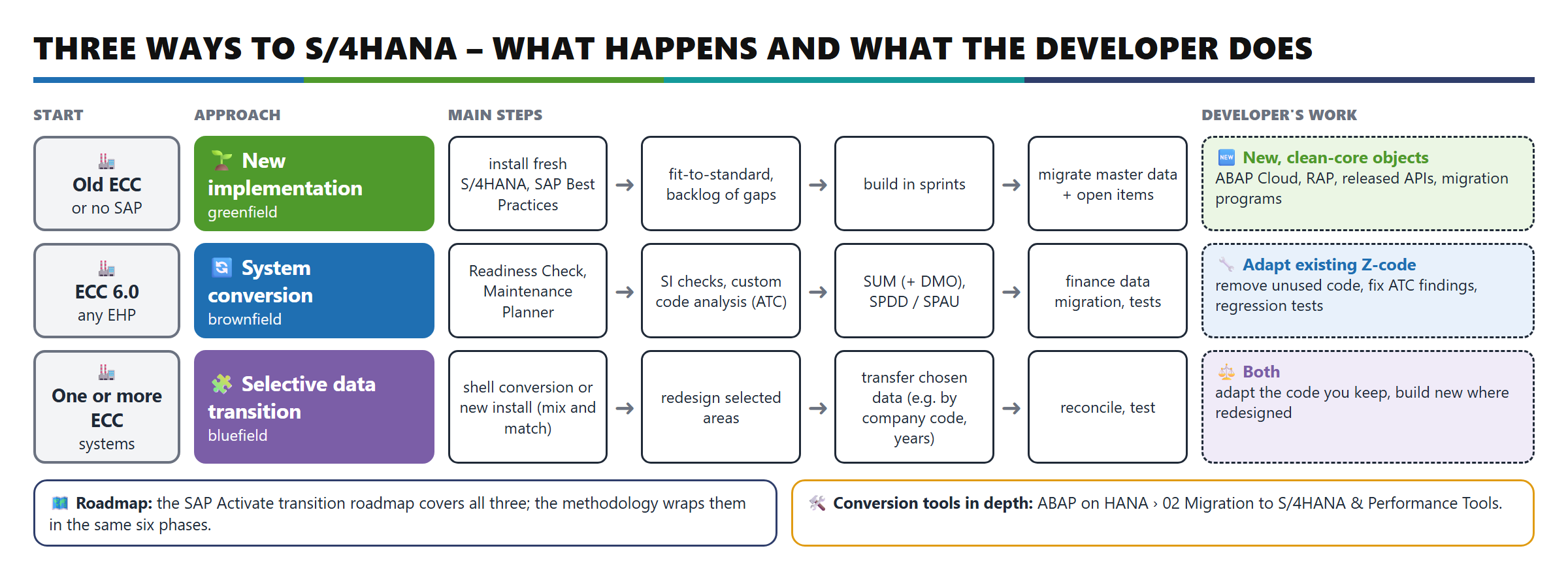
3.1 New implementation (greenfield)
A new S/4HANA system is installed and built on SAP Best Practices with fit-to-standard. Master data and open items (open orders, open receivables and payables, balances, stock) are migrated with the SAP S/4HANA Migration Cockpit; history usually stays in the old system or an archive. The only option for S/4HANA Cloud Public Edition.
- Developer's work: new objects built the clean core way (ABAP Cloud, RAP, released APIs, key-user and BTP extensions), migration programs where no cockpit object exists, interfaces. Old custom code is re-evaluated, not copied.
3.2 System conversion (brownfield)
The existing ERP system is converted in place: configuration, data, history and custom code stay. The main steps at overview level (tools in ABAP on HANA › 02 Migration to S/4HANA & Performance Tools):
Step | What it does |
|---|---|
1 SAP Readiness Check | Analyses the ERP system: relevant simplification items, custom code impact, add-ons, business functions, sizing |
2 Maintenance Planner | Checks add-ons and business functions against the target release, creates the stack file for SUM |
3 Simplification item checks | Relevance and consistency checks; blocking items solved before the conversion |
4 Custom code migration | Usage analysis, remove unused code, ATC with S/4HANA checks, fix findings |
5 SUM (with DMO) | Technical conversion and, if needed, database migration to HANA in one run; SPDD / SPAU for modifications |
6 Follow-up and finance data migration | Application follow-up activities, conversion of finance data into the universal journal, reconciliation, regression tests |
- Usually several mock conversions on copies of production to measure downtime and practise.
- Developer's work: custom code adaptation (ATC findings, quick fixes, manual fixes), SPDD / SPAU support, regression testing, performance fixes; afterwards, gradual move to Fiori and clean core.
3.3 Selective data transition
A middle way: build a new S/4HANA system but take over selected parts of the old one – configuration, code, and only the data that is needed.
Variant | How it works | Best when |
|---|---|---|
Shell conversion | A copy of production without master and transaction data is converted to S/4HANA; selected data is then transferred | Most of the existing solution is kept |
Mix and match | A new S/4HANA install receives selected configuration and repository objects from the old system, then selected data | Most of the solution is redesigned |
Other variants | Transfer of a whole client or of selected company codes, merging several ERPs into one, carve-out of a business unit, transfer of only recent years | Consolidation, divestment, limited history |
- Needs specialised data transfer tools: SAP's own services and the SAP Business Transformation Center, or partner tools.
- Developer's work: both – adapt the code that is carried over, build new where the process is redesigned, plus reconciliation reports and data checks.
3.4 Decision criteria
Criterion | New implementation | System conversion | Selective data transition |
|---|---|---|---|
Process redesign | Full – start from standard | Little at first; later in phases | Selected areas |
Data history | Usually only open items and balances | All history kept | Chosen scope (e.g. last years, some company codes) |
Custom code | Left behind, rebuilt clean | Kept and adapted | Partly kept |
Effort / duration | High (redesign, training, migration) | Lowest for the technical move | High – most complex planning |
Risk | Business change, adoption | Technical downtime, carrying old problems | Data consistency, tool dependence |
Typical for | Old, heavily customised systems; public cloud | Good current processes, many custom objects worth keeping | Mergers, carve-outs, several ERPs |
Part 4 – RISE with SAP and GROW with SAP
Both are commercial offerings – one subscription contract that bundles software, infrastructure, tools and services. They are not separate methodologies: the project still runs on SAP Activate. The contents change regularly, so in an interview speak about the idea, not the exact entitlements.
4.1 RISE with SAP
Launched in January 2021 as "business transformation as a service", mainly for existing ERP customers moving to the cloud – by conversion or new implementation.
- At launch it bundled: SAP S/4HANA Cloud, business process intelligence (the SAP Signavio portfolio), embedded tools and services, consumption credits for SAP BTP, and the SAP Business Network Starter Pack (a limited start on SAP's supplier networks).
- Later it was sold in packages (base, premium and, from 2023, premium plus) that add more BTP, process (SAP Signavio), AI, sustainability and finance capabilities; the packaging keeps changing. Since 2025 SAP calls the private-cloud ERP SAP Cloud ERP Private (formerly S/4HANA Cloud Private Edition).
- RISE with SAP methodology: SAP Activate plus extra services – onboarding sessions, a clean core success plan with recommended clean core tasks, clean core quality gates reviewed by SAP, all run in SAP Cloud ALM; SAP Signavio and SAP LeanIX are part of the toolchain.
4.2 GROW with SAP
Announced in March 2023 for new customers, often mid-size, who start directly on S/4HANA Cloud Public Edition (always greenfield). Bundles the public cloud ERP, SAP BTP, packaged activation services and learning, community and expert support; a base and a premium edition add further cloud solutions.
4.3 Who runs what
Party | Typically responsible for |
|---|---|
SAP | Infrastructure (own or hyperscaler data centres), technical operation of the cloud system (OS, database, backups, technical monitoring), software updates – executed by SAP |
Customer | Business processes, decisions and sign-offs, key users, data quality, adoption, release planning in the private cloud |
Implementation partner | Implementation project: fit-to-standard, configuration, extensions, integration, migration, testing, training; often application support afterwards |
- The exact split is defined per contract in SAP's roles-and-responsibilities documents – Basis tasks such as system installation are not done by the project team any more.
4.4 Clean core – what it means for a developer
- Clean core is the guiding principle of RISE and GROW: stay close to the standard and extend only in upgrade-stable ways, across processes, extensions, data and integrations.
- Public cloud: only key-user extensibility (custom fields, custom logic, custom CDS views in Fiori apps), developer extensibility with ABAP Cloud on released APIs, and side-by-side apps on SAP BTP.
- Private cloud: the same options are recommended; classic ABAP is still possible, rated by the Clean Core Levels A–D and governed by ATC.
- Details, levels and extension options: Clean Core › 01 Clean Core; side-by-side apps: ③ SAP BTP sections.
Part 5 – Deployment and rollout strategies
The transition approach (Part 3) says how the system is built; the rollout strategy says in which order the business goes live on it.
Strategy | How it works | Pros | Cons |
|---|---|---|---|
Big bang | All modules, sites and countries go live on one date | One cutover, no temporary interfaces, benefits at once | Highest risk, huge cutover, everyone needs training at the same time |
Phased by module | E.g. finance first, then logistics | Smaller steps, team learns | Temporary interfaces between old and new system, longer programme |
Phased by site / country | One plant, company or country after another | Risk limited to one unit, lessons applied to the next | Old and new systems run side by side for long, inter-company processes harder |
Waves | Groups of countries or units planned as releases (wave 1, 2, 3 …) | Predictable plan, reusable team and tools | Needs strong template governance |
Pilot | One small unit goes live first to prove the solution | Real-life proof before scaling | Pilot unit may be untypical; delay for the rest |
Parallel run | Old and new systems both used for a period, results compared | Safety net, proof of correct results | Double work for users, expensive; rare in modern SAP projects |
5.1 Global template and local rollouts
Multinational programmes build one global template – the common processes, configuration, master data rules and developments – then roll it out country by country.
- Template build: designed with the global process owners, usually live first in a pilot country.
- Localisation: each country adds legal requirements – tax, e-invoicing, statutory reports, payment formats, language. SAP delivers many country versions; the rest becomes local scope.
- Rollout projects: short fit-gap against the template (template fit), local gaps only, data migration, training, cutover. Changes to the template itself go through template governance.
- Developer's view: template objects must be configurable (no hard-coded company codes or countries); local developments are kept separate and clearly named; a template change is regression tested in all live countries.
Part 6 – Cutover and go-live
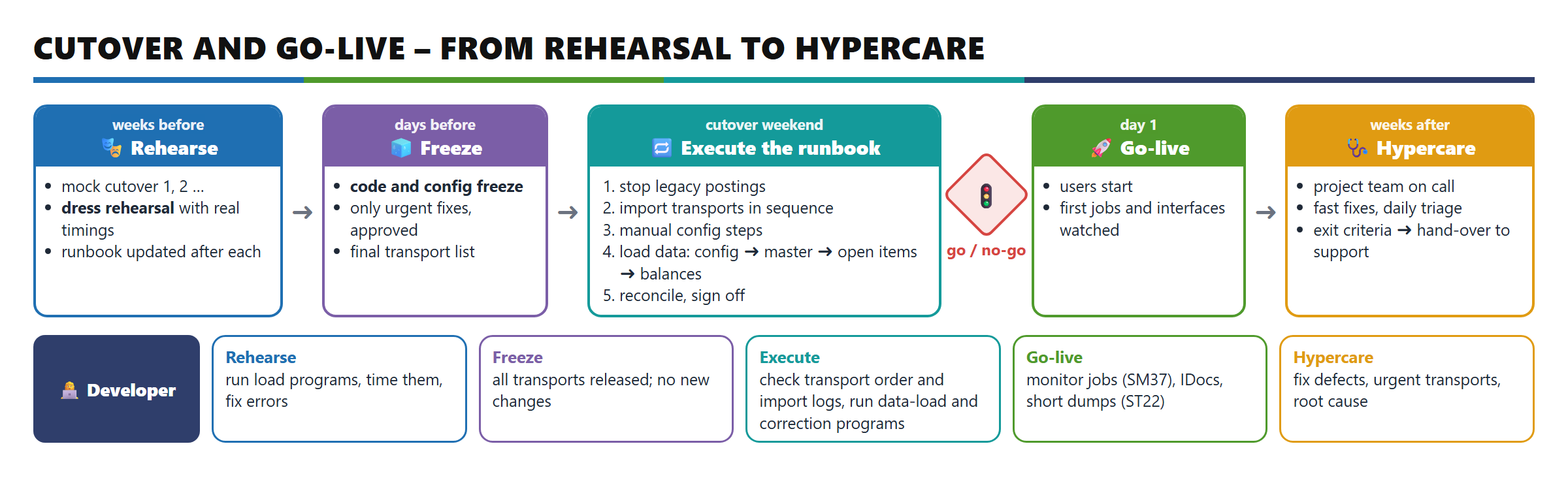
6.1 Plan and rehearsals
- Cutover plan / runbook: every step with owner, start time, duration, dependency, check and rollback point – often hundreds of lines, managed by the cutover manager.
- Mock cutovers: the full sequence run on a copy of production or a pre-production system; timings measured, errors fixed, the runbook improved.
- Dress rehearsal: the last mock, run exactly like the real thing, with the real timings.
- Freeze: code and configuration freeze before go-live – only approved, urgent fixes may move.
6.2 Data load sequence
Order | What is loaded | Examples |
|---|---|---|
1 | Configuration and organisational data (transports, manual settings) | Company codes, plants, number ranges |
2 | Master data | Business partners, materials, G/L accounts, bills of material, prices |
3 | Open items | Open purchase and sales orders, open receivables and payables |
4 | Balances and stock | G/L balances, inventory quantities and values, fixed assets |
5 | Reconciliation and sign-off | Counts and totals old vs new, business sign-off |
6.3 Go/no-go and hypercare
- Go/no-go criteria: no open critical defects, UAT signed off, data reconciled, users trained, support and rollback plan ready. The steering committee decides.
- Hypercare: several weeks of intensified support by the project team, daily defect triage, close monitoring; ends with agreed exit criteria and hand-over to the support organisation.
6.4 The developer's cutover tasks
- Check the transport sequence (dependencies, no missing predecessors) and import logs.
- Run and monitor data-load and correction programs; analyse errors with the functional team.
- Schedule and watch background jobs, interfaces and IDocs; check short dumps (ST22) and the job log (SM37) on day one.
- Fix hypercare defects quickly via urgent transports, with root-cause analysis.
Part 7 – Governance and supporting disciplines
7.1 Programme governance
Element | Purpose |
|---|---|
Steering committee | Senior sponsors: budget, scope, major risks, phase sign-offs, go/no-go |
PMO (project management office) | Plan, status reporting, resource and budget tracking, standards, document control |
RAID log | Risks, Assumptions, Issues, Dependencies – each with owner, impact and action; reviewed weekly |
Design authority | Solution architects decide on gaps, extension options, clean core exceptions |
Quality gates and sign-offs | Formal acceptance of each phase's deliverables (Part 2) |
7.2 Organisational change management and training
- Stakeholder analysis, communication plan, change impact analysis per role, train-the-trainer, end-user training before go-live, adoption measurement afterwards.
- Developer input: screenshots and short explanations of custom apps and reports for training material.
7.3 Data migration strategy
- Decide the scope (which objects, how much history), the source, the cleansing rules and the tool – ECC: usually LSMW · S/4HANA: the Migration Cockpit (staging tables or direct transfer); LSMW is on the Simplification List and not recommended for S/4HANA loads (SAP Note 2287723). Details: CORE ABAP › 06 Data Migration.
- Several mock loads in the test systems, each with error analysis and reconciliation (counts, totals, spot checks) signed off by the data owners.
7.4 Testing strategy
The test levels themselves are on page 04, Part 3. The strategy decides who tests what, where and when:
- Unit tests in sprints; SIT cycles on end-to-end processes; UAT by key users with sign-off; regression tests for every change and SAP update; performance tests with production-like volumes; cutover rehearsals.
- Test automation for regression – essential in the public cloud, where SAP updates arrive twice a year; test cases and results tracked in a test management tool such as SAP Cloud ALM.
- Entry and exit criteria per test phase (e.g. no open critical defects before UAT starts).
Part 8 – Tools around the methodology
Tool | What it is used for | Status |
|---|---|---|
SAP Cloud ALM | Implementation: Activate tasks, process scope, requirements, user stories, features, test management, deployment of transports; also operations monitoring | SAP's current ALM tool, included with SAP cloud subscriptions and Enterprise Support |
SAP Solution Manager 7.2 | On-premise ALM: roadmaps, process documentation, test suite, ChaRM (page 03), monitoring | Mainstream maintenance ends 31 Dec 2027; extended maintenance to end of 2030 only for selected functions (tied to Business Suite 7 extended maintenance) |
SAP Signavio | Process modelling and documentation (Process Manager), process mining, SAP Signavio Process Insights (finds improvement potential from system data, also for the business case), Process Navigator for SAP Best Practices | Acquired by SAP in 2021 |
SAP LeanIX | Enterprise architecture management: application landscape, capabilities, planning which systems to retire or replace | Acquired by SAP in 2023 |
SAP Readiness Check | Analysis of an existing system before a conversion or upgrade (ABAP on HANA › 02) | Current |
SAP Activate Roadmap Viewer | The methodology content: phases, deliverables, tasks, accelerators | Current |
SAP Signavio Process Navigator | SAP Best Practices scope items, process flows and test scripts | Replaced the SAP Best Practices Explorer in 2023 |
- Agile boards (Jira, Azure DevOps) and ITSM tools (ServiceNow) are on page 03.
Part 9 – "Which methodology did your project follow?"
A frequent opener. A good answer has four parts and takes about a minute:
- Frame: methodology and transition approach ("SAP Activate, new implementation").
- How it worked: phases and sprints, sprint length, tools, number of teams.
- Your part: in which phases you worked and what you delivered.
- One concrete detail: a gap you solved, a cutover task, a lesson learned.
Sample answer 1 – greenfield, SAP Activate with Scrum
"We followed SAP Activate for a new implementation of S/4HANA in the private cloud. In Explore the functional team ran fit-to-standard workshops; the gaps went into a backlog in SAP Cloud ALM, and I estimated the RICEFW objects for order to cash. Realize ran in two-week sprints with one Scrum team per process area; I built RAP-based Fiori apps, an output form and two inbound interfaces, unit tested them with ABAP Unit and showed them in the sprint reviews. After the build sprints we had two SIT cycles and UAT. In Deploy I ran the data-load checks in the cutover and supported three weeks of hypercare. Quality gates closed every phase – for example, the Realize gate required a clean ATC run on all our objects."
Sample answer 2 – system conversion
"Our project was a system conversion of ECC 6.0 to S/4HANA, following the SAP Activate transition roadmap. In Prepare we used usage data to retire about half of the custom objects, and the Readiness Check and ATC with S/4HANA checks gave us the findings list. I fixed findings with quick fixes and by hand – mostly material number length, MATDOC reads and obsolete statements. We did three mock conversions to bring the downtime into the weekend window, with SPDD and SPAU handled by the technical team. After go-live I worked on regression defects and performance tuning; the move to Fiori and clean core was planned as a second phase."
- Be honest about your role: "the functional team ran the workshops, I estimated and designed the technical part" is stronger than claiming everything.
Part 10 – Interview questions
Q1. What were the phases of ASAP, and what was the Business Blueprint?
Project Preparation, Business Blueprint, Realization, Final Preparation, Go-Live & Support. The Business Blueprint was the signed-off document describing how every process would run in SAP; it froze the scope before the build, and later changes needed a change request.
Q2. What replaced ASAP, and when?
SAP Activate, in 2015 alongside S/4HANA. It replaced ASAP 8 for on-premise and SAP Launch for cloud projects and combines SAP Best Practices, the methodology and guided configuration and tools.
Q3. What are the three pillars of SAP Activate?
SAP Best Practices (ready-made scope items, today in SAP Signavio Process Navigator), the methodology (phases, deliverables, tasks in the Roadmap Viewer) and guided configuration and tools (Central Business Configuration or SPRO, SAP Cloud ALM).
Q4. What is the SAP Activate Roadmap Viewer?
A free SAP web tool that publishes the Activate roadmaps – public cloud, private cloud / RISE, transition to S/4HANA, upgrades, BTP and more – as phases, deliverables and tasks with accelerators. The same content can be loaded into SAP Cloud ALM as project tasks.
Q5. What does a developer do in Explore and in Realize?
Explore: join gap discussions, propose the extension option, estimate objects, write technical designs. Realize: build and unit test in sprints, code reviews and ATC, demos in sprint reviews, then fix SIT and UAT defects and build data-load programs.
Q6. What is a quality gate?
A formal checkpoint at the end of a phase: deliverables are reviewed, risks checked and the phase signed off before the project continues. In RISE projects SAP adds clean core quality gates tracked in SAP Cloud ALM.
Q7. Explain the main steps of a system conversion.
Readiness Check, Maintenance Planner, simplification item checks, custom code analysis and adaptation with ATC, the technical conversion with SUM (and DMO if the database is not yet HANA) including SPDD / SPAU, then follow-up activities such as finance data migration, reconciliation and regression tests – practised in mock conversions.
Q8. What is selective data transition, and what are shell conversion and mix and match?
A new S/4HANA system that takes over only selected configuration, code and data. Shell conversion converts a copy of production without business data, then transfers the chosen data – good when most of the solution is kept. Mix and match starts from a new install and brings over selected settings and objects – good when most is redesigned.
Q9. How do you choose between the three transition approaches?
By the need for process redesign, the value of the existing custom code, how much history must be kept, risk and effort, and the target (public cloud means new implementation). Mergers, carve-outs and partial history point to selective data transition.
Q10. What is RISE with SAP, and how does it differ from GROW with SAP?
Both are subscription offerings bundling cloud ERP, SAP BTP, tools and services in one contract. RISE (2021) targets mainly existing customers moving to the cloud, usually private cloud by conversion or new implementation. GROW (2023) targets new customers starting greenfield on S/4HANA Cloud Public Edition. Both use SAP Activate and the clean core principle.
Q11. In a RISE project, what does SAP do and what does the project team do?
SAP runs the infrastructure and the technical operation of the cloud system and applies software updates. The customer and the implementation partner do the implementation – configuration, extensions, integration, migration, testing – and the application support. The exact split is defined in the contract.
Q12. What does clean core mean for you as a developer on RISE?
No modifications; extensions only through released APIs and extension points – key-user extensibility, ABAP Cloud developer extensibility, or side-by-side on SAP BTP. In the private cloud classic code is still possible but rated by Clean Core Levels and checked with ATC.
Q13. Big bang or phased rollout – pros and cons?
Big bang: one cutover, no temporary interfaces, benefits at once – but the highest risk and a huge training and cutover effort. Phased (by module or site): lower risk and lessons learned between steps – but temporary interfaces, old and new systems in parallel and a longer programme.
Q14. What is a global template rollout?
One template with common processes, configuration and developments is built and proven in a pilot, then rolled out country by country with only local legal and business additions. For developers: build template objects configurable, keep local logic separate, and regression test template changes in all live countries.
Q15. What happens in a cutover, and what are your tasks?
Following a rehearsed runbook: freeze, stop legacy postings, import transports in sequence, manual settings, load configuration, master data, open items and balances, reconcile, then the go/no-go decision. My tasks: check transport order and logs, run and monitor load programs and jobs, and fix issues fast in hypercare.
Q16. Which tools support an SAP Activate project today?
SAP Cloud ALM for tasks, requirements, tests and deployments; SAP Signavio for process modelling and Process Insights; SAP LeanIX for enterprise architecture; SAP Readiness Check for conversions; the Roadmap Viewer and SAP Signavio Process Navigator for content. SAP Solution Manager 7.2 is still in use on-premise, with mainstream maintenance ending at the end of 2027.
🏠 Start Here · ◀ 04 · Developer's Day · 06 · Interview Questions ▶ · Sections: CORE ABAP | OOPS ABAP | ABAP on HANA | Clean Core | RAP | ABAP Points | SAP Fiori | SAPUI5 | Mobile Development (MDK) | BTP Foundations | BTP Development | CAP | SAP Build | ABAP on BTP | Integration Suite | SAP Business AI | SAP BASIS | Security | SAP SDLC
Functional: FICO ABAP | TRM ABAP | VIM | SAP BIS | SD ABAP | MM ABAP | PP ABAP | QM ABAP | PM ABAP | PS ABAP | EWM | TM ABAP | GTM ABAP | EHS ABAP | HR ABAP | BW | SAP Datasphere | SAP Business Data Cloud | SAP MDG | SAP Analytics Cloud | SAP Ariba | SAP CX | SAP IBP