Everything about data in a freestyle SAPUI5 app: models, data binding, formatters and types, i18n, consuming OData V2 and V4 services (read, create, update, delete, $batch, filters), routing and navigation, fragments and dialogs, build, deployment and Git. The basic examples use the Products app (my.products) from SAPUI5 › 03 · SAPUI5 Fundamentals; OData V4 in depth uses the Sales Order Approval dashboard (Part 10). Custom controls are on SAPUI5 › 05 and testing on SAPUI5 › 06. The backend side of OData (SEGW, Gateway) is on CORE ABAP › 08 OData; RAP services in the RAP section.
Part 1 – Models
A model is a client-side object that holds the data (or fetches it on demand) and offers methods to read, set and update it. Controls are bound to model paths, so the UI updates when the data changes. A UI5 model is not the backend service: an ODataModel is a proxy in the browser that talks to an OData service built in ABAP (SEGW, RAP) or CAP.
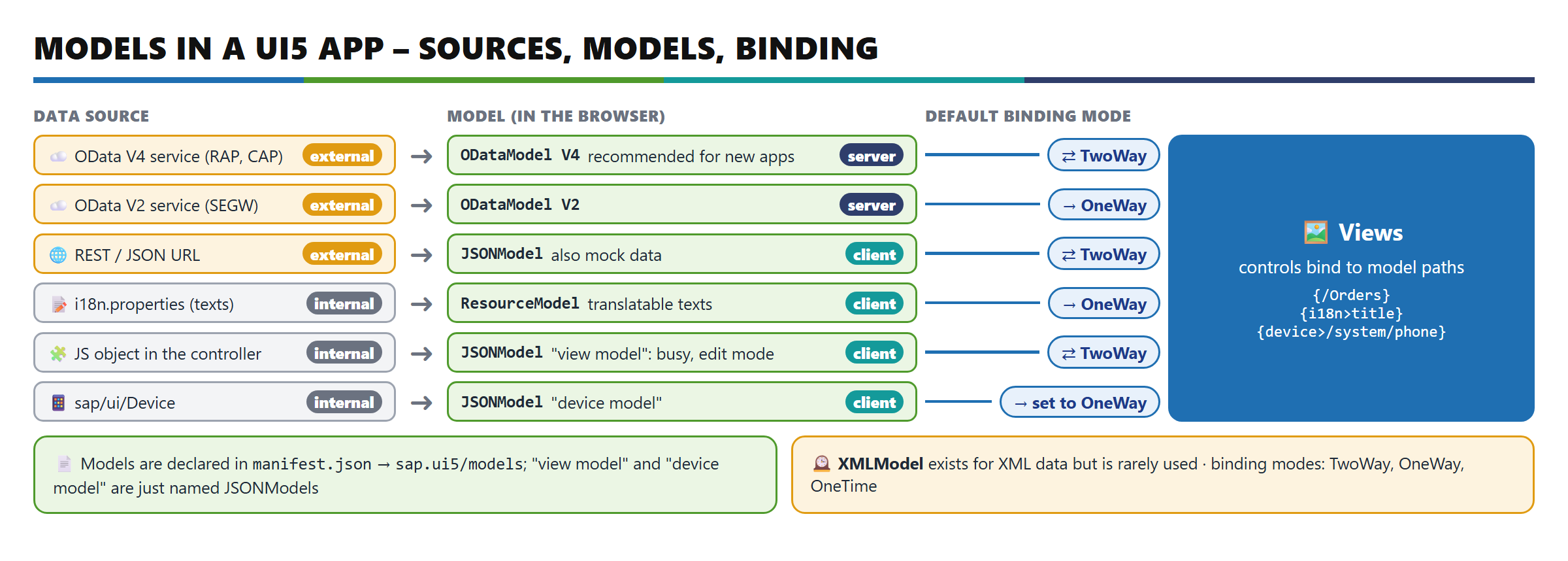
Model | Module | Side | Typical use | Default mode |
|---|---|---|---|---|
JSONModel | sap/ui/model/json/JSONModel | Client | View state, small data sets, mock data, data loaded from a REST/JSON URL | TwoWay |
XMLModel | sap/ui/model/xml/XMLModel | Client | XML data; rarely used (all values arrive as strings) | TwoWay |
ResourceModel | sap/ui/model/resource/ResourceModel | Client | Translatable texts from | OneWay |
ODataModel V2 | sap/ui/model/odata/v2/ODataModel | Server | OData V2 services (SEGW, RAP V2 binding) | OneWay |
ODataModel V4 | sap/ui/model/odata/v4/ODataModel | Server | OData V4 services (RAP, CAP); recommended for new apps | TwoWay |
Device model | JSONModel wrapping | Client | Named | set to OneWay |
- Client-side models load all their data into the browser; sorting and filtering then run in the browser without server calls (like an internal table in ABAP). Use them for small data sets.
- Server-side models request data in pages as the UI needs it (
$top/$skip, growing lists), cache it, and write changes back; sorting and filtering are sent to the server ($orderby,$filter).
Working with a JSONModel
|
- Other methods:
setData(obj)(replace all data),getData(),refresh(true)(force bound controls to update after you changed the data object directly).
Part 2 – Setting models and binding paths
Where | How | Visible to |
|---|---|---|
manifest.json (recommended) |
| All views of the component |
Component in code | this.getOwnerComponent().setModel(oModel, "name") | All views of the component |
View | this.getView().setModel(oModel, "name") | That view and its controls |
Control | this.byId("productTable").setModel(oModel) | That control and its children |
- Models are propagated down the control tree: a child sees the models of its parents. Dialogs and fragments are not in the view's tree, so add them as dependents (
addDependent) to inherit the view's models (Part 13). - Named models:
setModel(oModel, "shop"), then{shop>/products}in bindings andgetModel("shop")in code. The unnamed default model uses{/products}. - Legacy:
sap.ui.getCore().setModel(oModel)(global model for the whole page) is deprecated; use the manifest or the component instead.
Binding paths and contexts
Path | Example | Meaning |
|---|---|---|
Absolute (starts with | /products/1/price | From the model root; |
Relative (no | price | Resolved against the control's binding context (set by an aggregation template or by element binding) |
Named model |
| Same, in the model named |
OData |
| Entity set + key, then properties or navigation properties |
- A binding context points at one record:
oItem.getBindingContext()(add the model name for named models). Use.getPath()(e.g./products/1),.getProperty("price")or.getObject()(the whole record).
Part 3 – Binding types
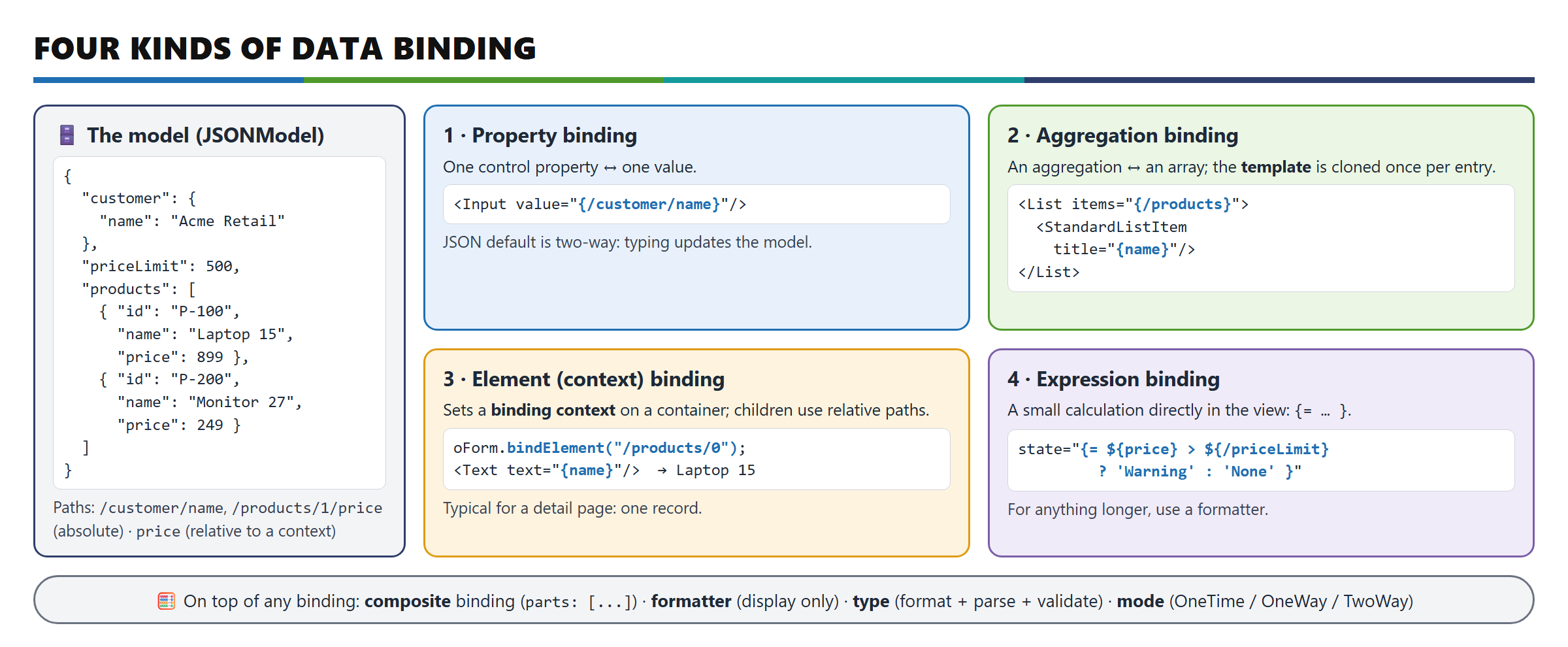
Property binding
A control property is bound to one value: <Input value="{/customer/name}"/>. The extended form allows options: value="{ path: '/customer/name', mode: 'OneWay' }".
Aggregation (list) binding
An aggregation is bound to an array or an OData entity set; the inner control is the template that UI5 clones once per entry, and its paths are relative to each entry.
|
- Grid table (
sap.ui.table.Table): bindrows="{/Products}"and give eacht:Columnat:template, e.g.<t:Column><t:label><Label text="Product"/></t:label><t:template><Text text="{Name}"/></t:template></t:Column>. - Without the template (
<items>…) an aggregation binding has nothing to clone. For different row layouts use a factory function instead of a template.
Element (context) binding
Element binding sets a binding context on a container (view, form, panel), so all children can use relative paths. It is the standard way to show one record, typically on a detail page.
|
|
Expression binding
A short calculation directly in the view (Part 5): visible="{= ${/products}.length > 0 }".
Part 4 – Binding modes
Mode | Direction | Typical use |
|---|---|---|
OneTime | Model → view once, when the binding is created; later changes are ignored | Static data, metadata, texts that never change |
OneWay | Model → view; every model change updates the view | Display-only data |
TwoWay | Model ↔ view; user input is written back to the model | Input fields, forms |
Modes supported per model
Model | OneTime | OneWay | TwoWay |
|---|---|---|---|
OData V4 model | Yes | Yes | Yes (default) |
OData V2 model | Yes | Yes (default) | Yes |
ODataMetaModel (V4) | Yes (default) | Yes | No |
ODataMetaModel (V2) | Yes (default) | No | No |
JSON model | Yes | Yes | Yes (default) |
XML model | Yes | Yes | Yes (default) |
Resource model | Yes | Yes (default) | No |
- Change the default of a model with
oModel.setDefaultBindingMode("OneWay")or in the manifest ("settings": { "defaultBindingMode": "TwoWay" }– needed for editable forms with the V2 model). - Change it for one binding:
value="{ path: 'Name', mode: 'OneTime' }".
Part 5 – Composite and expression binding, formatters, types
Syntax | Example |
|---|---|
Simple |
|
Extended (object) | value="{ path: 'Price', type: 'sap.ui.model.type.Float', mode: 'OneWay' }" |
Composite (several parts) | text="{ parts: ['firstName', 'lastName'], formatter: '.formatter.fullName' }" |
Expression | state="{= ${Price} > ${/priceLimit} ? 'Warning' : 'None' }" |
OData V2 metadata | maxLength="{/#Product/Name/@maxLength}" |
OData V4 metadata |
|
- Composite and expression binding use the complex binding syntax, which is the default in current releases (the old
binding-syntaxbootstrap option is deprecated); apps also setdata-sap-ui-compat-version="edge".
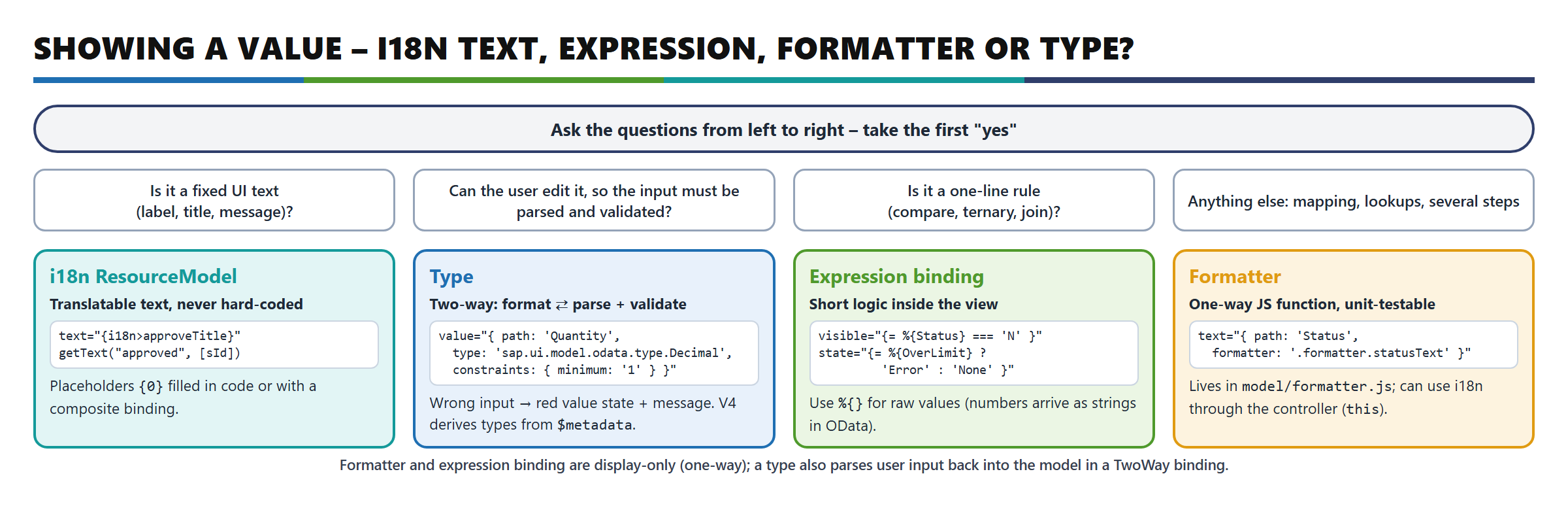
Expression binding
- Syntax:
{= expression }. Inside,${path}is the bound value (formatted by its type) and%{path}the raw model value. JavaScript operators work: comparison,&&,||,!,? :,+.
|
- OData decimal and Int64 values arrive as strings, and
${…}may give a formatted string ("1,234.00"); use%{…}for numeric comparisons, or a formatter. - Keep expressions short; anything with more logic belongs in a formatter (readable and testable).
Formatters
A formatter is a function called with the model value(s) just before the value is shown. It changes only what is displayed, not the model data (like a conversion exit in ABAP, but one-way). Typical uses: status texts, colours, dates, combined values.
|
|
|
- Alternative without a controller property:
core:require="{ formatter: 'my/products/model/formatter' }"on the view or a control, thenformatter: 'formatter.stockText'(no dot). - Put formatters in
model/formatter.js, never in global variables, so they are reusable and unit-testable.
Types: format, parse and validate
A data type formats the value for display and parses and validates user input on the way back, so it works with two-way binding (a formatter does not).
|
- Types:
String,Integer,Float,Boolean,Date,Time,DateTime,Currency,Unitinsap.ui.model.type; OData types insap.ui.model.odata.type(the V4 model derives them automatically from the metadata). - Invalid input raises a validation error; with message handling on (
"handleValidation": trueinsap.ui5) the field gets a redvalueStateand the message appears in the message model. - XML model pitfall: every value from an XML model is a string, so controls that expect a boolean or a number (CheckBox
selected, RatingIndicatorvalue) need a type, e.g.{ path: 'inStock', type: 'sap.ui.model.type.Boolean' }, or use a JSON model.
Part 6 – Texts and translation (i18n)
Apps are used in many languages, so no visible text is hard-coded. Texts live in .properties files (key = text) and are bound through a ResourceModel; this is internationalisation (i18n).
|
- Translations:
i18n_de.properties,i18n_fr.properties… The runtime picks the user's language and falls back along the chaini18n_de_CH→i18n_de→i18n_en(the fallback locale, defaulten) →i18n.properties, unlesssupportedLocales/fallbackLocalesay otherwise. - Manifest:
sap.app/i18nnames the file (for{{appTitle}}in the descriptor) andsap.ui5/models/i18ncreates the model with"bundleName": "my.products.i18n.i18n". Optional settings:supportedLocales,fallbackLocale. - In a view:
text="{i18n>title}". Texts with placeholders ({0}) are usually filled in code:
|
- The language comes from the launchpad user settings or the browser; test with the URL parameter
sap-language=DE.
Part 7 – OData basics for UI5 developers
OData (Open Data Protocol) is a REST-based protocol for reading and changing data over HTTP. It was created by Microsoft and is now an OASIS standard. A browser cannot call ABAP function modules, BAPIs, classes or CDS views directly, so an OData service sits in between and exposes them as resources. Like all REST services it is stateless: each request carries everything the server needs, so the server keeps no session memory and scales to many users.
Term | Meaning | Example |
|---|---|---|
Entity type | Structure of a record: properties, key, data types, lengths |
|
Entity set | Addressable collection of an entity type; the endpoint for CRUD |
|
Navigation property | Follows an association to related entities (a join) |
|
Service document | Lists the entity sets | …/Northwind.svc/ |
Metadata document | Full description of types, keys, associations, annotations | …/Northwind.svc/$metadata |
- Often one database table or CDS view becomes one entity type with one entity set, and a join becomes an association with a navigation property; real services can also combine or project data.
- URL shape:
https://<host>:<port>/<servicepath>/<EntitySet>?<query options>.
Query options (try them on the public Northwind sample service)
Service root for learning: https://services.odata.org/V2/Northwind/Northwind.svc/ (V4: replace V2 with V4). V2 returns XML in the browser unless you add $format=json; V4 returns JSON.
Task | URL part | SQL analogy |
|---|---|---|
Read all products | /Products?$format=json | SELECT * FROM products |
Paging: skip 10, take 3 | /Products?$skip=10&$top=3 | OFFSET 10 ROWS FETCH 3 |
Filter | /Products?$filter=CategoryID eq 2 | WHERE categoryid = 2 |
Contains (V2) | $filter=substringof('cola',ProductName) eq true | WHERE productname LIKE '%cola%' |
Contains (V4) | $filter=contains(ProductName,'cola') | WHERE productname LIKE '%cola%' |
Some columns | $select=ProductID,ProductName,Discontinued | SELECT productid, productname, … |
Sort | $orderby=UnitPrice desc | ORDER BY unitprice DESCENDING |
Count | /Products/$count | SELECT COUNT(*) |
One record by key |
| SELECT SINGLE … WHERE key = … |
Related data | /Orders(10248)?$expand=Order_Details,Employee | INNER JOIN |
- Inline count with the data:
$inlinecount=allpages(V2) /$count=true(V4). Many requests can be sent in one HTTP call with$batch(Part 9).
EPM – SAP's demo data model on ABAP systems
- EPM (Enterprise Procurement Model) is SAP's demo data model for a fictitious company: business partners, products, sales orders, purchase orders and invoices, stored in the
SNWD_*tables. - Fill the tables with the data generator, transaction SEPM_DG.
- SAP's demo OData services are built on it, e.g.
/sap/opu/odata/IWBEP/GWSAMPLE_BASIC/, so it is the on-premise alternative to Northwind for practising.
OData V2 vs V4 in UI5
Aspect | OData V2 model | OData V4 model |
|---|---|---|
Module | sap/ui/model/odata/v2/ODataModel | sap/ui/model/odata/v4/ODataModel |
Typical backend | SEGW projects, RAP service binding (V2) | RAP service binding (V4), CAP |
Default binding mode | OneWay | TwoWay |
Create / update / delete | Model methods: | Through bindings and contexts: |
Actions / functions |
| Operation binding: |
Update request | MERGE or PUT | PATCH |
$batch | On by default ( | Always for |
| Explicit ( | Can be automatic: |
Fiori elements stack | Fiori elements for OData V2 | Fiori elements for OData V4 ( |
Part 8 – Connecting the app to a service
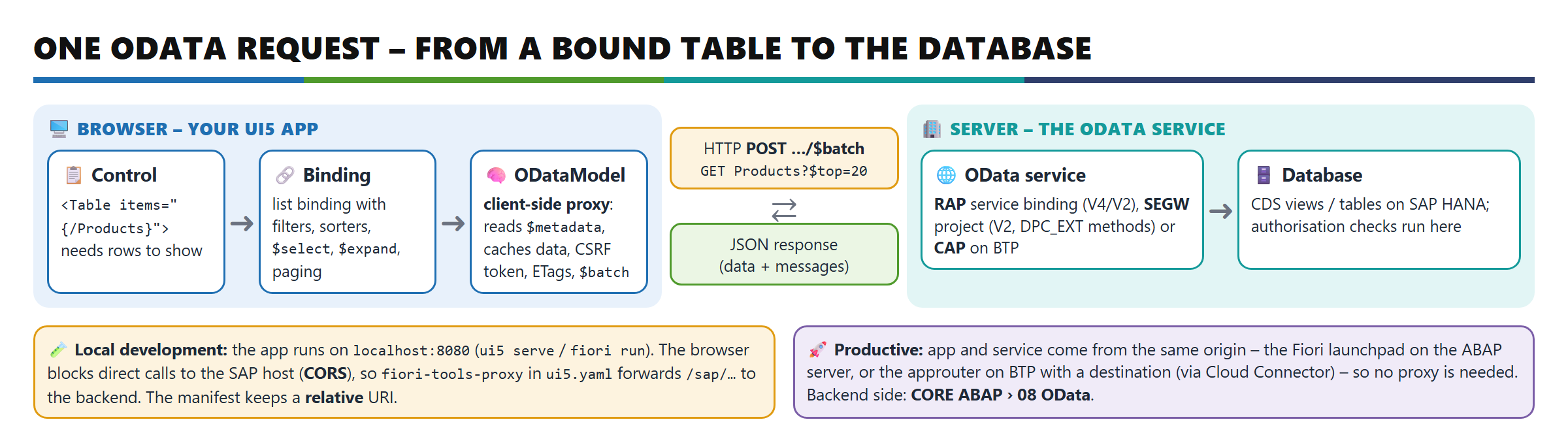
Steps: (1) declare a data source in the manifest, (2) create the default model for it, (3) during local development add a proxy (or a mock server), (4) bind controls to entity sets.
|
- The model type is derived from
odataVersion(2.0→ V2 model,4.0→ V4 model). The URI is relative; never hard-code a server in the manifest. - Then bind:
<List items="{/Products}"><StandardListItem title="{ProductName}"/></List>– the model sends the request and fills the list.
CORS and the development proxy
CORS (cross-origin resource sharing) is the browser rule that a page from one origin ( http://localhost:8080) may call another origin (the SAP host) only if that server allows it. SAP systems normally don't, so a direct call fails with a CORS error. The fix in development is a proxy: the local server forwards /sap/... (or /V2/...) to the real backend, so the browser only talks to localhost.
|
- The proxy exists only for BAS / VS Code development. In production the app and the service share an origin (launchpad on the ABAP server) or the BTP approuter forwards calls through a destination.
- Mock server (no backend needed): the Fiori tools add
@sap-ux/ui5-middleware-fe-mockserverwithwebapp/localService/metadata.xmland JSON mock files (npm run start-mock). Legacy:sap/ui/core/util/MockServer(V2 only). - Reaching on-premise systems from SAP BTP (destinations, Cloud Connector) → see BTP Foundations › BTP Services, Identity & Connectivity.
Part 9 – CRUD with the OData V2 and V4 models
Operation | V2 model / binding | V4 model | HTTP | SEGW method (DPC_EXT) |
|---|---|---|---|---|
Read list |
|
| GET | <SET>_GET_ENTITYSET |
Read one |
|
| GET | <SET>_GET_ENTITY |
Create |
| oListBinding.create(oData) | POST | <SET>_CREATE_ENTITY |
Update |
| Two-way binding or | MERGE/PUT (V2), PATCH (V4) | <SET>_UPDATE_ENTITY |
Delete | remove(sPath) | oContext.delete() | DELETE | <SET>_DELETE_ENTITY |
Function / action | callFunction("/Release", …) | bindContext("…release(...)", oCtx).invoke() | POST/GET | EXECUTE_ACTION |
Deep insert |
|
| POST | CREATE_DEEP_ENTITY |
File download | GET | same | GET | GET_STREAM |
File upload |
| same | POST/PUT | CREATE_STREAM |
bindElement,bindItemsandbindRowsare binding methods on controls, not model methods; they make the model send GET requests. There is noupload()method: uploads go through an upload control and a media entity.- The SEGW method names are generated per entity set in the DPC_EXT class (backend details: CORE ABAP › 08 OData). RAP services need no such methods (RAP section).
OData V2 model
|
|
- Other useful V2 methods:
metadataLoaded()(promise),refresh(),hasPendingChanges(),setDeferredGroups([...]),setUseBatch(false)(single requests, easier to debug).
OData V4 model
|
- Read one record without a control:
oModel.bindContext("/Products('P-100')").requestObject(). - Manifest settings commonly used:
operationMode: "Server"(filter and sort on the server),autoExpandSelect: true(the model builds$select/$expandfrom the bindings),earlyRequests: true. - Draft-enabled RAP or CAP services handle Edit/Save/Discard through draft actions; Fiori elements does this automatically (→ see SAP Fiori › 03 · SAP Fiori Elements).
$batch, change groups and concurrency
$batch packs many OData requests into one HTTP POST to <service>/$batch. Modifying requests are grouped in change sets, which the server processes as one unit (all succeed or all fail); reads are outside change sets. Fewer round trips = faster apps.
- V2:
useBatchis on by default. Put changes in a deferred group (setDeferredGroups(["changes"]),groupId: "changes") to collect them and send them withsubmitChanges({ groupId: "changes" }). - V4: every binding has an update group.
$auto(default) sends changes automatically in a batch,$directsends single requests, and an own group name ($$updateGroupId: "productGroup"in the binding parameters) collects changes untiloModel.submitBatch("productGroup"); undo withoModel.resetChanges("productGroup"). - CSRF token: the models fetch an
X-CSRF-Tokenautomatically before modifying requests. ETag: if the service delivers ETags the model sendsIf-Match, so a change to data that someone else modified fails (optimistic locking). - Messages: backend error and success messages are collected in the message model (
sap/ui/core/Messaging; Legacy:sap.ui.getCore().getMessageManager()) and shown with aMessagePopoverorMessageBox.
Part 10 – OData V4 in depth: the Sales Order Approval dashboard
The V4 model works differently from the V2 model: there is no read(), create() or callFunction() on the model. Everything goes through bindings (list, context, property, operation) and the contexts they create. Once you see this tree, reading, editing, actions and refreshing become simple. The example is the manager dashboard on the service ZUI_SalesOrder_O4 (→ see SAPUI5 › 03 · SAPUI5 Fundamentals, Part 11).
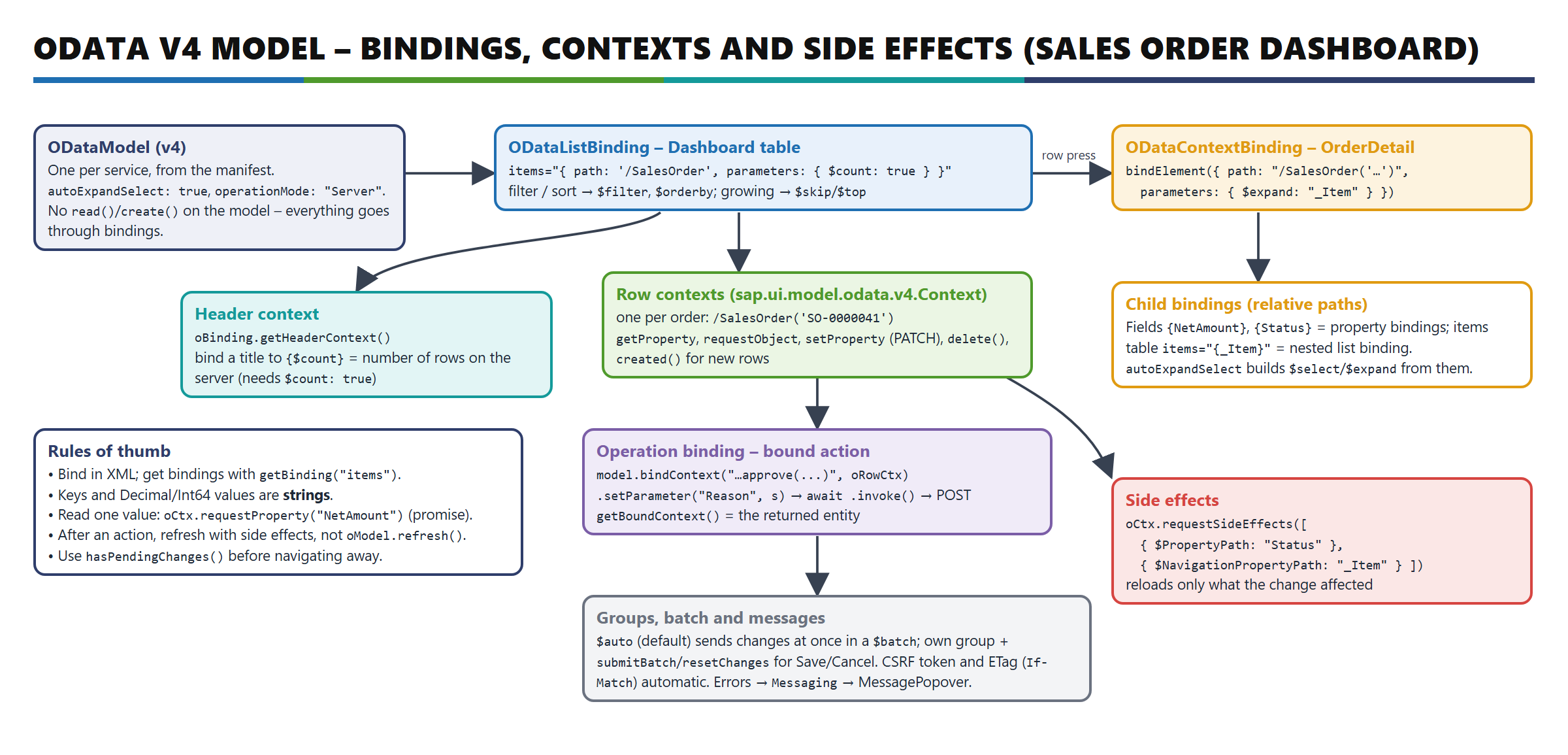
Binding | Created by | Gives you |
|---|---|---|
ODataListBinding |
| Row contexts, |
ODataContextBinding |
| One bound context ( |
Operation binding (context binding whose path ends with | oModel.bindContext("…approve(...)", oContext) |
|
ODataPropertyBinding | text="{NetAmount}" | One value with its OData type |
- A context (
sap/ui/model/odata/v4/Context) is one entity:getProperty,requestObject,requestProperty,setProperty(PATCH),delete(),created()(promise of a new row),requestSideEffects,refresh. - Detail page: if you pass the row context of the list (
setBindingContext(oRowContext)), list and detail share the same data. WithbindElement(path)the detail page gets its own context binding and its own copy, so a change on one side must be refreshed on the other.
Binding parameters that matter
Parameter | Effect |
|---|---|
| OData query options for this binding; with |
$$updateGroupId: "orderEdit" | Changes of this binding wait in group |
$$groupId | Group for read requests, e.g. |
$$ownRequest: true | The binding sends its own request instead of reusing the parent's data |
$$patchWithoutSideEffects: true | The PATCH response does not overwrite other values; load them with |
$$operationMode: "Server" | Filter and sort on the server (or set |
Approve an order: bound action + side effects
|
- The action name is namespace-qualified, exactly as in
$metadata: RAPcom.sap.gateway.srvd.<service definition>.v0001.approve(...), CAP e.g.ManagerService.approve(...). Action parameters:oAction.setParameter("Reason", sText)beforeinvoke()(the Reject dialog). invoke()replacedexecute()(UI5 1.123); both return a promise.- Side effects = values the server changed as a consequence (status, totals, items). Fiori elements reads the
@Common.SideEffectsannotations and refreshes automatically; a freestyle app callsrequestSideEffectsitself.{ $NavigationPropertyPath: "" }reloads the whole entity,{ $NavigationPropertyPath: "_Item" }the items. - Back on the dashboard the approved order must leave the "waiting" list: refresh the list binding (
this.byId("orderTable").getBinding("items").refresh()), or share the row context with the detail page as described above.
Edit with Save and Cancel (own update group)
|
- Read without a control:
await oModel.bindContext("/SalesOrder('SO-0000041')").requestObject(); one value:await oContext.requestProperty("NetAmount"); a list:await oModel.bindList("/SalesOrder").requestContexts(0, 10). - Draft-enabled services (RAP
with draft, CAP@odata.draft.enabled) keep the edit state on the server with Edit / Activate / Discard actions; Fiori elements does this for you, a freestyle app calls these actions itself (→ see SAP Fiori › 03 · SAP Fiori Elements). - Messages: error and success messages of the service land in the message model (
Messaging); bind aMessagePopoverto it. In a$batcheach request reports its own result, so one failed change does not hide the others. - Typing: OData
Edm.DecimalandEdm.Int64values are strings in JavaScript; compare with%{…}or convert in a formatter (Part 5).
Part 11 – Filters, sorters and paging
|
- Operators:
EQ,NE,GT,GE,LT,LE,BT(between,value1+value2),Contains,StartsWith,EndsWith. Several filters on the same field are OR-combined, on different fields AND. - Grouping:
new Sorter("Category", false, true)– the third argument groups the list with headers. - Declarative in XML:
items="{ path: '/Products', sorter: { path: 'Name' }, filters: [{ path: 'Price', operator: 'GT', value1: 100 }] }". V4 binding parameters:parameters: { $select: 'ProductID,Name', $expand: '_Supplier', $count: true }. - With an OData model, filters and sorters become
$filter/$orderbyon the server; with a JSONModel they run in the browser.SearchFieldliveChange(parameternewValue) filters while typing. - Paging:
growing="true"+growingThreshold="20"on a List or sap.m.Table loads 20 rows at a time ($skip/$top); the grid table loads rows while scrolling.
Part 12 – Routing and navigation
The router turns the URL hash (index.html#/products/P-100) into views: each view state gets its own URL, so the browser back button, bookmarks and launchpad deep links work. The router belongs to the component (UIComponent provides it), reads its configuration from the manifest and is started with this.getRouter().initialize() in Component.init (SAPUI5 › 03).
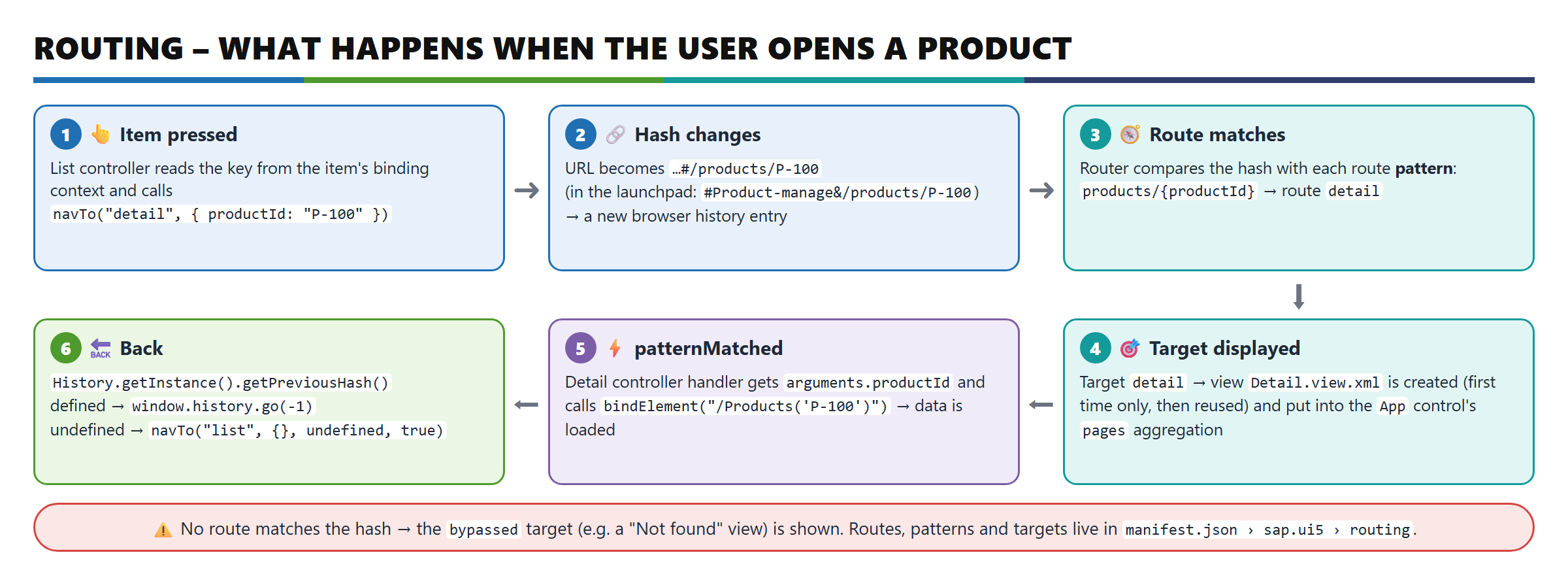
Routing configuration in manifest.json
|
Part | Meaning |
|---|---|
config | Defaults for all targets: view type, package path, the container control ( |
routes | Name + URL pattern + target(s). The first matching route wins; |
targets | Which view to show ( |
bypassed | Target shown when no route matches (a "not found" page) |
- A route contains targets and a target contains a view. A route can show several targets at once (
"target": ["master", "detail"]for a SplitApp withcontrolAggregationmasterPages/detailPages), or a target can name aparenttarget that is shown first. - Root view
App.view.xml:<mvc:View … displayBlock="true"><App id="app"/></mvc:View>. - Older property names
viewPath,viewName,viewLevelare aliases ofpath,name,level. Legacy: the SAP Web IDE App Descriptor Editor; today edit the JSON or use the Fiori tools Application Modeler.
Pattern | Meaning | Matches |
|---|---|---|
products/{productId} | Mandatory parameter | #/products/P-100 |
products/:productId: | Optional parameter |
|
| Mandatory / optional query parameters | #/products?tab=info |
:all*: | Rest of the hash as one string | anything |
Navigate, read parameters, go back
|
|
navTo(routeName, parameters, componentTargetInfo, replace):replace = truereplaces the current history entry instead of adding one. The older three-argument formnavTo(name, {}, true)still works.- patternMatched vs routeMatched:
getRoute("detail").attachPatternMatchedfires only for that route; the router'sattachRouteMatchedfires for every matched route (including parent routes). The handler extracts the parameter, builds the path and binds the element. - Flexible column layout:
sap.f.routing.Routerwith targets inbeginColumnPages,midColumnPages,endColumnPagesfor list-detail-detail apps. - Cross-app navigation in the launchpad uses intents (
#SemanticObject-action, e.g.#Product-display?ProductID=P-100) through the launchpad's Navigation service; inbound intents are declared insap.app/crossNavigation/inboundsand configured as target mappings (→ see SAP Fiori › 02 · SAP Fiori Launchpad & Security). Inside the launchpad your own routes follow&/:#Product-manage&/products/P-100.
Part 13 – Fragments and dialogs
A fragment is a light-weight, reusable piece of UI (*.fragment.xml) without its own controller: it uses the controller of the view that loads it (or one you pass). Fragments split large views and hold dialogs, popovers and value helps – similar to subscreens in ABAP dialog programming.
Kind | How | Use |
|---|---|---|
Static (embedded) |
| Reuse the same form or toolbar in several views |
Dynamic (loaded in code) |
| Dialogs and popovers created when first needed |
|
|
loadFragment(controller method) loads asynchronously, prefixes IDs with the view ID (sothis.byIdworks) and adds the fragment as a dependent of the view, so it gets the view's models and i18n and is destroyed with the view.- With
Fragment.load({ id: this.getView().getId(), name, controller: this })callthis.getView().addDependent(oDialog)yourself. - Legacy:
sap.ui.xmlfragment(...)(synchronous, deprecated). - Simple messages need no fragment:
MessageToast.show("Saved"),MessageBox.error("…"), and
|
- No standard control, composition (VBox + controls) or fragment fits? Build a custom control → see SAPUI5 › 05 · UI5 Tooling, TypeScript & Custom Controls.
Part 14 – Build, deployment and Git
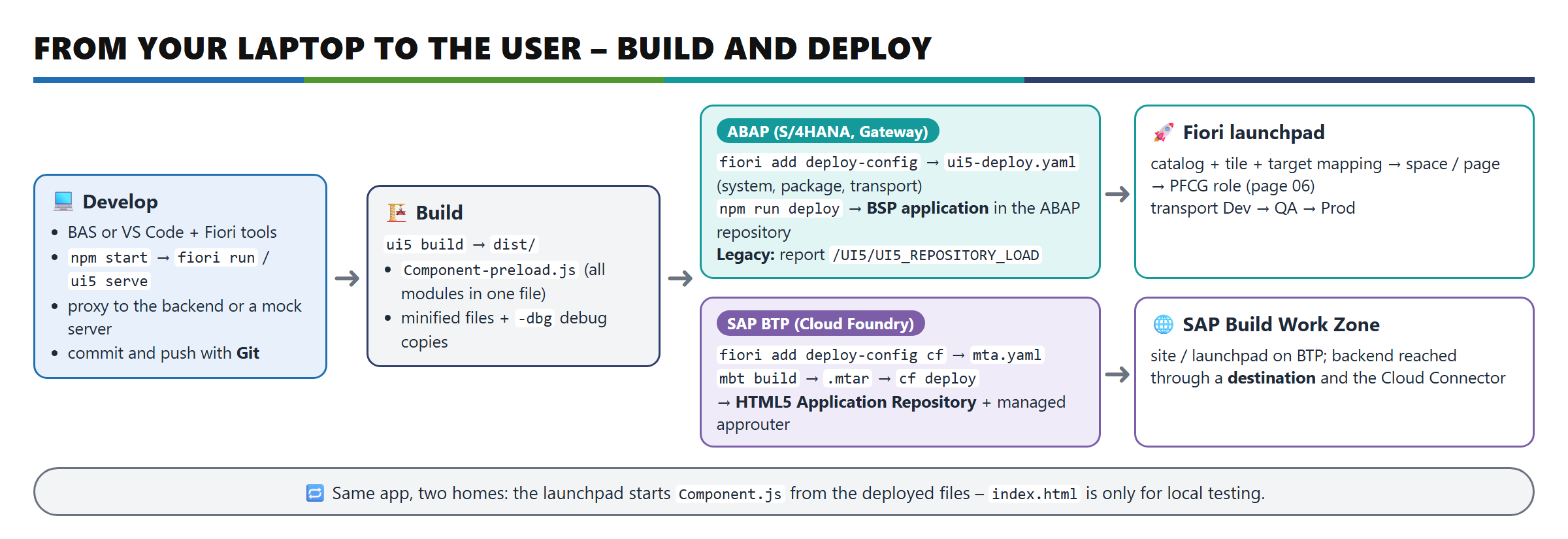
- Before you deploy, run the unit (QUnit), integration (OPA5) and end-to-end (wdi5) tests → see SAPUI5 › 06 · Testing, Performance & Best Practices. Build options, custom tasks and TypeScript builds → SAPUI5 › 05 · UI5 Tooling, TypeScript & Custom Controls.
Build
ui5 build(ornpm run build) writes the deployable app todist/:Component-preload.jsbundles all modules and views into one file (one request instead of many), files are minified, and-dbgcopies keep the readable sources for debugging.ui5 build --clean-destemptiesdist/first;ui5 build self-containedalso bundles the needed framework parts for a fully standalone app.
Deploy to an ABAP system (S/4HANA, SAP Gateway)
|
|
- The app becomes a BSP application in the ABAP repository (served under
/sap/bc/ui5_ui5/sap/zproducts/) and is recorded in the transport request, which moves it Dev → QA → Prod. - Prerequisites on the server: the OData service
/UI5/ABAP_REPOSITORY_SRVmust be active and the user needs developer authorisation for the package. - Legacy / fallback: report
/UI5/UI5_REPOSITORY_LOAD(SE38) uploads a zipped or localdistfolder into a BSP application, and can also download or delete one. After manual uploads, run/UI5/APP_INDEX_CALCULATEto refresh the UI5 application index. - Then make it reachable for users: catalog, tile and target mapping, space and page, PFCG role (→ see SAP Fiori › 02).
Deploy to SAP BTP (Cloud Foundry)
fiori add deploy-config cfadds anmta.yaml(multi-target application) andxs-app.json(approuter routes).npm run build in the MTA folder (mbt build) creates an .mtar archive; npm run deploy (cf deploy <file>.mtar) deploys it.- The app is stored in the HTML5 Application Repository and served by the managed approuter; calls to the backend go through a destination (and the Cloud Connector for on-premise systems).
- Users open it from a SAP Build Work Zone site (the BTP launchpad, successor of the SAP Launchpad service). Details: SAP Fiori › 02 and the SAP Build with Work Zone section.
Launchpad inbound in the manifest
|
Git basics
Git is a distributed version control system: every developer has the full history locally, and save points are called commits. Install it from git-scm.com; BAS and VS Code have Git built in (Source Control view). A remote repository (GitHub, GitLab, Azure DevOps, Bitbucket) is used to share code.
|
- Work on a branch per feature (
git switch -c feature/detail-page) and merge it through a pull request.
Part 15 – Interview questions
Q1. Which models does UI5 offer, and what is the difference between client-side and server-side models?
JSONModel, XMLModel and ResourceModel are client-side: all data is in the browser, sorting and filtering run locally. The ODataModel (V2, V4) is server-side: it requests data on demand, pages it, and sends filter, sort and changes to the OData service. A model is a client object; the OData service is the backend.
Q2. What are the binding modes, and what is the default per model?
OneTime (model to view once), OneWay (model to view on every change), TwoWay (both directions). Defaults: JSON, XML and OData V4 TwoWay; OData V2 and Resource model OneWay; metadata models OneTime.
Q3. Explain property, aggregation and element binding.
Property binding links one control property to one value. Aggregation binding links an aggregation to a collection and clones a template per entry. Element binding sets a binding context (one record) on a container, e.g. bindElement("/Products('P-100')"), so children bind with relative paths.
Q4. Absolute vs relative binding path?
An absolute path starts with / and is resolved from the model root (/products/0/name). A relative path has no leading slash and is resolved against the binding context set by an aggregation template or element binding (name).
Q5. Expression binding vs formatter vs type?
Expression binding ({= … }) is for short logic inside the view. A formatter is a controller or module function for more complex display logic; it is one-way. A type formats, parses and validates, so it supports two-way binding and input checks (Integer with constraints, Date, Currency).
Q6. How do you implement translation (i18n)?
Put texts in i18n/i18n.properties plus i18n_<lang>.properties, declare a ResourceModel named i18n in the manifest, bind {i18n>key} in views and use getResourceBundle().getText("key", [args]) in code. The runtime falls back from the specific language to the default file.
Q7. How do create, update and delete differ between the OData V2 and V4 models?
V2 has model methods: create, update, remove, callFunction, createEntry + submitChanges. V4 works through bindings: ODataListBinding.create, Context.setProperty or two-way binding (PATCH), Context.delete, operation bindings with invoke(), and submitBatch for own groups.
Q8. What is $batch, and how do you control when changes are sent?
One HTTP POST that carries several OData requests; changes inside a change set are atomic. V2: deferred groups collect changes until submitChanges. V4: $auto sends automatically, $direct without batch, an own update group waits for submitBatch(groupId).
Q9. How do you filter and sort a table?
Get the binding (getBinding("items")) and call filter([new Filter("Name", FilterOperator.Contains, sQuery)]) or sort(new Sorter("Price", true)). With OData this becomes $filter / $orderby on the server; with a JSONModel it runs in the browser.
Q10. How is routing configured, and how do you pass and read a parameter?
In manifest.json › sap.ui5 › routing: config (container control and aggregation), routes (name, pattern, target) and targets (views). Initialise the router in Component.init. Navigate with navTo("detail", { productId }) for the pattern products/{productId}, and read it in getRoute("detail").attachPatternMatched via oEvent.getParameter("arguments").productId.
Q11. What is a fragment, and how do you open a dialog from one?
A reusable UI part without its own controller. Load it with this.loadFragment({ name }) (or Fragment.load + addDependent), cache the promise, then open() the dialog; close it with close(). As a dependent it inherits the view's models and is destroyed with the view.
Q12. How do you deploy a UI5 app to an ABAP system and to SAP BTP?
ABAP: fiori add deploy-config creates ui5-deploy.yaml; npm run deploy builds and uploads the app as a BSP application with a transport (legacy: /UI5/UI5_REPOSITORY_LOAD); then configure the launchpad. BTP: an MTA project is built with mbt build, deployed with cf deploy to the HTML5 Application Repository, and added to SAP Build Work Zone.
Q13. What is a context in the OData V4 model, and how do you show the number of rows?
A context (sap/ui/model/odata/v4/Context) stands for one entity: a list binding creates one row context per entry, a context binding one bound context. Relative bindings resolve against it, and it offers requestObject, setProperty, delete, requestSideEffects. The row count comes from $count: true on the list binding: read it in the table's updateFinished event (total) or bind to $count on the list's header context (getHeaderContext()).
Q14. What are side effects, and how do you handle them in a freestyle app?
Values that the server changes as a consequence of an edit or action (status, totals, items). Fiori elements reads the @Common.SideEffects annotations automatically. In a freestyle app call oContext.requestSideEffects([{ $PropertyPath: "Status" }, { $NavigationPropertyPath: "_Item" }]) after the change, optionally with $$patchWithoutSideEffects on the binding.
Q15. Scenario: after Approve the detail page shows the new status, but the dashboard list still shows the order as waiting. Why, and how do you fix it?
The detail page was bound with bindElement, so it has its own context binding and its own copy of the order; the list binding still holds the old data. Fix: refresh the list binding after the action, or open the detail page with the list's row context (setBindingContext(oRowContext)) so both share one entity; for dependent values use requestSideEffects.
Q16. Scenario: a status column needs a text and a colour, and a quantity input must reject values below 1. Which binding features do you use?
Status text and colour: a formatter in model/formatter.js (or a short expression binding for the colour), with texts from i18n. Quantity: a type such as sap.ui.model.odata.type.Decimal with constraints: { minimum: '1' } in a TwoWay binding, so wrong input is rejected and shown as a value state; with the V4 model the type is derived from $metadata, you only add the extra constraint.
🏠 Start Here · ◀ 03 · UI5 Fundamentals · 05 · Tooling & TypeScript ▶ · Sections: CORE ABAP | OOPS ABAP | ABAP on HANA | Clean Core | RAP | ABAP Points | SAP Fiori | SAPUI5 | Mobile Development (MDK) | BTP Foundations | BTP Development | CAP | SAP Build | ABAP on BTP | Integration Suite | SAP Business AI | SAP BASIS | Security | SAP SDLC
Functional: FICO ABAP | TRM ABAP | VIM | SAP BIS | SD ABAP | MM ABAP | PP ABAP | QM ABAP | PM ABAP | PS ABAP | EWM | TM ABAP | GTM ABAP | EHS ABAP | HR ABAP | BW | SAP Datasphere | SAP Business Data Cloud | SAP MDG | SAP Analytics Cloud | SAP Ariba | SAP CX | SAP IBP