How TM runs a shipper's transport from the sales order or purchase order to the paid carrier invoice: transportation requirements, freight unit building, planning in the transportation cockpit and with the optimizer, freight orders and bookings, carrier selection and tendering, execution and tracking, charge calculation, freight settlement with MM and cost distribution to FI/CO. Each step lists the customizing that controls it, and the end of the page collects the key customizing and apps. Org units: page 01; master data and documents: page 02; postings and interfaces in depth: page 04.
Part 1 – The shipper process end to end
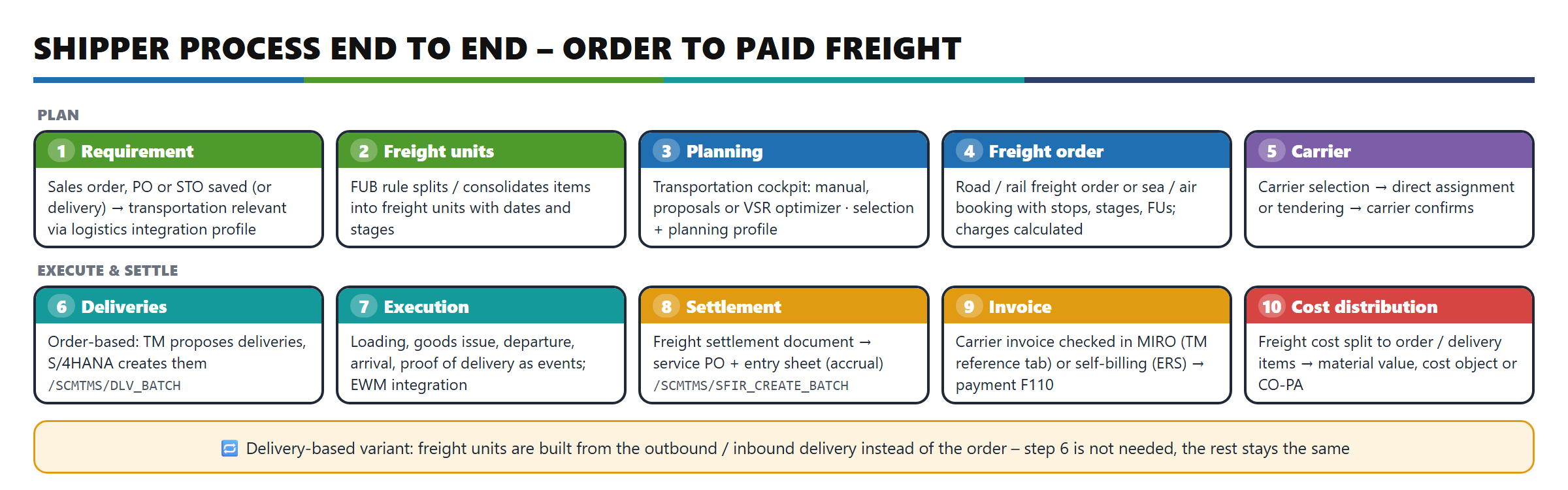
Step | What happens | Main document |
|---|---|---|
1. Requirement | A transportation-relevant sales order, PO or STO (or its delivery) is saved | VBAK / EKKO / LIKP |
2. Freight unit building | The FUB rule turns requirement items into freight units | Freight unit (TOR FU) |
3. Planning | Freight units are assigned to vehicles, schedules or carriers – manually or by the optimizer | – |
4. Freight order / booking | Created by planning; charges calculated | Freight order (TO) / booking (BO) |
5. Subcontracting | Carrier selected, order sent or tendered, carrier confirms | Freight order |
6. Deliveries (order-based) | TM proposes deliveries, S/4HANA creates them; new delivery-based freight units replace the order-based ones | LIKP / LIPS |
7. Execution | Loading, goods issue, departure, arrival, proof of delivery reported as events | Freight order execution tab |
8. Freight settlement | FSD created and posted → service PO + service entry sheet (accrual) | FSD, service PO, entry sheet |
9. Invoice | Carrier invoice checked in MIRO, or self-billing (ERS); payment in FI | RBKP / RSEG |
10. Cost distribution | Freight cost split to items and posted to stock, cost objects or CO-PA | Settlement management document |
Part 2 – Transportation requirements: order-based and delivery-based
A transportation requirement is the demand to move goods. In embedded TM it is not a separate document: the S/4HANA order or delivery item itself is the requirement and the freight unit references it. In decentralised TM the same documents arrive as OTR (order-based transportation requirement) and DTR (delivery-based transportation requirement); LSPs use forwarding orders.
Type | Source documents | When to use |
|---|---|---|
Order-based (OTR logic) | Sales order, customer returns, purchase order, stock transport order, returns STO, sales and MM scheduling agreements | Plan transport early, before deliveries exist; TM then proposes the deliveries (date and quantity split by transport) – advanced |
Delivery-based (DTR logic) | Outbound and inbound deliveries | Deliveries are created as usual in SD/LE (VL10, VL01N) and TM plans them – simpler, closest to LE-TRA – basic |
Forwarding order (LSP) | Manual, EDI, portal | Selling transport services |
2.1 Configuration: making documents transportation-relevant
- 1. Control key – activates the integration of a document category with TM (decides which documents of a chain are integrated).
- 2. Logistics integration profile – per integration scenario: freight unit building rule or a condition to find it, Incoterm location stage building, other defaults.
- 3. Assignment of the logistics integration profile to the document type (sales document type, purchasing document type, delivery type).
- Incoterm location stage building (field on the profile): with an Incoterm location (Incoterms part 2 mapped to a location, page 02) TM can build two stages – source → Incoterm location and Incoterm location → destination – and plan only the stage the shipper pays for.
- Changes to the sales order or delivery (quantity, date, deletion) update or cancel the freight units automatically; the change controller of the freight unit type decides how planned freight orders react.
Part 3 – Freight unit building
A freight unit (FU) is the smallest unit that stays together through the whole transport chain. Freight units and requirement items are N:N – one large item can be split into several FUs, several items can be consolidated into one. The freight unit building rule (FUBR) decides.
FUBR setting | Meaning |
|---|---|
Consolidation strategy | Per item (one FU per item), per request (all compatible items of one document in one FU) or as much as possible (several requirements in one FU, across documents) |
Critical quantity | The unit of measure used to split an item (e.g. weight, pallets) |
Split quantity / item split allowed | Maximum size of one FU; e.g. 5 t cement with split quantity 500 kg → 10 FUs |
Planning quantities | Weight, volume, pallets … copied to the FU and checked against capacity |
Equipment type | Consolidate into a container or trailer type with its capacity |
Freight unit type | Type of the FUs created |
- Determination of the FUBR: condition (type /SCMTMS/FUBR) → else the standard FUB rule → else default settings; FUB_AUTO is the process strategy, not a rule.
- Items are first grouped by hard constraints: source and destination location, dates, document attributes, packaging and incompatibilities (e.g. food with chemicals).
- Design rule: bigger FUs make optimization faster and simpler; smaller FUs give more optimization potential but more objects to plan.
3.1 Freight unit type – what it controls
Setting group | Examples |
|---|---|
Change controller and strategies | Reaction to changes of the requirement or freight order; creation, save and delete strategies |
Execution | Execution track relevance: 1 no tracking, 2 execution tracking in TM, 3 tracking with external event management; immediate processing |
Planning | Default planning profile; pick-up / delivery window rule or condition |
Direct shipment | Direct shipment options are determined via the carrier selection settings; the FU becomes a freight order automatically, manually or by report |
Org units, means of transport, units of measure | Default execution and purchasing org / group (or condition), default means of transport, weight and volume units |
Track changes, event management | Change documents; last expected event |
Part 4 – Transportation planning
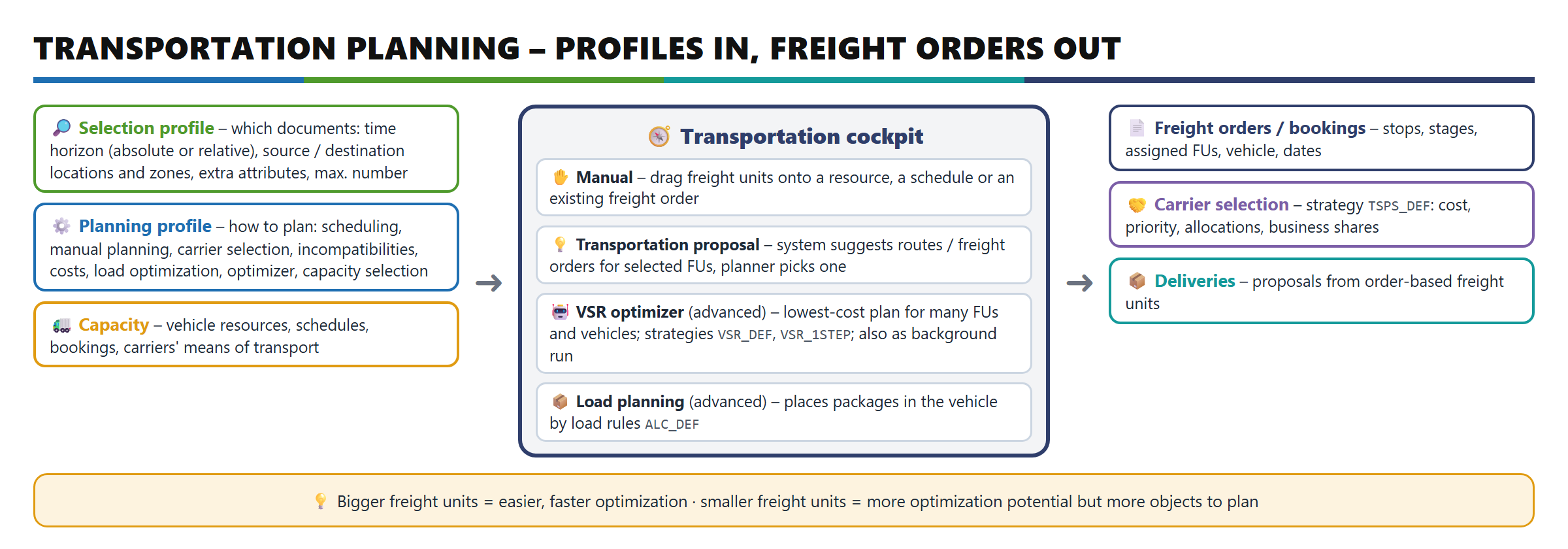
Planning assigns freight units to capacity and creates freight orders (road, rail) or assigns them to freight bookings (sea, air). The dispatcher works in the transportation cockpit, which is opened with a selection profile (which documents) and a planning profile (how to plan).
Profile | Contents |
|---|---|
Selection profile | Time horizon (absolute or relative with offset and duration, factory calendar), geographical attributes (source / destination locations and zones, include / exclude), additional attributes (any field of the document), maximum number of documents |
Planning profile | Planning horizon and eight reusable settings: scheduling (loading / unloading durations, forward or backward, strategies e.g. VSRI_SCH / VSS_EMBED), manual planning, carrier selection (strategy TSPS_DEF), incompatibilities, constraints and costs (earliness / lateness penalty costs), load optimization (ALP_DEF), optimizer (runtime, transshipments, freight order building rule, VSR_DEF / VSR_1STEP), capacity selection (resources, schedules, transportation mode, planning blocks) |
Profile and layout set | Combines selection, planning and capacity profiles plus the screen layout of the cockpit for one planner |
4.1 Planning modes
Mode | How it works | Scope |
|---|---|---|
Manual | Drag and drop FUs onto a vehicle resource, schedule, booking or existing freight order; scheduling calculates the dates | Basic |
Transportation proposal | The system calculates several routing / vehicle options for selected FUs; the planner picks one | Uses the optimizer |
VSR optimization | Vehicle scheduling and routing optimizer finds the lowest-cost plan for many FUs and vehicles (costs from the planning profile and the network); interactive or as background job | Advanced |
Load planning | Places packages or pallets in the vehicle using load rules (stacking, axle loads) | Advanced |
Direct shipment | Per carrier / service level the FU becomes a freight order without consolidation (carrier selection settings) | Basic |
- Planning checks capacity, time windows, incompatibilities, lanes and schedules; violations are shown or block the assignment depending on the check strategy in the planning profile.
Part 5 – Freight orders, freight bookings and deliveries
Document | Content | Typical source |
|---|---|---|
Freight order (road, rail) | Stops and stages, assigned FUs as items, vehicle / resource, carrier, dates, charges, execution events, output | Planning, direct shipment, manual creation (Create Road Freight Order) |
Freight booking (ocean, air) | Booked capacity on a voyage or flight, carrier, cut-off dates, containers (TUs); FUs assigned for the main carriage | Created manually or from schedules, before FUs are known |
Transportation unit | Trailer, railcar or container moving FUs across several freight orders | Planning (multi-stage, trailer swaps) |
Service order | Additional services without movement | Manual |
- The freight order type controls: number range, transportation mode, subcontracting relevance, settlement relevance and FSD type, default org units, change controller, execution relevance, output profile, charge calculation. Freight booking types are defined the same way.
- Multimodal transport: an FU can have stages (pre-carriage by truck, main carriage by vessel, on-carriage by truck) planned on different freight orders and bookings; the main carriage flag marks the primary leg.
5.1 Delivery creation from TM (order-based planning, advanced)
- After planning order-based FUs, TM creates delivery proposals (one per order and freight order combination) and S/4HANA creates the outbound or inbound deliveries; S/4HANA keeps TM's dates and does not consolidate proposals, but may split further by its own criteria.
- Triggered by the action Create Deliveries in ERP on the freight order or booking, from the Freight Orders worklist, or in background with report /SCMTMS/DLV_BATCH (job Create Deliveries from Freight Documents).
- After creation the delivery is the requirement: its freight units replace the order-based ones in the freight order; the FU's delivery planning status shows the progress.
Part 6 – Carrier selection and tendering
6.1 Carrier selection
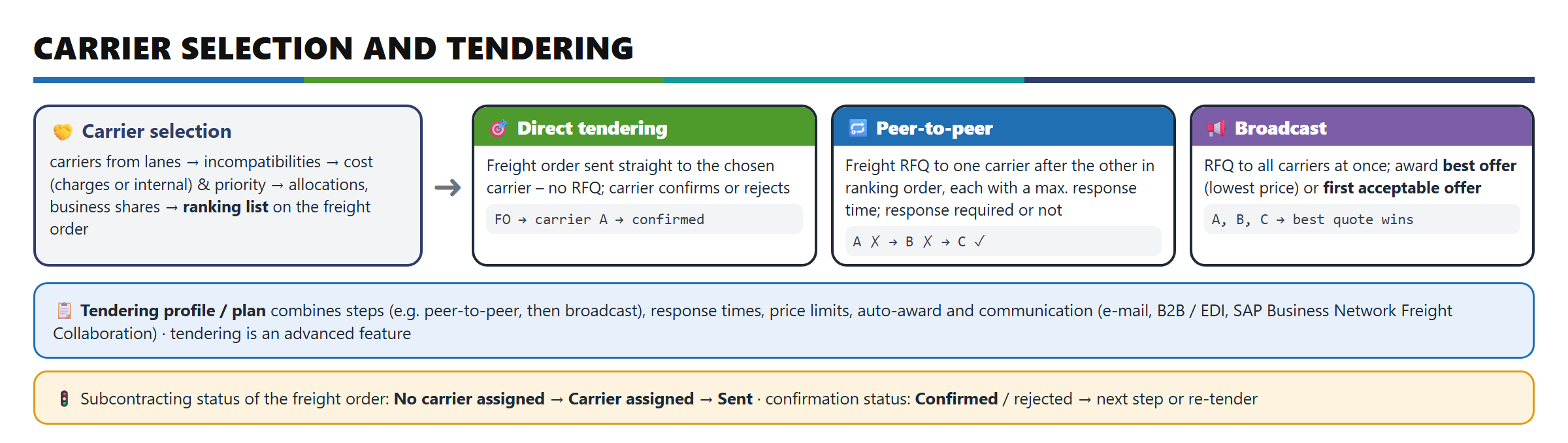
- Automatic carrier selection (advanced; basic TM assigns the carrier manually) finds carriers for freight orders or bookings: carriers from lanes → incompatibilities → costs (charges from freight agreements or internal costs) and priorities → transportation allocations (min / max capacity per carrier, lane, period) → business shares (target percentage per carrier with tolerance and penalty) → ranking list on the freight order.
- Strategies: cost and priority, business share, transportation allocation, continuous move; settings in the carrier selection settings of the planning profile (and per lane).
- Result: carrier assigned automatically, freight order tendered, or manual choice from the ranking list.
6.2 Tendering (advanced)
Type | How it works |
|---|---|
Direct tendering | The freight order is sent directly to one carrier without a freight RFQ; the carrier confirms or rejects |
Peer-to-peer | Freight RFQ to one carrier at a time in ranking order, each with a maximum response time; variants response required / no response required |
Broadcast | Freight RFQ to all carriers at once; award to the best offer (lowest price) or the first acceptable offer |
- A tendering profile / plan combines steps (e.g. peer-to-peer first, broadcast as fallback), response times, price limits, automatic award and re-tendering, and the communication channel: e-mail, B2B / EDI (quotes come back as messages) or SAP Business Network Freight Collaboration.
- Subcontracting status of the freight order: No Subcontracting Result → (In Tendering) → Carrier Assigned → Sent; the carrier's response sets the confirmation status.
- Long-term carrier contracting (freight RFQs for annual rates) is strategic freight management, not short-term tendering.
Part 7 – Execution and tracking
- Execution relevance comes from the document type (Part 3.1): with tracking, the freight order has an Execution tab with expected events per stop (loading begin / end, departure, arrival, unloading, proof of delivery) and the actual events reported.
- Events come from the dispatcher, the driver or carrier (app, portal, EDI), the warehouse (goods issue, loading in EWM) or a tracking network; delays and exceptions are events too.
- Statuses on the freight order: life cycle, execution status (not started, in execution, executed), subcontracting, delivery and goods movement status from the linked deliveries.
- EWM integration: freight orders drive loading and unloading; with Advanced Shipping and Receiving TM and EWM exchange freight order, TU and warehouse status directly (detail: page 04).
- Tracking beyond the company: SAP Business Network Global Track and Trace (cloud) or SAP Event Management (on-premise) correlates planned and actual events across carriers and modes.
- Fiori app Freight Order Execution Monitoring shows open, delayed and executed freight orders.
Part 8 – Charge calculation, freight settlement and cost distribution
8.1 Charge calculation
- Runs on the freight order or booking (automatically on save or by action): agreement determination → calculation sheet → rate tables → charge items (master data hierarchy: page 02 Part 6).
- The calculation profile (in the charges profile of the purchasing organization) sets the calculation level (header, stage, item), the date used and how agreements are determined.
8.2 Freight settlement
Step | Detail |
|---|---|
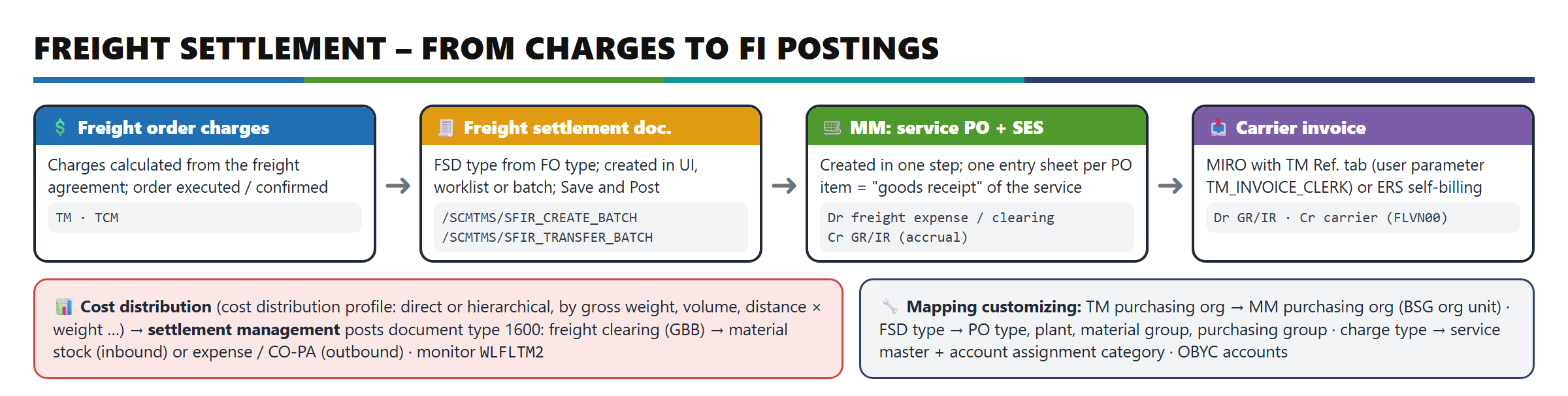
Create the FSD | From the freight order / booking, the Freight Settlements worklist or report /SCMTMS/SFIR_CREATE_BATCH (option: post immediately). The FSD type comes from the freight order type; the settlement profile controls splits, consolidation, collective settlement and stage split |
Post to MM | Save and Post creates a service purchase order and a service entry sheet in one step (asynchronously via bgRFC, monitor SBGRFCMON), with one entry sheet per PO item. The entry sheet posts the accrual (credit GR/IR). Report /SCMTMS/SFIR_TRANSFER_BATCH posts existing FSDs or reprocesses errors |
Verify the invoice | MIRO shows a TM Ref. tab when user parameter TM_INVOICE_CLERK = X: enter freight order or carrier, the FSD charges are proposed and compared with the carrier invoice |
Self-billing | ERS (evaluated receipt settlement, credit memo procedure): the invoice is created from the FSD data, no carrier invoice needed; differences as subsequent debit / credit |
Corrections | Cancel Document (cancels accrual, entry sheet and PO), Reverse Document (return entry sheet, ERS carriers), Cancel PO, Reprocess failed document; charges added later create a new FSD, reductions need a credit memo |
- MM mapping customizing: TM purchasing organization → MM purchasing organization (org model, /SCMTMS/ORG_INT, page 01) · FSD type → PO document type, plant, material group, purchasing group · charge item category / charge type → service master (activity number, AC01) and account assignment category (e.g. K cost center) · G/L accounts through MM automatic account determination (OBYC: GR/IR, freight clearing, inventory and consumption).
- Display the PO and entry sheet in ME23N or the TM document flow; the application log of the FSD shows posting errors.
8.3 Cost distribution
- The cost distribution profile (method direct or hierarchical through the packaging hierarchy; rule gross weight, net weight, volume, distance × weight or custom; level ERP item or forwarding order) is assigned to the charges profile and enabled in FO, FB and FSD types.
- Example (direct, by gross weight): freight 2,000.00 for 4,500 kg; an item of 2,500 kg receives 2,500 / 4,500 × 2,000 = 1,111.11.
- The FSD hands the distributed amounts to settlement management, which posts document type 1600 (reversal 1601): first to a freight clearing account (OBYC GBB), then to the material (inbound – moving average price changes at once) or to the expense account / cost object / CO-PA (outbound). Monitor with WLFLTM2.
- BAdIs for custom rules:
/SCMTMS/TCD_DISTRIB_RULE,/SCMTMS/TCD_DIST_RULE_HIE_LVLS,/SCMTMS/TCD_UNALLOC_CE,/SCMTMS/TCD_UNASSIGN_DI(page 05).
8.4 LSP: forwarding settlement (short)
For a logistics service provider the selling side mirrors this: the forwarding order is priced with forwarding agreements, the forwarding settlement document is transferred to SD billing, and FI creates the customer receivable. Internal settlement between org units is also possible.
Part 9 – Key customizing, apps and transactions
9.1 Key customizing (SPRO › Transportation Management)
Activity | What it controls |
|---|---|
Control keys, logistics integration profile, assignment to document types | Which sales, purchasing and delivery documents create freight units and with which FUBR / stage building (Part 2) |
Define Freight Unit Types | Change controller, execution relevance, planning defaults, direct shipment, org unit determination (Part 3.1) |
Freight unit building rules (application setting) | Consolidation, split and planning quantities (Part 3) |
Define Freight Order Types / Define Freight Booking Types | Number range, mode, subcontracting, settlement relevance and FSD type, output, change controller (Part 5) |
Selection, planning and capacity profiles; carrier selection settings; tendering profiles (application settings) | Planning and subcontracting behaviour (Parts 4, 6) |
Means of transport, equipment, transportation modes | Vehicle classes and capacities (page 02 Part 5) |
Charge types, calculation profile, charges profile, assignment to org unit | Charge calculation (Part 8.1) |
Define Settlement Profile, Define Freight Settlement Document Types, number ranges | Settlement splits, BP determination, cost distribution, output profile (Part 8.2) |
Integration for settlement posting: purchasing information, service master and account assignment category | Service PO and entry sheet in MM (Part 8.2) |
Define Cost Distribution Profiles and methods | Freight cost split (Part 8.3) |
9.2 Apps and transactions per step
Most TM screens are FPM applications started as tiles in the SAP Fiori launchpad (tile groups such as Order Management, Logistics Integration, Planning, Settlement, Contract Management). S/4HANA Cloud Public Edition delivers business roles such as Dispatcher (TM) SAP_BR_DISPATCHER, Transportation Buyer SAP_BR_TRANSP_BUYER and Transportation Manager SAP_BR_TRANSPORTATION_MGR. Worklists (POWL) list documents per query.
Step | Fiori app / tile | Transaction / report |
|---|---|---|
Org structure | – | PPOCE, PPOME, PPOSE |
Locations, network | Define Location, transportation network cockpit | /SAPAPO/CREATE_LOCATION, Transportation Network Cockpit (path finder, no transaction code) |
Freight units | Freight Units worklist, Display / Edit Freight Unit | – |
Planning | Transportation Cockpit | Background planning jobs |
Freight orders / bookings | Freight Orders, Freight Bookings, Create / Edit Road Freight Order (Cloud: Manage Freight Orders) | – |
Deliveries | Action Create Deliveries in ERP | /SCMTMS/DLV_BATCH |
Execution | Freight Order Execution Monitoring | – |
Settlement | Freight Settlements worklist, FSD UI | /SCMTMS/SFIR_CREATE_BATCH, /SCMTMS/SFIR_TRANSFER_BATCH, SBGRFCMON |
Invoice, PO | Create Supplier Invoice | MIRO (TM Ref. tab), ME23N |
Cost distribution | Monitoring apps | WLFLTM2 |
LE-TRA (legacy) | – | VT01N shipment, VI01 shipment costs – compatibility pack only |
Part 10 – Interview questions
Q1. Walk me through the TM shipper process.
Transportation-relevant sales order / PO / delivery → freight units by FUB rule → planning in the transportation cockpit (manual or optimizer) → freight order / booking with charges → carrier selection and tendering → (order-based) delivery creation → execution events → freight settlement document → service PO and entry sheet → MIRO or ERS → cost distribution to stock, cost objects or CO-PA.
Q2. Order-based vs delivery-based planning – when do you choose which?
Order-based plans from sales orders / POs before deliveries exist and lets TM propose the deliveries – best when transport capacity drives the delivery split; it needs the advanced licence. Delivery-based plans existing deliveries – basic scope, simpler, close to LE-TRA, fits when shipping creates deliveries first.
Q3. How does a sales order become relevant for TM?
The control key activates integration for the document category, a logistics integration profile (FUBR or condition, stage building) is assigned to the sales document type; on save S/4HANA creates freight units directly – no OTR in embedded TM.
Q4. What does a freight unit building rule control?
Consolidation (per item, per request, as much as possible), critical quantity, split quantity, planning quantities and equipment. It is found by condition (/SCMTMS/FUBR), else the standard FUB rule, else default settings (FUB_AUTO is the process strategy).
Q5. What are the selection profile and planning profile?
The selection profile chooses which documents to plan (time horizon, locations / zones, attributes); the planning profile defines how (scheduling, manual planning, carrier selection, incompatibilities, costs, load optimization, optimizer, capacity selection). Both open the transportation cockpit.
Q6. What is the VSR optimizer?
Vehicle scheduling and routing: an optimizer (advanced licence) that assigns many freight units to vehicles and routes at the lowest total cost under capacity, time-window and network constraints, using costs from the planning profile; strategies VSR_DEF / VSR_1STEP.
Q7. Freight order vs freight booking?
A freight order is a road or rail transport planned for a carrier or own vehicle; a freight booking reserves capacity on a scheduled sea or air departure, often before freight units are known. Both are /SCMTMS/TOR instances (TO / BO).
Q8. Explain the tendering types.
Direct tendering sends the freight order to one carrier without RFQ. Peer-to-peer sends RFQs one carrier after another with response times. Broadcast sends to all at once and awards the best or first acceptable offer. Tendering profiles combine steps and channels (e-mail, EDI, Business Network).
Q9. What happens when a freight settlement document is posted?
S/4HANA creates a service PO and a service entry sheet in one step (bgRFC); the entry sheet posts the accrual against GR/IR. The carrier invoice is then checked in MIRO (TM Ref. tab) or created by ERS, and paid in FI.
Q10. Which customizing links TM settlement to MM?
Purchasing org via the org model (/SCMTMS/ORG_INT), FSD type → PO type, plant, material group, purchasing group, charge types → service master and account assignment category, and OBYC accounts; plus FSD type on the freight order type and user parameter TM_INVOICE_CLERK for MIRO.
Q11. How are freight costs distributed and posted?
A cost distribution profile (direct or hierarchical, by weight, volume, distance × weight) splits the FSD amount to order / delivery items; settlement management posts document type 1600 via the freight clearing account to material stock (inbound) or expense / CO-PA (outbound). Monitor with WLFLTM2.
Q12. A freight order has no charges and the FSD cannot be created – how do you analyse?
Check the charges profile of the purchasing organization, a released freight agreement for carrier, lane and date, released rate-table validities, the calculation log on the freight order, settlement relevance and FSD type on the freight order type, and the carrier's BP roles (CRM010, FLVN00, FLVN01).
🏠 Start Here · ◀ 02 · Master Data · 04 · Integration & Reporting ▶ · Sections: CORE ABAP | OOPS ABAP | ABAP on HANA | Clean Core | RAP | ABAP Points | SAP Fiori | SAPUI5 | Mobile Development (MDK) | BTP Foundations | BTP Development | CAP | SAP Build | ABAP on BTP | Integration Suite | SAP Business AI | SAP BASIS | Security | SAP SDLC
Functional: FICO ABAP | TRM ABAP | VIM | SAP BIS | SD ABAP | MM ABAP | PP ABAP | QM ABAP | PM ABAP | PS ABAP | EWM | TM ABAP | GTM ABAP | EHS ABAP | HR ABAP | BW | SAP Datasphere | SAP Business Data Cloud | SAP MDG | SAP Analytics Cloud | SAP Ariba | SAP CX | SAP IBP