TM owns the freight, but almost every document it handles starts or ends in another module: SD and MM documents create freight units, TM proposes deliveries, freight settlement creates a service purchase order and service entry sheet that FI/CO turns into accruals and distributed freight costs, EWM loads the freight order, and carriers receive and answer it by B2B message, EDI or a business network. This page shows what each integration creates, which messages and settings are involved, and how TM data is reported. The integration overview is on page 01 Part 6; the processes and their customizing on page 03; BAdIs, APIs and code on page 05.
Part 1 – The document chain across modules
Follow one outbound shipment through the system and you meet every integration on this page. In embedded TM all of it happens inside one S/4HANA system through internal calls; in a decentralised TM system the same steps run as SOAP messages between the ERP and TM systems.
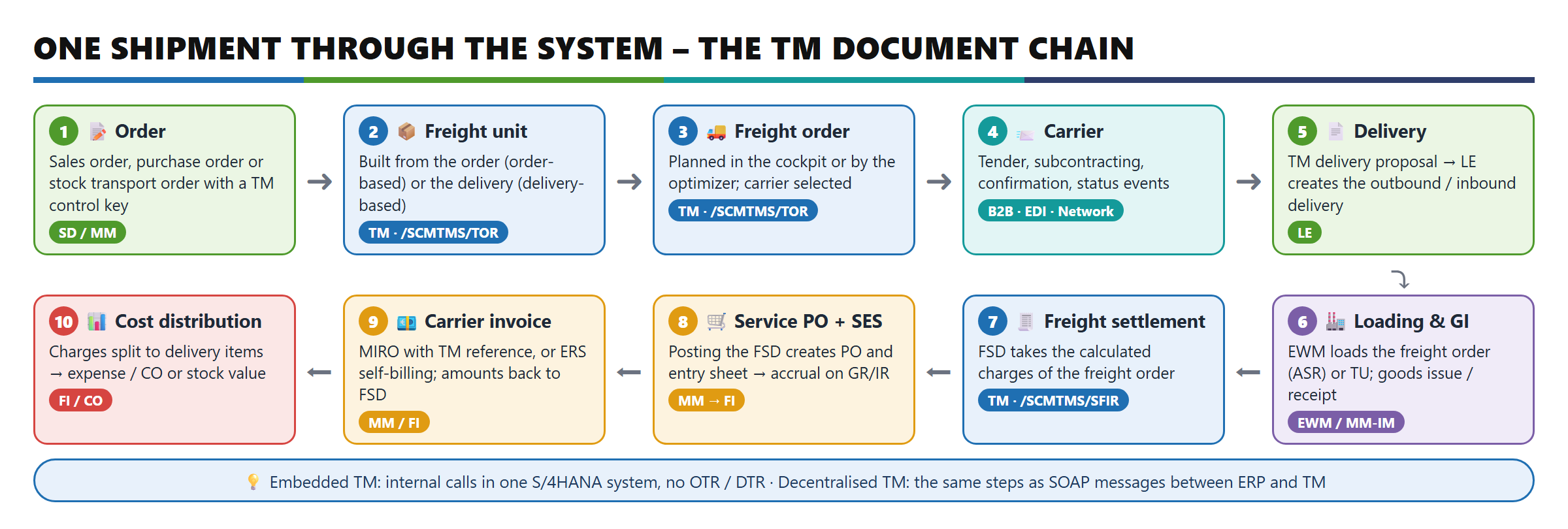
Step | Document | Module | Created by |
|---|---|---|---|
1 | Sales order / purchase order / stock transport order | SD / MM | User or interface |
2 | Freight unit (BO /SCMTMS/TOR) | TM | Freight unit building when the order (advanced) or the delivery (basic) is saved |
3 | Freight order / freight booking | TM | Planning (manual, transportation cockpit, optimizer) |
4 | Outbound / inbound delivery | LE | TM delivery proposal (order-based) or created first in LE (delivery-based) |
5 | Carrier confirmation, tender response | TM ⇄ carrier | B2B message, EDI or SAP Business Network |
6 | Loading, goods issue / goods receipt | EWM / MM-IM | Warehouse or freight order action |
7 | Freight settlement document (BO /SCMTMS/SUPPFREIGHTINVREQ, SFIR) | TM | From the freight order, interactively or in batch |
8 | Service PO + service entry sheet → accrual | MM / FI | Posting the freight settlement document |
9 | Carrier invoice (MIRO) or self-billing (ERS) | MM / FI | Invoice clerk or ERS run |
10 | Cost distribution to delivery items | TM → FI/CO | Settlement, by distribution profile |
Part 2 – SD: sales orders and deliveries as transportation requirements
2.1 Transportation relevance
Not every SD document goes to TM. A control key decides it: you define control keys in customizing (activity Define Control Keys for Document Integration, older name Define Control Keys for Document Transfer) and assign them to sales document types, purchase order types and delivery types (activities Activate Transfer of Sales Documents / Purchase Orders / Delivery Documents). When a document is created, the control key is copied to it and to its follow-on documents. The logistics integration profile and freight unit building rules: page 03.
Integration | What creates the freight unit | Scope | Typical use |
|---|---|---|---|
Order-based | The sales order (or PO / STO) when it is saved | Advanced TM | Early planning and carrier booking before deliveries exist; TM proposes the deliveries |
Delivery-based | The outbound (or inbound) delivery | Basic TM | Classic shipper: SD creates deliveries (VL10…), TM plans what is already picked or about to be |
Both | Order first, then the delivery takes over | Advanced TM | Long lead times; the delivery replaces the order quantity in the freight unit |
- Embedded TM has no OTR / DTR: the freight unit references the sales order or delivery directly. In decentralised TM the ERP sends the document with the SOAP service IntracompanyTransportationRequestRequest_In, and TM creates an order-based (OTR) or delivery-based (DTR) transportation requirement (BO /SCMTMS/TRQ) from which the freight units are built.
- Changes in SD (quantity, date, deletion, new delivery split) re-trigger freight unit building; planned freight orders are adjusted or flagged.
- The sales order document flow shows the TM documents (freight unit, freight order), and the sales order has a TM status. Advanced TM can also schedule sales order items with TM's transportation network and durations instead of the SD route schedule.
2.2 Delivery creation from TM
With order-based integration TM plans first and then tells LE which deliveries to create – the delivery proposal. TM proposes, SD/MM creates:
- The delivery profile groups freight units into proposals: one per freight unit, per order item or per order. Only freight units of the same freight order or booking can end up in one proposal.
- LE may split a proposal further (its own split criteria), but it does not merge proposals and keeps TM's planned dates.
- Trigger: action on the freight order / freight unit worklist, or the background report /SCMTMS/DLV_BATCH (delivery proposal creation). Results and LE error messages go to the application log; delivery errors raise a TM alert.
- In embedded TM, goods issue for the deliveries of a freight order can be posted from the freight order when no warehouse system handles the loading.
SD side of these documents (sales order, delivery, copy control, document flow): SD ABAP › 02.
Part 3 – MM: purchase orders, stock transport orders and inbound deliveries
MM document | Transport | Who organises it |
|---|---|---|
Purchase order | Inbound from the supplier | TM only if you organise the pick-up (Incoterms such as EXW / FCA); otherwise the supplier ships and TM may only plan the receipt |
Inbound delivery (supplier advice, VL31N) | Inbound, delivery-based | Freight unit from the inbound delivery (basic) or update of the PO-based freight unit |
Stock transport order (UB / NB) | Plant to plant | Outbound delivery at the issuing plant, inbound at the receiving plant – one freight unit chain |
Returns PO / customer returns | Back to supplier / from customer | Same logic with the returns document types |
- PO and STO types get a control key exactly like sales document types (Part 2.1). Purchase order background: MM ABAP › 02.
- For inbound flows the receiving plant becomes the destination location, the supplier's address (a business partner location) the source.
- The second MM integration – paying the carrier – is the freight settlement in Part 4.
Part 4 – Freight settlement into MM: service PO, service entry sheet, invoice
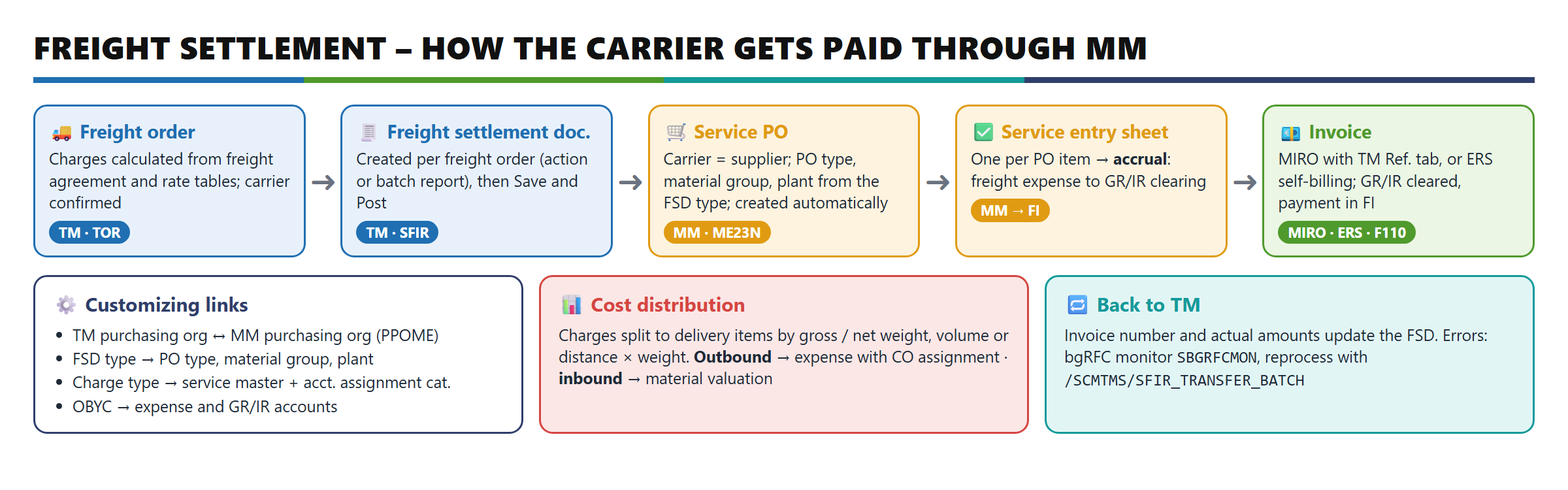
TM never posts to FI directly. The freight settlement document (FSD) takes the calculated charges of a freight order or booking and is posted to MM: MM creates a service purchase order and a service entry sheet (one per PO item). The service entry sheet posts the accrual (expense against the GR/IR clearing account) and is the reference for invoice verification. PO and entry sheet exist mainly for this technical purpose – nobody maintains them by hand.
4.1 Steps and transactions
Step | Where | Notes |
|---|---|---|
Create FSD | Freight order action, worklist, or report /SCMTMS/SFIR_CREATE_BATCH | Option 'post immediately'; FSD type comes from the freight order / booking type |
Post FSD | FSD action Save and Post, or /SCMTMS/SFIR_TRANSFER_BATCH | Creates / changes PO and SES asynchronously (bgRFC, monitor SBGRFCMON; side-by-side: XML monitor SXMB_MONI) |
Check PO / SES | ME23N | Carrier = supplier; one service entry sheet per PO item |
Carrier invoice | MIRO (tab TM Ref. with freight order / carrier) or ERS self-billing | User parameter TM_INVOICE_CLERK = X shows the TM tab in MIRO |
Feedback | Automatic | FSD gets the invoice number and the actual amounts |
Clear GR/IR | MR11 | Differences between accrual and invoice |
4.2 Customizing that links TM to MM
- Purchasing organization mapping: the TM purchasing org unit points to the MM purchasing organization (org model in PPOME, transfer with /SCMTMS/ORG_INT, page 01 Part 5).
- Assign Purchasing Information for Posting: per FSD type the PO document type, material group, plant and purchasing group.
- Assign Service Master Record and Account Assignment Category: each charge type (and charge category / subcategory) → service master (activity number, AC01) and account assignment category (e.g. K cost center).
- MM account determination (OBYC) finds the expense and GR/IR accounts – see MM ABAP › 03.
- Reversing an FSD or a credit memo after invoicing works through FSD actions (Cancel Document, Reverse Document for ERS carriers, Reprocess failed Document).
Part 5 – FI/CO: accruals, cost distribution and freight on the customer invoice
5.1 Accruals
The accrual is posted when the liability is known (for example after the carrier has picked up the goods and the freight order is confirmed for settlement) – not when the invoice arrives. It sits on the GR/IR clearing account until the invoice is posted. In the public cloud the app Monitor Accrual Postings shows freight orders whose posting failed. FI side of GR/IR: FICO ABAP.
5.2 Cost distribution
One freight order carries many deliveries, but controlling wants freight per product, delivery or customer. Cost distribution splits the freight order charges to the transported items:
Distribution basis | Example profile (public cloud) |
|---|---|
Gross weight | SDP_ODI_GW |
Net weight | SDP_ODI_NW |
Gross volume | SDP_ODI_GV |
Distance × weight | SDP_ODI_DW |
- The cost distribution profile is part of the charges profile of the purchasing organization; the FSD type must allow cost distribution. Freight units must come from an order or delivery.
- Result: outbound freight goes to an expense account (with CO account assignment, so CO-PA and margin analysis see freight per product); inbound freight can be added to the material valuation (stock value) like delivery costs.
- Public cloud apps: Manage Freight Cost Allocation Documents, Monitor Freight Cost Allocation Documents; the freight order shows a Cost Distribution tab.
5.3 Freight on the customer invoice
- Shipper: freight order charges can be handed to SD billing as a pricing condition – the copy control of the billing type must take the price from the freight order (price source). SD pricing: SD ABAP › 03.
- Logistics service provider (advanced): the customer is invoiced from the forwarding settlement document (FWSD, BO /SCMTMS/CUSTFREIGHTINVREQ) created from the forwarding order; it is transferred to SD billing, which creates the invoice and the FI receivable.
Part 6 – EWM: shipping, receiving and loading
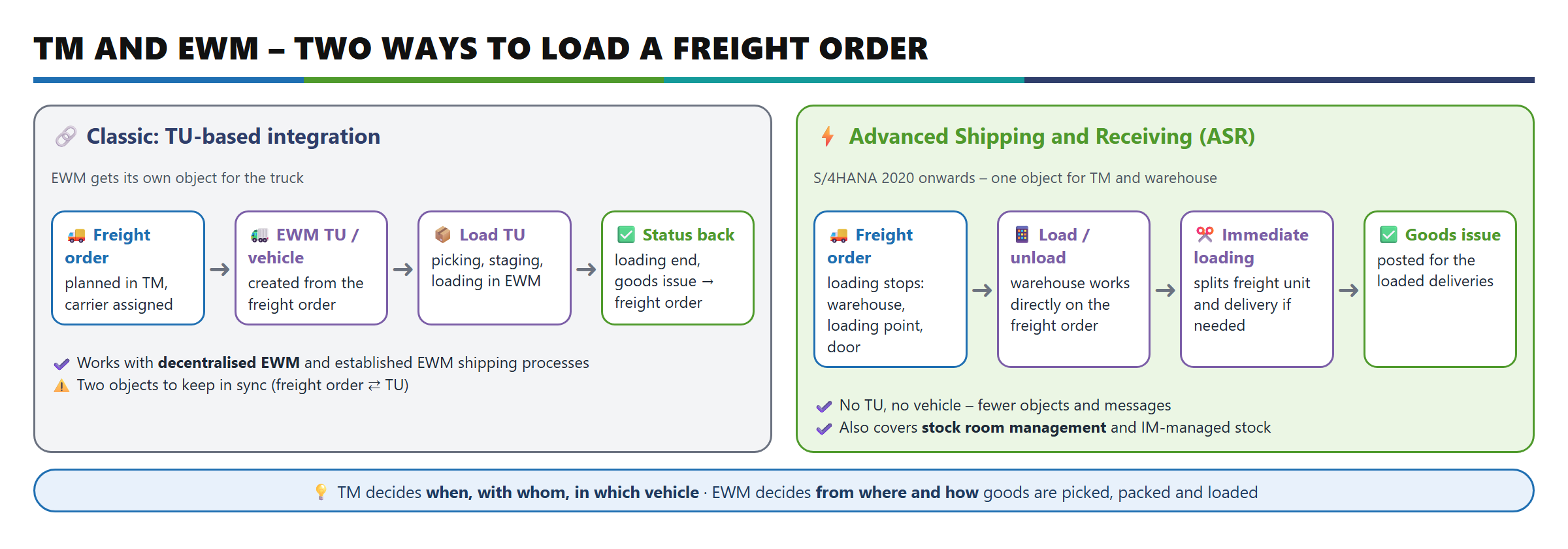
TM decides when, with whom and in which vehicle; EWM decides from where and how goods are picked, packed and loaded. Two integration models exist:
Model | How it works | When |
|---|---|---|
TU-based integration (classic) | The freight order is sent to EWM and creates a transportation unit (TU) / vehicle; EWM loads the TU and reports loading and goods issue back | Decentralised EWM, existing EWM processes |
Advanced Shipping and Receiving (ASR) | EWM works directly on the freight order – no TU, no vehicle. Loading stops on the freight order carry warehouse number, loading point and door; warehouse staff load or unload with a Fiori app on the freight order; immediate loading can split freight unit and delivery automatically | S/4HANA 2020 onwards with embedded EWM; since 2023 also TM and EWM together in one decentralised S/4HANA system; covers stock room management and IM-managed stock |
- Dock appointments (time slots at the warehouse door) can be booked by carriers in SAP Business Network Freight Collaboration (dock appointment scheduling).
- EWM objects (warehouse request, TU, staging, loading): EWM › 03 and 04.
Part 7 – Carriers: B2B messages, EDI and SAP Business Network
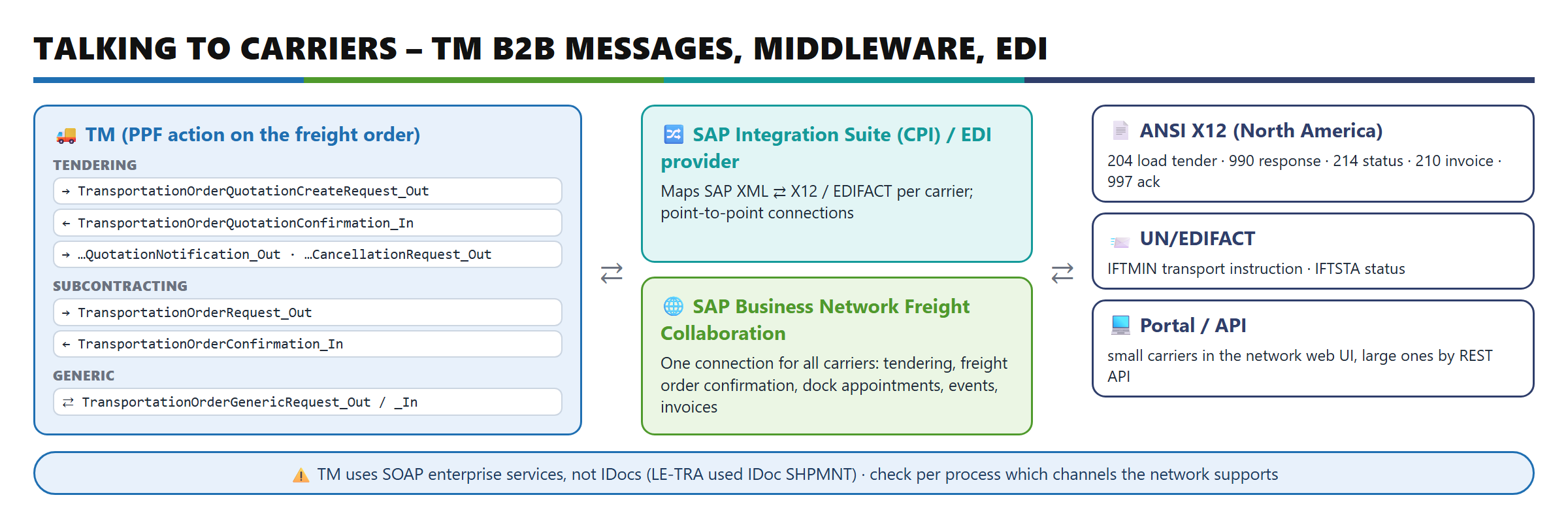
TM talks to carriers with SOAP enterprise services (XML), not with IDocs. Each message is triggered as a PPF action on the freight order (output management tab) and sent through a logical port (SOAMANAGER). Carriers rarely read SAP XML, so a middleware or a business network translates it to EDI.
Process | Outbound from TM | Inbound to TM |
|---|---|---|
Tendering (RFQ to one or more carriers) | TransportationOrderQuotationCreateRequest_Out; award TransportationOrderQuotationNotification_Out; withdrawal TransportationOrderQuotationCancellationRequest_Out | TransportationOrderQuotationConfirmation_In (accept / reject / counter-offer) |
Subcontracting (send the freight order to the chosen carrier) | TransportationOrderRequest_Out | TransportationOrderConfirmation_In |
Generic replication of freight orders | TransportationOrderGenericRequest_Out | TransportationOrderGenericRequest_In |
7.1 EDI standards the carriers use
Purpose | ANSI X12 (North America) | UN/EDIFACT |
|---|---|---|
Load tender / transport instruction | 204 | IFTMIN |
Tender response | 990 | – |
Status / tracking events | 214 | IFTSTA |
Freight invoice | 210 | INVOIC |
Functional acknowledgement | 997 | CONTRL |
- Mapping SAP XML ⇄ EDI is done in SAP Integration Suite (CPI) or an EDI provider – see SAP BTP Integration Suite** › 01 SAP Cloud Integration.
- Legacy: LE-TRA shipments sent IDoc SHPMNT to carriers; TM does not use this IDoc.
7.2 SAP Business Network Freight Collaboration
- The shipper connects TM once to the network; carriers work in a web portal, by API or by EDI. The network covers tendering, subcontracting (freight order confirmation), dock appointments, event reporting and carrier invoicing / settlement disputes.
- Supported channels differ by process: subcontracting (freight order confirmation) works by API and EDI (204 / 990, EDIFACT), network tendering by API and portal.
- Carrier invoices created in the network come back as invoices for the FSD (Part 4).
Part 8 – Global trade, dangerous goods and tracking
Topic | What TM does | Partner solution |
|---|---|---|
Dangerous goods | Checks freight units and freight orders for dangerous goods (mixed loading, allowed modes) and prints the DG data on documents | S/4HANA product compliance / dangerous goods master data |
Customs / export control | Sends freight documents for export declarations and compliance screening; customs status can block execution | SAP Global Trade Services (GTS) or partner customs software |
Tracking | Expected events (pick-up, departure, arrival, proof of delivery) on the freight order; actual events reported on the Execution tab | SAP Business Network Global Track and Trace (cloud); SAP Event Management (on-premise) |
- Carriers report events by app, API or EDI (214 / IFTSTA); delays update the expected times and can raise alerts. Reported events can also trigger follow-up actions (e.g. proof of delivery → ready for settlement).
Part 9 – Reporting and embedded analytics
Layer | Examples | Notes |
|---|---|---|
Worklists (POWL) | Freight Orders – Worklist, freight unit and FSD worklists in the Web Dynpro UI | Queries per user or role; custom queries and fields by configuration or feeder enhancement (page 05); missing POWL types are assigned with POWL_TYPER |
Fiori apps | Transportation cockpit, freight order management, Monitor Accrual Postings, freight cost allocation apps | Started from the Fiori launchpad by business role |
Overview pages / analytical apps | Freight Order Execution Monitoring, Freight Order Quantity Analysis, Cost Analysis, Tendering Analysis, Allocation and Business Share Analysis | Built on CDS views; some standard queries use a fixed rolling time window |
CDS views | I_TransportationOrderItem_2, I_TransportationOrderStop_2 (freight document items and stops), RAP BO interface I_FreightOrderTP | The release state (C1) decides whether ABAP Cloud code may use a view – page 05 Part 9 |
BW / data warehouse | TM DataSources for TOR, TRQ, FSD, FWSD | Legacy BW extraction; cancelled documents are not extracted |
- Classic custom reports read the BOPF node tables: /SCMTMS/D_TORROT (TOR root, field TOR_ID), /SCMTMS/D_TORITE (items), /SCMTMS/D_TORSTP (stops). Nodes are linked by GUID keys (DB_KEY / PARENT_KEY / ROOT_KEY) – reading them is fine, writing never (table list and example: page 02 Part 8; service manager: page 05).
- Typical KPIs: freight cost per kg / per delivery, on-time pick-up and delivery, tender acceptance rate per carrier, utilisation of trucks, accruals vs invoices.
CDS and analytics basics: ABAP on HANA › 05 CDS Views.
Part 10 – Interview questions
Q1. How does a sales order become relevant for TM?
Through the control key: it is defined in customizing (Define Control Keys for Document Integration) and assigned to the sales document type, PO type or delivery type. When the document is saved, TM builds freight units from it – from the order (order-based, advanced) or from the delivery (delivery-based, basic).
Q2. What are OTR and DTR, and why don't you see them in embedded TM?
Order-based and delivery-based transportation requirements – copies of the ERP order or delivery in TM (BO /SCMTMS/TRQ), created by IntracompanyTransportationRequestRequest_In in decentralised TM. Embedded TM builds freight units directly from the S/4HANA document, so the copy is not needed.
Q3. How are deliveries created from TM?
TM creates delivery proposals from planned freight units, grouped by the delivery profile, and LE creates the deliveries – interactively or with report /SCMTMS/DLV_BATCH. LE may split but not merge proposals and keeps TM's dates.
Q4. Which documents does freight settlement create in MM?
Posting the freight settlement document creates a service purchase order and a service entry sheet per item. The entry sheet posts the accrual to GR/IR and is the reference for MIRO or ERS. The invoice number and amounts flow back to the FSD.
Q5. How is the charge type mapped to MM?
Customizing Assign Service Master Record and Account Assignment Category maps charge types to a service master and an account assignment category; Assign Purchasing Information for Posting sets PO type, material group, plant and purchasing group per FSD type; OBYC finds the G/L accounts.
Q6. What is cost distribution and where do the costs end up?
It splits freight order charges to the transported items by weight, volume or distance × weight. Outbound freight goes to expense with CO account assignment (visible in margin analysis), inbound freight can be capitalised into material valuation.
Q7. How does TM integrate with EWM in S/4HANA?
Classic: the freight order creates an EWM transportation unit that EWM loads. With Advanced Shipping and Receiving (embedded, from 2020) the warehouse works directly on the freight order – loading stops with warehouse number and door, loading and unloading apps, no TU.
Q8. Which messages are used to tender a freight order?
TransportationOrderQuotationCreateRequest_Out sends the request for quotation, the carrier answers with TransportationOrderQuotationConfirmation_In, and the award goes out with TransportationOrderQuotationNotification_Out. The final freight order goes with TransportationOrderRequest_Out and is confirmed by TransportationOrderConfirmation_In.
Q9. A carrier only understands EDI. What do you do?
Map the TM SOAP messages to X12 204 / 990 / 214 / 210 or EDIFACT IFTMIN / IFTSTA in SAP Integration Suite or an EDI provider – or onboard the carrier to SAP Business Network Freight Collaboration, which offers portal, API and EDI channels (EDI for subcontracting, not for network tendering).
Q10. Where do you see tracking events, and which solutions report them?
On the Execution tab of the freight order (expected and actual events). Events come from users, carriers via EDI 214 / IFTSTA or apps, SAP Business Network Global Track and Trace (cloud), or SAP Event Management (on-premise).
Q11. How would you build a report of freight cost per delivery?
Prefer released CDS views and the cost distribution result; otherwise read freight order root, items and charges via the BOPF service manager or the node tables (/SCMTMS/D_TORROT, D_TORITE) and join the delivery references. Expose it as a CDS-based Fiori analytical app rather than a classic ALV.
Q12. Why does TM post freight costs through MM instead of FI directly?
So the standard procure-to-pay controls apply: a PO with the carrier as supplier, an entry sheet that posts the accrual, three-way matching in MIRO or ERS, GR/IR clearing and payment in FI – exactly like any other purchased service.
🏠 Start Here · ◀ 03 · Processes & Config · 05 · Development ▶ · Sections: CORE ABAP | OOPS ABAP | ABAP on HANA | Clean Core | RAP | ABAP Points | SAP Fiori | SAPUI5 | Mobile Development (MDK) | BTP Foundations | BTP Development | CAP | SAP Build | ABAP on BTP | Integration Suite | SAP Business AI | SAP BASIS | Security | SAP SDLC
Functional: FICO ABAP | TRM ABAP | VIM | SAP BIS | SD ABAP | MM ABAP | PP ABAP | QM ABAP | PM ABAP | PS ABAP | EWM | TM ABAP | GTM ABAP | EHS ABAP | HR ABAP | BW | SAP Datasphere | SAP Business Data Cloud | SAP MDG | SAP Analytics Cloud | SAP Ariba | SAP CX | SAP IBP