TM is built differently from SD or MM: there are no user exits in big module pools and few classic BAPIs. Every TM document is a BOPF business object – nodes, actions, determinations, validations and queries – and you extend TM by enhancing those objects, implementing BAdIs, configuring conditions and PPF output, and adjusting FPM screens. Programs read and change TM data through the BOPF service manager, and in S/4HANA also through released CDS views, OData and SOAP APIs. This page shows each technique with the names you must know, one complete code example and the typical RICEFW objects. General techniques: CORE ABAP › 10 Enhancements, 07 Interfaces, 11 Forms; RAP and clean core: the RAP section and Clean Core › 01 Clean Core.
Part 1 – How TM is built: BOPF business objects
BOPF (Business Object Processing Framework) is SAP's framework of the 2010s for business objects: a model describes the data (nodes) and the behaviour (actions, determinations, validations), and the framework handles buffering, locking, transactions and the database. TM kept BOPF when it moved into S/4HANA. For new custom applications BOPF is legacy (successor: RAP), but to work in TM you must know it – the TM objects themselves are BOPF.
Business object | Represents | Node tables (examples) |
|---|---|---|
/SCMTMS/TOR | Transportation order: freight unit, freight order, freight booking, transportation unit – one BO, distinguished by the TOR category (field TOR_CAT) and TOR type | /SCMTMS/D_TORROT root, /SCMTMS/D_TORITE items, /SCMTMS/D_TORSTP stops |
/SCMTMS/TRQ | Transportation request: forwarding order and forwarding quotation (LSP); OTR / DTR in decentralised TM | TRQ node tables |
/SCMTMS/SUPPFREIGHTINVREQ (SFIR) | Freight settlement document (pay the carrier) | SFIR node tables |
/SCMTMS/CUSTFREIGHTINVREQ (CFIR) | Forwarding settlement document (invoice the customer) | CFIR node tables |
/SCMTMS/LOCATION | Location master (shared with EWM) | – |
/SCMTMS/TCC_TRNSP_CHRG | Transportation charges – used as a delegated node inside TOR (charges of a freight order) | – |
- Every BO has a generated constants interface that you use in code instead of GUIDs: /SCMTMS/IF_TOR_C (
sc_bo_key,sc_node-root,sc_node-item_tr,sc_association-root-item_tr,sc_alternative_key-root-tor_id,sc_query-…,sc_action-…). - Tools: BOBX (Business Object Builder – display the model and existing enhancements), the BOPF Enhancement Workbench (BOPF_EWB / /BOBF/CUST_UI – BOPF Enhancement Workbench: create enhancements of extensible SAP objects), /BOBF/TEST_UI (test tool: run a query such as ROOT_ELEMENTS on /SCMTMS/TOR, display and change nodes). Newer releases also show BOPF objects in ADT.
- Never write node tables with UPDATE / MODIFY: you would bypass determinations, validations, locks and change documents. Reading them in reports is acceptable.
Part 2 – Inside a business object: nodes, actions, determinations, validations
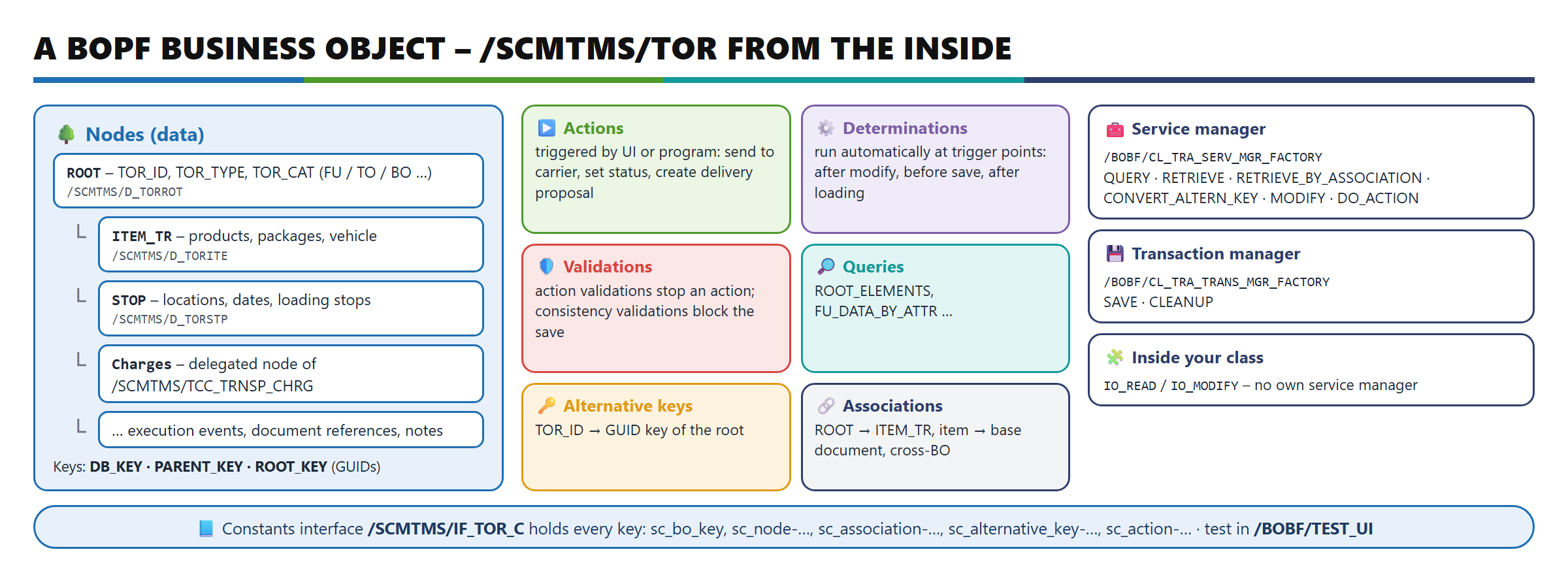
Entity | What it is | TM example | Implemented by |
|---|---|---|---|
Node | Hierarchical data part (table), GUID key DB_KEY, PARENT_KEY, ROOT_KEY | ROOT, ITEM_TR, STOP, charges (delegated) | DDIC structures + node table |
Association | Navigation between nodes or to another BO | ROOT → ITEM_TR, item → base document | Model |
Action | Operation a user or program triggers | Send to carrier, set status, create delivery proposal | Class implementing |
Determination | Logic the framework runs automatically at a trigger point (after modify, before save, after loading) | Derive totals, statuses, defaults | Class implementing |
Validation | Consistency check; action validations can stop an action, consistency validations can block saving | Mandatory fields, plausibility of dates | Class implementing |
Query | Search for node instances | ROOT_ELEMENTS, FU_DATA_BY_ATTR | Generic or own class |
Alternative key | Business key → GUID conversion | TOR_ID → root key | Model |
- Service manager (
/BOBF/IF_TRA_SERVICE_MANAGER, from/BOBF/CL_TRA_SERV_MGR_FACTORY=>GET_SERVICE_MANAGER): QUERY, RETRIEVE, RETRIEVE_BY_ASSOCIATION, CONVERT_ALTERN_KEY, MODIFY, DO_ACTION. - Transaction manager (
/BOBF/CL_TRA_TRANS_MGR_FACTORY=>GET_TRANSACTION_MANAGER): SAVE and CLEANUP – BOPF never commits on its own when you work from a program. - Inside determinations and validations you get IO_READ / IO_MODIFY instead of the service manager, and you must not create a new service manager after the 'before writing data' phase.
Part 3 – Reading and changing TM data with the service manager
The standard pattern: get the service manager for the BO, convert the business key into the GUID key, RETRIEVE the root, then follow associations to the sub-nodes. The same pattern works for every TM object – only the constants interface changes.
|
- Changing data: build a
/BOBF/T_FRW_MODIFICATIONtable (node, change mode, key, data reference, changed fields), call MODIFY, then SAVE on the transaction manager and check EV_REJECTED and the messages. For business operations prefer DO_ACTION with the standard action – it runs the same checks as the UI.
|
- Inside S/4HANA Cloud (ABAP Cloud) BOPF APIs are not released – use the RAP interface I_FreightOrderTP with EML or the OData APIs instead (Part 9).
Part 4 – Enhancing a business object: fields and logic
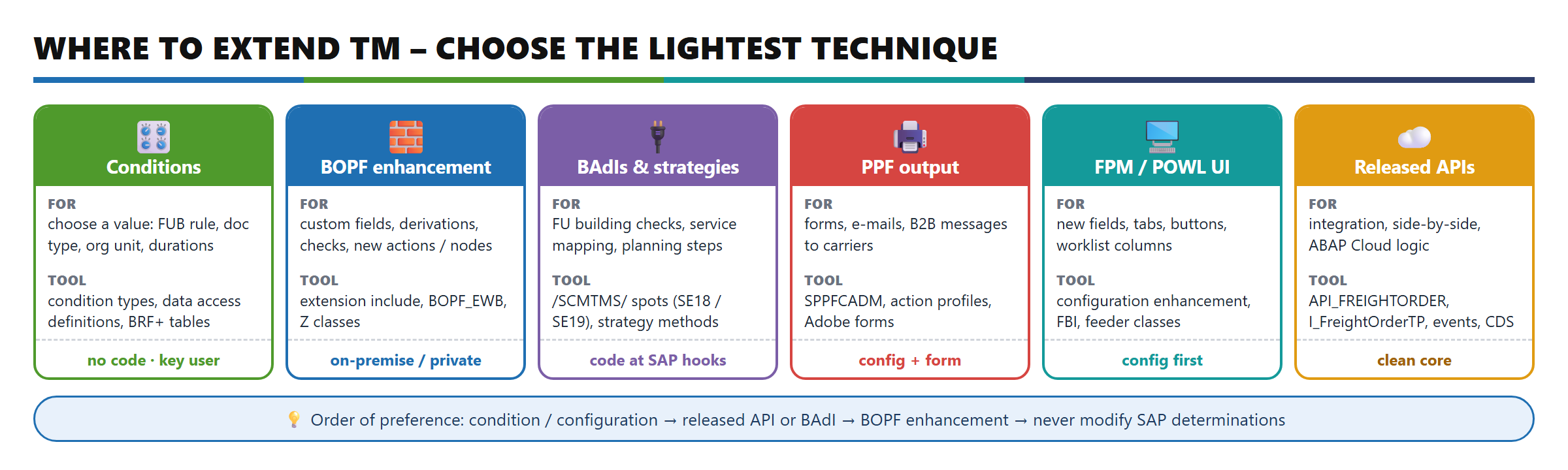
4.1 Custom fields
- Add the field to the node's extension include (append structure on the node's data structure, e.g. the TOR root) – it is then persisted in the node table and available in RETRIEVE / MODIFY.
- Show it on the screen with an FPM / FBI configuration change (Part 6) and, if needed, in POWL queries, output forms and B2B message mappings.
4.2 Custom logic in the BOPF Enhancement Workbench
In the BOPF Enhancement Workbench (BOPF_EWB / /BOBF/CUST_UI) you create an enhancement object for an extensible SAP BO (e.g. /SCMTMS/TOR) and add your own determinations, validations, actions, nodes or queries, each implemented in a Z class. The SAP model is not modified, and the enhancement survives upgrades.
|
- Root determinations of /SCMTMS/TOR run for every TOR category (freight units, orders, bookings) – filter on TOR_CAT / TOR_TYPE in the code, as above.
- Choose the trigger carefully: 'after modify' for derivations the user should see at once, 'before save' for final values, 'after commit' only for follow-up actions outside the transaction.
- Avoid post-exits on SAP determination classes (e.g. the TOR root determination class): they work, but they are modifications of SAP logic and hard to maintain – an own determination is cleaner.
Part 5 – BAdIs, strategies and conditions
5.1 BAdIs
TM has hundreds of BAdIs in enhancement spots under /SCMTMS/. Find them in SE18 / SE84 by package or by a breakpoint on GET BADI / CALL BADI while running the process. Names you can quote:
BAdI / spot | Area | Use |
|---|---|---|
/SCMTMS/TRQ_CHECK_FUB | Freight unit building | Decide whether a change of the requirement (also custom nodes) must re-trigger freight unit building |
/SCMTMS/TOR_SE_TOR_GN_REQ | Inbound service TransportationOrderGenericRequest_In | Map or enrich the incoming XML before the freight document is created or changed |
/SCMTMS/TOR_SE_SHPMNT_REQ, /SCMTMS/TOR_SE_TORSCM_ASG | Other TOR enterprise services | Pattern: one BAdI per service ( |
Spot /SCMTMS/PLN_OPT_LSO | Load planning optimizer | Change optimizer input / output |
EVAL_STARTCOND_PPF, EVAL_SCHEDCOND_PPF, PRINTER_DETERM_PPF | PPF output (Part 7) | Start and schedule conditions for actions, printer determination |
5.2 Strategies and the process controller
- Planning, carrier selection and other processes run as strategies made of methods (customizing of the process controller). You can add an own method (a class) to a copied strategy – e.g. a pre-processing step before the optimizer or a custom freight unit building step.
5.3 Conditions
- TM conditions (BRF+ based) determine values without code: freight unit building rule, document type, organizational unit, loading duration, time windows, charges profile and many more. A condition type (e.g.
/SCMTMS/TOR_ORGUNIT,/SCMTMS/FU_LOAD_DURA) defines what is determined; data access definitions (overview: transaction /SCMTMS/DA) supply the input fields – from a BO field path or from an own ABAP class; a BRF+ decision table holds the rules. - Rule of thumb: if the requirement is 'choose X depending on Y', try a condition with an own data access definition before writing a BAdI.
Part 6 – UI enhancements: FPM, FBI and worklists
- TM screens are Floorplan Manager (FPM) Web Dynpro applications; the FBI (FPM BOPF Integration) layer connects UI components to BOPF nodes through feeder classes. New fields, tabs or buttons are added by configuration enhancement of the component configuration – no modification.
- A new button usually calls a custom BOPF action (Part 4); a new tab shows a custom node.
- Worklists (POWL): custom queries are configuration; new columns need the field in the query result structure and an enhancement of the feeder class (for freight orders /SCMTMS/CL_UI_POW_FD_TOR_FO).
- Newer TM functions also come as SAPUI5 / Fiori elements apps – these are extended with the Fiori extension options (adaptation projects, Fiori elements annotations), not with FPM.
Part 7 – Output with PPF and forms
TM output (freight order print, bill of lading, loading instructions, e-mails) and many B2B messages are PPF actions. The PPF application for TM is /SCMTMS/TRANSPORTATION (transaction SPPFCADM); action profiles are assigned to the document types, and the freight order shows them on the Output Management tab.
Element | Meaning |
|---|---|
Action profile / action definition | Which outputs a document type can have, when and how often |
Processing method | Smart Form / Adobe form print, e-mail, or a method call (e.g. send a SOAP message) |
Start / schedule condition | Condition (or BAdI EVAL_STARTCOND_PPF / EVAL_SCHEDCOND_PPF) when the action is created and executed |
Form | Usually an Adobe form with an interface filled from the BO data |
- Custom form: copy the standard action, point it to your Adobe form and an agent class derived from /SCMTMS/CL_PPF_SERV_FOR_TOR (method PERSONALIZE_DOC_BY_ABAP), assign it to the action profile. Forms in general: CORE ABAP › 11 Forms.
- Newer releases also offer S/4HANA output management (BRF+ output determination, application object type TM_FREIGHTORDER) for freight orders.
Part 8 – Interfaces and APIs
API | Type | Use |
|---|---|---|
Freight Order (A2X) – service API_FREIGHTORDER | OData V4 | Create, read, update, cancel freight orders (cloud API_FREIGHTORDER; on-premise 2025 API_FREIGHTORDER_2) |
Freight Order – Replicate (inbound) | SOAP | Create freight orders from an external planning system (public cloud) |
Location (A2X) | OData | Transportation locations |
TransportationOrderGenericRequest_In / _Out | SOAP (enterprise service) | Create / replicate freight documents; generic integration with external systems |
TransportationOrderRequest_Out, …Quotation… services | SOAP | Carrier subcontracting and tendering (page 04 Part 7) |
IntracompanyTransportationRequestRequest_In | SOAP | ERP orders and deliveries into decentralised TM (OTR / DTR) |
Business events of I_FreightOrderTP (e.g. Created) | RAP business events | Event-driven follow-up logic or side-by-side apps |
- SOAP services are configured in SOAMANAGER; each has a mapping BAdI (Part 5). Monitoring: SRT_MONI / message monitor, and the TM application log.
- There is no classic BAPI for freight orders – from ABAP use the service manager (on-premise) or EML on the RAP interface (ABAP Cloud).
Part 9 – CDS views and RAP interfaces
- The list of TM CDS views (I_TransportationOrderItem_2, I_TransportationOrderStop_2 …) and TP views (I_FreightOrderTP …) is on page 02 Part 9. Use the interface views for reads and reports, the TP views for changes with EML and for business events (S/4HANA Cloud).
- The release state shown in ADT decides the use: C1 for use in ABAP Cloud, C0 for extensions. Not every TM view is released or extensible, and the set grows with each release.
|
The behaviour definition of I_FreightOrderTP publishes the event Created on the entity alias FreightOrder. The local handler receives the keys of the new orders and can default fields such as carrier or purchasing organization with EML (MODIFY ENTITIES OF I_FreightOrderTP). RAP and EML in detail: RAP › 08 · EML and 10 · Business Events & Event-Driven RAP.
Part 10 – Typical TM developments (RICEFW)
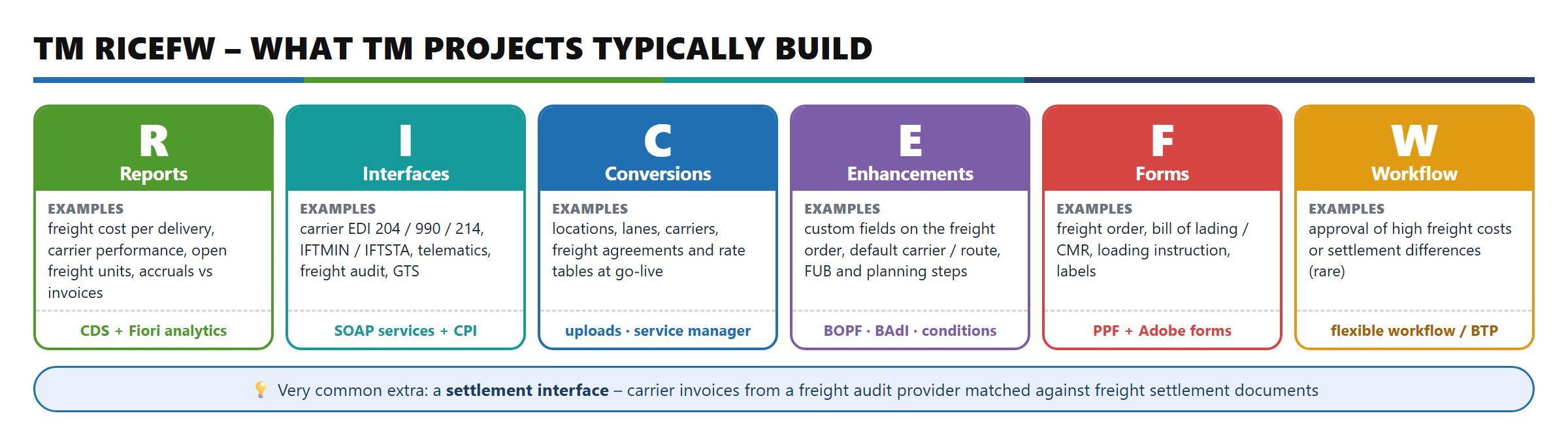
Type | Example | Technique |
|---|---|---|
Report | Freight cost per delivery / customer; carrier performance; open freight units | Released CDS views or service manager; Fiori analytical app |
Interface | Carrier EDI (204 / 990 / 214, IFTMIN / IFTSTA); telematics events; external optimizer; freight audit and payment provider | SOAP services + CPI mapping, mapping BAdIs, OData |
Conversion | Locations, lanes, freight agreements and rate tables at go-live | Rate table / agreement upload, generation of locations from master data, service manager programs |
Enhancement | Custom fields on freight order; default carrier or route; custom freight unit building rule; extra planning step | BOPF enhancement, conditions, BAdIs, strategy methods |
Form | Freight order, bill of lading / CMR, loading instruction, shipping labels | PPF action + Adobe form |
Workflow | Approval of high freight costs or settlement differences | Flexible workflow / BTP process automation (rare) |
- Settlement interface (very common): carrier invoices from a freight audit provider are matched against FSDs, or FSD data is sent to an external AP system – built on the FSD BO and MM invoice APIs.
Part 11 – Interview questions
Q1. Which business objects are behind TM documents?
BOPF objects: /SCMTMS/TOR for freight units, freight orders, freight bookings and transportation units (separated by TOR category); /SCMTMS/TRQ for forwarding orders and quotations (and OTR / DTR in decentralised TM); /SCMTMS/SUPPFREIGHTINVREQ (SFIR) freight settlement; /SCMTMS/CUSTFREIGHTINVREQ (CFIR) forwarding settlement.
Q2. Explain nodes, actions, determinations and validations.
Nodes hold the data hierarchy, actions are operations triggered from outside, determinations derive data automatically at trigger points, validations check consistency and can block an action or the save. Each behaviour entity is implemented in a class with a framework interface.
Q3. How do you read a freight order in ABAP?
Get the service manager for /SCMTMS/IF_TOR_C=>SC_BO_KEY, convert the TOR_ID with CONVERT_ALTERN_KEY, RETRIEVE the root and RETRIEVE_BY_ASSOCIATION for items or stops. In ABAP Cloud use I_FreightOrderTP with EML or a released CDS view.
Q4. How do you change a freight order from a program?
MODIFY with a modification table or, better, DO_ACTION with the standard action, then SAVE on the transaction manager and check EV_REJECTED. Never update the node tables directly.
Q5. How do you add a custom field and default it?
Append the field to the node's extension include, add it to the FPM configuration, and create an own determination in the BOPF Enhancement Workbench (trigger after modify) that sets it with IO_MODIFY.
Q6. Why does your root determination run for freight units too?
All TOR categories share the /SCMTMS/TOR business object, so a root determination fires for every category. Filter on TOR_CAT and TOR_TYPE in the code or in the trigger conditions.
Q7. BAdI or condition – how do you decide?
If the business wants to choose a value depending on data (document type, FUB rule, org unit), use a condition with a data access definition – maintainable by key users. Use a BAdI when real logic, external calls or mapping are needed.
Q8. How is output produced in TM?
With PPF: application /SCMTMS/TRANSPORTATION in SPPFCADM, action profiles assigned to document types, actions with start conditions and processing methods (Adobe form, e-mail, B2B message). Newer releases also support S/4HANA output management for freight orders.
Q9. Which APIs exist for freight orders?
The Freight Order (A2X) OData V4 API (cloud API_FREIGHTORDER, on-premise 2025 API_FREIGHTORDER_2), SOAP enterprise services such as TransportationOrderGenericRequest_In / _Out and the carrier B2B services, and the RAP interface I_FreightOrderTP with business events. There is no classic BAPI.
Q10. How do you find the right enhancement point in TM?
Check the BO model in BOBX for actions and determinations, search enhancement spots under /SCMTMS/ in SE18 / SE84, set breakpoints on GET BADI / CALL BADI, and look at the process controller strategy and condition types of the process in customizing.
Q11. Is BOPF still the right choice for new custom objects?
No – BOPF is legacy for new development; RAP is the successor. You still enhance TM's own BOPF objects on-premise, but new custom business objects are built in RAP, and ABAP Cloud code uses released RAP interfaces and CDS views.
Q12. Name a typical TM RICEFW list.
Carrier EDI interface via CPI, freight order and bill of lading forms via PPF, custom fields and determinations on the freight order, custom FUB or planning steps, freight cost reports on CDS, rate table and location uploads at go-live, and a settlement interface to a freight audit provider.
🏠 Start Here · ◀ 04 · Integration & Reporting · 06 · S/4HANA & Architect ▶ · Sections: CORE ABAP | OOPS ABAP | ABAP on HANA | Clean Core | RAP | ABAP Points | SAP Fiori | SAPUI5 | Mobile Development (MDK) | BTP Foundations | BTP Development | CAP | SAP Build | ABAP on BTP | Integration Suite | SAP Business AI | SAP BASIS | Security | SAP SDLC
Functional: FICO ABAP | TRM ABAP | VIM | SAP BIS | SD ABAP | MM ABAP | PP ABAP | QM ABAP | PM ABAP | PS ABAP | EWM | TM ABAP | GTM ABAP | EHS ABAP | HR ABAP | BW | SAP Datasphere | SAP Business Data Cloud | SAP MDG | SAP Analytics Cloud | SAP Ariba | SAP CX | SAP IBP