What an ABAP developer builds in treasury projects: extra fields and checks on financial transactions, changes to the flows that reach One Exposure, rules for Bank Account Management and payment approval, programs that create deals with the BAPI_FTR_… function modules, interfaces with IDocs, SOAP and OData APIs, reports on CDS views and the typical RICEFW objects around banks, market data and confirmations. General techniques are taught in CORE ABAP › 07 Interfaces and 10 Enhancements and in ABAP on HANA › 05 CDS Views; clean core: Clean Core › 01 Clean Core and in the RAP section; payment formats (DMEE / DMEEX) and bank statement enhancements in FICO ABAP › 06. Business background: pages 01 – 04.
Part 1 – Where to enhance treasury: choosing the technique
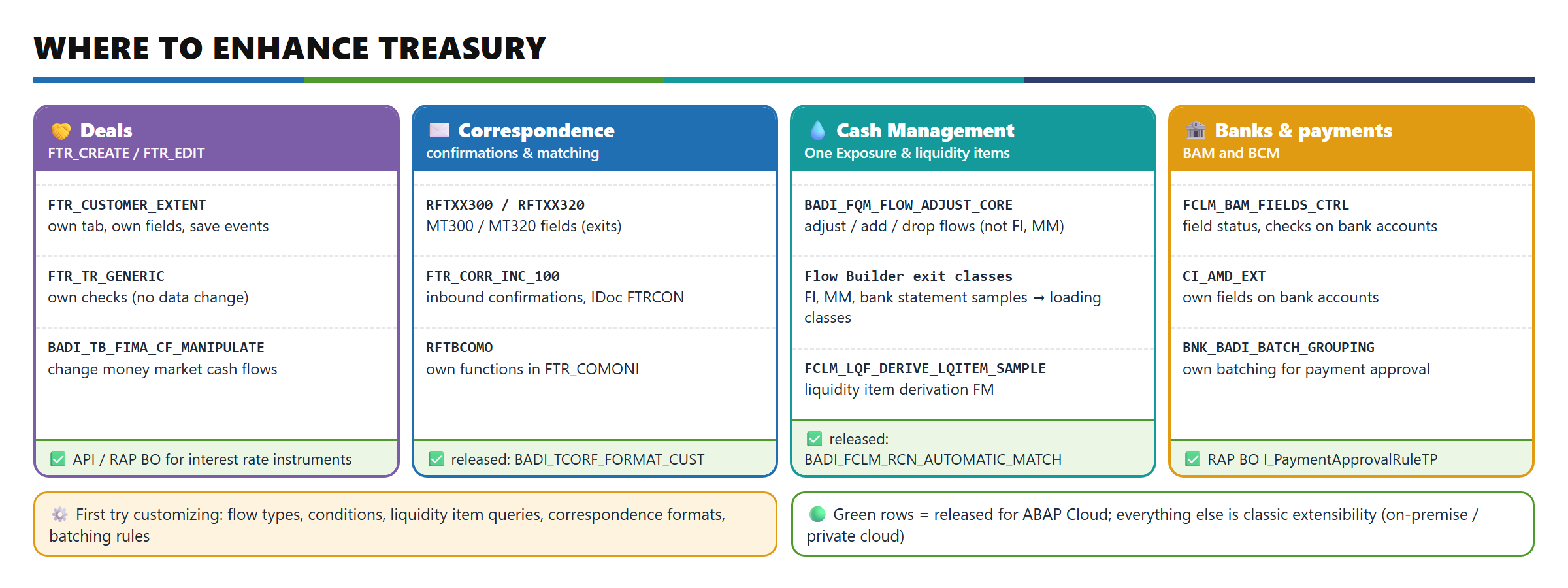
Requirement | Technique | Where |
|---|---|---|
Own fields / own tab on the financial transaction (FTR_CREATE / FTR_EDIT) | BAdI FTR_CUSTOMER_EXTENT | Part 2 |
Own checks before a deal is saved | BAdI FTR_TR_GENERIC | Part 2 |
Change generated cash flows of money market deals | BAdI BADI_TB_FIMA_CF_MANIPULATE | Part 2 |
Change SWIFT confirmation fields or the inbound confirmation | Exits RFTXX300 / RFTXX320 (old correspondence), BAdI FTR_CORR_INC_100; released BAdI BADI_TCORF_FORMAT_CUST | Part 2 |
Change, add or drop flows in One Exposure (sources other than FI / MM) | BAdI BADI_FQM_FLOW_ADJUST_CORE | Part 3 |
Enrich or filter FI / MM flows | Flow Builder exit classes (copies of the SAP samples) | Part 3 |
Special liquidity item logic | Derivation function module (template FCLM_LQF_DERIVE_LQITEM_SAMPLE) | Part 3 |
Field control and own fields on bank accounts | BAdI FCLM_BAM_FIELDS_CTRL, include CI_AMD_EXT | Part 4 |
Batch payments by own criteria for approval | BAdI BNK_BADI_BATCH_GROUPING | Part 4 |
Create deals from a file or another system | BAPI_FTR_…, OData / SOAP APIs | Parts 5, 7 |
Clean core (ABAP Cloud, public cloud) | Released BAdIs, released RAP BO interfaces and CDS views, APIs on the Business Accelerator Hub | Part 7 |
- Treasury BAdIs sit in the IMG under the area they enhance (Transaction Manager, Cash and Liquidity Management, Bank Communication Management). Find others with SE18 (search by the package of the transaction) or a breakpoint on
GET BADI/CL_EXITHANDLER=>GET_INSTANCE; implement in SE19 (CORE ABAP › 10 Enhancements). - Most of these BAdIs are classic extensibility (on-premise and private cloud). In ABAP Cloud only objects with release state released may be used – check in ADT (Released Objects) or the SAP Cloudification Repository.
Part 2 – Transaction Manager: BAdIs and exits for deals and correspondence
BAdI / exit | Area | Use |
|---|---|---|
FTR_CUSTOMER_EXTENT | Deal entry (FTR_CREATE / FTR_EDIT) | Own tab with own fields on the transaction screen; event methods such as EVT_TRANSACTION_SAVE_CHECK and EVT_TRANSACTION_SAVE_CANCEL to check and save the own data |
FTR_TR_GENERIC | Financial transaction | Own checks at defined events – it does not change the deal data |
BADI_TB_FIMA_CF_MANIPULATE | Cash flow calculation (money market) | Change the flows generated from the conditions |
FTR_TR_FACILITY | Facilities | Own logic for facility processing |
FTR_CORR_INC_100 | Correspondence – inbound | Process inbound confirmations, also from the IDoc interface (message type FTRCON) |
RFTXX300 / RFTXX320 (customer exits – old correspondence, replaced by the Correspondence Framework) | Correspondence – SWIFT | Fill or change fields of outgoing MT300 / MT320 messages |
RFTBCOMO (customer exit) | Correspondence Monitor | Own functions in FTR_COMONI |
BADI_TCORF_FORMAT_CUST | Correspondence format – released (ABAP Cloud) | Clean-core adaptation of correspondence formats |
FTR_XI_INTERFACE_MAPPING | Message interfaces of the Transaction Manager | Adjust the mapping of inbound / outbound XI (SOAP) messages |
- Custom fields on deals – pattern: FTR_CUSTOMER_EXTENT supplies the tab and the save events; keep the custom data in an own Z table keyed by company code (BUKRS) and transaction number (RFHA), read it in PBO, check it in EVT_TRANSACTION_SAVE_CHECK and write it at save. Do not modify the SAP tables of the deal.
- Change cash flows only where SAP intends it: flows are derived from conditions and flow types. Before coding, check whether a different condition type, flow type or calculation setting solves the requirement – customizing is upgrade-safe, BAdI logic in flow calculation is hard to test.
- Confirmations can also be adapted in the correspondence customizing (correspondence types, channels, formats) – code only for what the format cannot express.
Part 3 – Cash Management: One Exposure, Flow Builder and liquidity items
Enhancement | Scope | Use |
|---|---|---|
BADI_FQM_FLOW_ADJUST_CORE (method ADJUST_FLOWS) | Flows from all source applications except FI and MM | Set own attributes, change or add account assignments, add flows or drop flows – called before the flows are saved in FQM_FLOW |
Bank statement adapter BAdI (Adjustment of Flows in Bank Statement Adapter) | Prior-day bank statement items not yet posted | Skip or add flows from statement items; does not change how the statement is posted; not for intraday items |
TRM integration BAdI (methods DERIVE, UPDATE_FLOW_TYPE) | Treasury flows in One Exposure | Derive the liquidity item from treasury attributes; overwrite the One Exposure flow type of TRM flows (e.g. make a deal type not cash-relevant) |
Flow Builder exit classes | FI documents, MM purchase orders / requisitions, bank statement link | Copy the samples CL_FCLM_APAR_HADI_SAMPLE (FI, method IF_FCLM_HADI_APAR~FLOW_ADJUST), CL_FCLM_MM_HADI_SAMPLE (MM: FILTER_POITEM, FILTER_PRITEM, FLOW_ADJUST) or CL_FCLM_BS_DELE_HADI_SAMPLE in SE24, then generate and assign the loading classes |
Liquidity item derivation FM | Origins C (AR / AP) and D (G/L) | Template FCLM_LQF_DERIVE_LQITEM_SAMPLE; FCLM_LQF_DERIVE_LQITEM_DEFAULT as example |
BADI_FCLM_RCN_AUTOMATIC_MATCH | Cash management reconciliation – released | Own rules for automatic matching (ABAP Cloud) |
- Loading classes are generated AMDP code: the Flow Builder reads FI and MM documents in bulk with AMDP (SQLScript). Your exit class is merged into a generated loading class – after changing it, regenerate and reassign the loading classes in the Flow Builder settings, then test with a Flow Builder run in test mode (ABAP on HANA › 06 AMDP).
- Performance: ADJUST_FLOWS runs for every flow that is written. No SELECT per flow – read additional data once per call for all flows.
- Before coding: most "wrong" cash positions are configuration – activation of the source application, flow type of the G/L account, liquidity item queries, missing bank account on the document (page 03 Q3).
Part 4 – Bank Account Management and Bank Communication Management
Object | Area | Use |
|---|---|---|
FCLM_BAM_FIELDS_CTRL | BAM bank account master data | Field status (hide, display, mandatory) and additional checks on bank account fields |
CI_AMD_EXT (include in FCLM_BAM_AMD) | BAM bank account master data | Own fields on the bank account |
Sensitive fields (customizing) | BAM change requests | Changes of marked fields trigger the approval workflow – configuration, not code |
BNK_BADI_BATCH_GROUPING | BCM batching | Own criteria for grouping payments into batches, e.g. by amount band so that large payments get their own approval |
BNK_BADI_UI_FILTER | BCM monitor / approval (BNK_MONI, BNK_APP) | Filter what approvers see (not called by the Fiori app Approve Bank Payments) |
I_PaymentApprovalRuleTP | BAM payment approval rules – released RAP BO | Maintain payment approval rules with EML in ABAP Cloud |
I_BankPowerOfAttorneyTP_2 | Bank power of attorney – released RAP BO | Signatory documents in ABAP Cloud |
- BAM itself is maintained in Fiori (Manage Bank Accounts); mass changes and the initial load use its import / export function – a better choice than a custom upload program.
- Payment medium formats for treasury payments are the same DMEE / DMEEX trees as for F110 – see FICO ABAP › 06 Part 6; bank statement exits (FEB00001 and the electronic bank statement BAdIs) are listed there too.
Part 5 – BAPIs for financial transactions
The Transaction Manager has one family of BAPIs per product category, all named BAPI_FTR_…. They run the same checks as FTR_CREATE (limits, release, flow generation) and never commit themselves.
BAPI | Purpose |
|---|---|
BAPI_FTR_FTD_CREATE / BAPI_FTR_FTD_DEALCREATE | Create a fixed-term deposit (basic data / complete deal with payment details and flows) |
BAPI_FTR_FTD_REVERSE | Reverse a fixed-term deposit |
BAPI_FTR_FXT_CREATE | Create an FX spot / forward transaction |
BAPI_FTR_CP_CREATE | Create a commercial paper |
BAPI_FTR_CFT_CREATE | Create a cash flow transaction |
BAPI_FTR_FST_CREATE / BAPI_FTR_FLP_CREATE | Forward security / forward loan |
BAPI_FTR_SECURITY_GETDETAIL / _DEALGET | Read a security transaction |
…_CHANGE, …_DEALCHANGE, …_GETDETAIL | Change and read variants exist per product category |
BAPI_TRANSACTION_COMMIT / _ROLLBACK | End the LUW |
5.1 Example: create a fixed-term deposit, test first
- GENERALCONTRACTDATA (structure BAPI_FTR_CREATE) holds what every deal has: company code, product type, transaction type, business partner, contract date, portfolio, trader. FIXEDTERMDEPOSIT (BAPI_FTR_CREATE_FTD) holds currency, term start / end, amount, interest rate and the interest calculation settings.
- TESTRUN = 'X' simulates the creation (all checks, nothing saved); the real call returns the transaction number in FINANCIALTRANSACTION. Values are internal keys: product type 51A, transaction type 100 (investment), partner number with leading zeros.
|
- FIXEDTERMDEPOSIT also has FLOW_TYPE, INTEREST_CALC_METH, FREQUENCY_CATEGORY / FREQUENCY and the working-day shift fields. Fields not passed must have defaults in the product / transaction type customizing or be filled explicitly – the RETURN table names what is missing. The deal number comes back in FINANCIALTRANSACTION; the company code is the one in GENERALCONTRACTDATA.
- BAPI_FTR_FXT_CREATE: the traded currency is mandatory in S/4HANA, and the counter amount must be consistent with rate and traded amount (otherwise message T7357).
- Data load pattern: read the file → map and validate → test run per deal → ALV of errors → real run + commit per deal → application log with the transaction numbers. One commit per deal keeps a failing deal from blocking the others.
- Clean core: the BAPIs are not released for ABAP Cloud – use the released RAP BO interface or the OData API for interest rate instruments, or the Migration Cockpit for go-live data (Part 7, page 06).
Part 6 – IDocs and message interfaces
Message type / interface | Direction | Use |
|---|---|---|
FINSTA | Inbound | Bank statement (details: FICO ABAP › 05 Part 8) |
PAYEXT | Outbound | Payment order to the bank (EDI) – today mostly replaced by ISO 20022 files |
FTRCON | Inbound | Counter-confirmations of financial transactions; processing can be adapted with BAdI FTR_CORR_INC_100 |
ALE interfaces of the FTR BAPIs | Inbound / outbound | Create deals from another system, e.g. inbound function module IDOC_INPUT_FTR_FXT_CREATE for FX transactions |
SOAP proxies (XI interfaces) | Inbound / outbound | Trading platform integration and other treasury messages; mapping BAdI FTR_XI_INTERFACE_MAPPING |
- IDoc mechanics (partner profiles, WE19, BD87): CORE ABAP › 07 Interfaces. For new integrations prefer the SOAP and OData APIs through SAP Integration Suite (Integration Suite › 02).
Part 7 – OData and SOAP APIs, RAP business objects
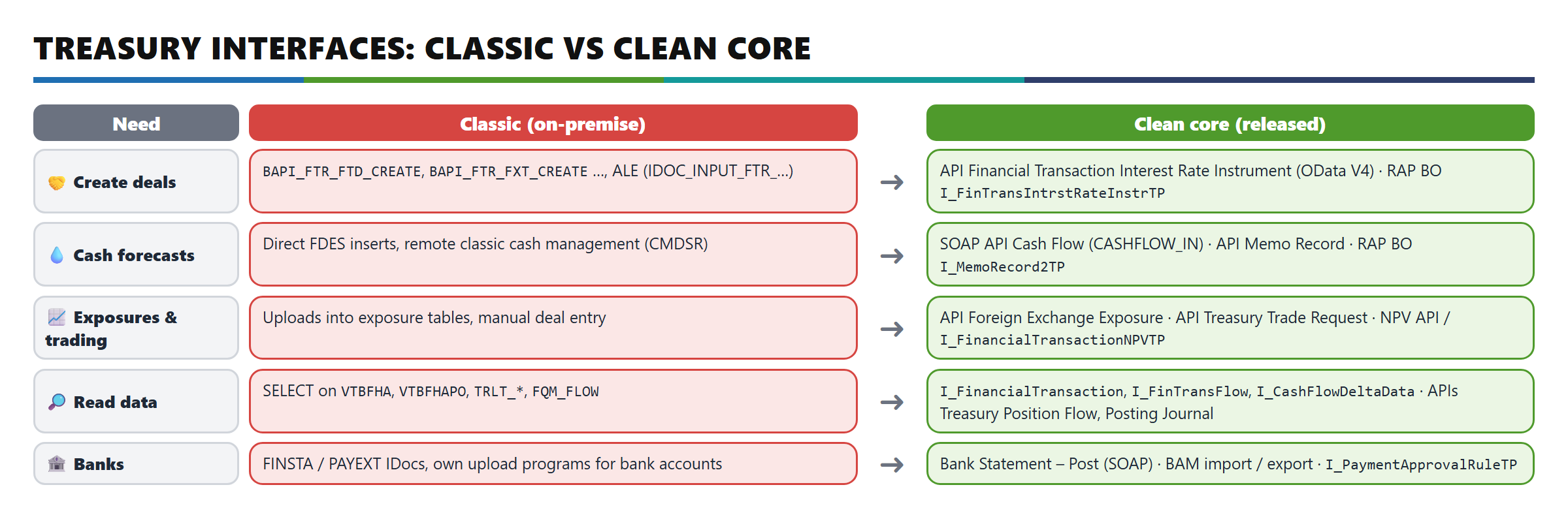
API (SAP Business Accelerator Hub) | Type | Use |
|---|---|---|
Financial Transaction Interest Rate Instrument | OData V4 | Read, create, update, settle, roll over, reverse, give notice or terminate interest rate instrument transactions |
Financial Transaction Net Present Value | OData V4 | Create, read, update, delete NPVs of financial transactions (e.g. from an external valuation system) |
Foreign Exchange Exposure | OData V4 | Create and process FX exposures for Exposure Management 2.0 |
Treasury Trade Request – Read, Create | OData V4 | Trade requests for FX and money market instruments (Trading Platform Integration) |
Treasury Position Flow – Read (API_TRSYPOSFLOW_SRV) | OData V2 | Read treasury position flows |
Line Item of Treasury Posting Journal Entry – Read (API_TRSYPOSTGJRNLENTRITM_SRV) | OData V2 | Read treasury posting journal items |
Memo Record | OData V4 | Manage memo records from outside |
Cash Flow (CASHFLOW_IN) | SOAP, asynchronous | Create, update, delete cash flows in One Exposure from remote systems |
Finance – Cash Management Outbound Integration | SOAP, outbound | Send cash flows to another cash management system |
Bank Statement – Post (BANKSTATEMENTPOST_IN) | SOAP | Post bank statements |
Bank (OData V4), Bank – Read (API_BANKDETAIL_SRV) | OData | Bank master data (bank directory) |
Released RAP BO interface | Business object |
|---|---|
I_FinTransIntrstRateInstrTP | Interest rate instrument financial transaction |
I_FinancialTransactionNPVTP | Net present value of a financial transaction |
I_MemoRecord2TP | Memo record |
I_CashPoolTP | Cash pool |
I_PaymentApprovalRuleTP, I_BankPowerOfAttorneyTP_2 | BAM payment approval rule, power of attorney |
I_IHBAccountTP | In-House Banking account |
- The list reflects the Business Accelerator Hub and the SAP Cloudification Repository in late 2026; names of on-premise copies start with OP_ on the Hub. Scope grows with every release; api.sap.com lists the APIs per product and release.
- Inside S/4HANA use the RAP BO interface with EML (RAP › 08 · EML); from outside use the OData / SOAP API, activated through a communication arrangement in the cloud or the service registration on-premise.
Part 8 – Reports on treasury data
Tables and the released interface views are listed on page 02 (Parts 5 and 9); analytical cubes on page 04 Part 9. A classic on-premise report reads the deal header VTBFHA directly:
|
- Field meaning: SANLF product category, SGSART product type, SFHAART transaction type, KONTRH business partner, WGSCHFT transaction currency, DBLFZ / DELFZ term start / end, SAKTIV active status. Flows with amounts and posting status are in VTBFHAPO (page 02 Part 5).
- ABAP Cloud / clean core: build the same report on I_FinancialTransaction and I_FinTransFlow (released), expose it as an analytical query or Fiori elements list – no access to VTBFHA is allowed there.
- Cash reports: never read FQM_FLOW with your own aggregation logic for the cash position – use I_CashFlowDeltaData or the cash cubes, which apply flow types, certainty levels and bank account assignment consistently.
Part 9 – Typical RICEFW objects in treasury
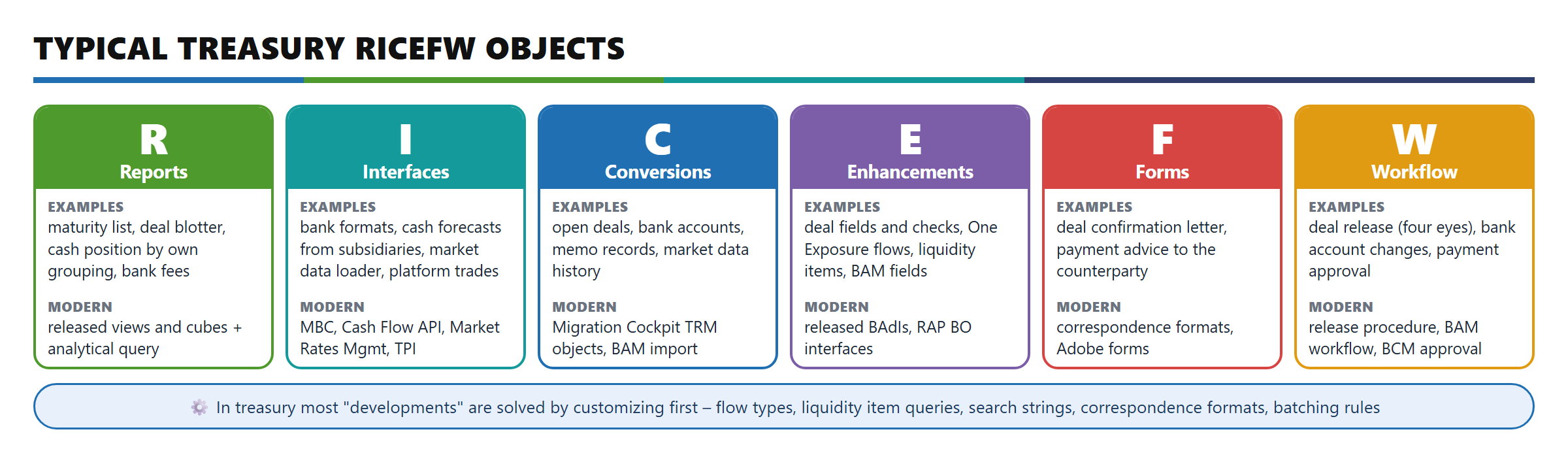
Type | Typical object | Modern way |
|---|---|---|
Report | Maturity list, deal blotter, cash position by own grouping, bank fee report | Released CDS views / cubes + analytical query or Fiori elements (page 04 Part 9) |
Interface – bank | Bank statement in a bank-specific format; custom parsing of the note to payee; payment format adjustments | camt.053 + search strings first; mapping in Integration Suite; DMEEX format tree with exit function module (FICO ABAP › 06) |
Interface – cash forecast | Forecasts from a subsidiary ERP, a planning tool or Excel into the liquidity forecast | Cash Flow SOAP API (CASHFLOW_IN) or Memo Record API instead of direct FDES inserts |
Interface – market data | Loader for a provider without standard adapter (rates, curves, prices) | SAP Market Rates Management (bring your own rates) or datafeed; file upload as fallback |
Conversion | Open deals, bank accounts, memo records at go-live | Migration Cockpit TRM objects (e.g. TRM – Fixed term deposit, TRM – Foreign exchange spot/forward contract), BAM import, Memo Record API (page 06) |
Enhancement | Own deal fields and checks, flow adjustments in One Exposure, liquidity item derivation | BAdIs of Parts 2 – 4; released BAdIs in ABAP Cloud |
Form | Deal confirmation (letter / PDF), payment advice to the counterparty | Correspondence framework with own format; Adobe forms (CORE ABAP › 11 Forms) |
Workflow | Deal release (four-eyes), bank account change requests, payment approval | Release procedure, BAM workflow, BCM approval (CORE ABAP › 12 Workflow) |
- Bank statement custom parsing: extend with interpretation algorithms and search strings first; code only what remains (exit FEB00001 or statement BAdIs) – never post manually from a custom parser.
- Correspondence: a bank that cannot send MT320 often sends PDFs – the matching then becomes manual in FTR_COMONI; agreeing SWIFT or a confirmation platform with the bank is usually cheaper than code.
Part 10 – Interview questions
Q1. How do you add a custom field to a financial transaction?
Implement BAdI FTR_CUSTOMER_EXTENT: it adds an own tab to FTR_CREATE / FTR_EDIT and offers save events (e.g. EVT_TRANSACTION_SAVE_CHECK). Store the data in a Z table keyed by company code and transaction number; do not change SAP's deal tables.
Q2. Which BAdI changes flows in One Exposure?
BADI_FQM_FLOW_ADJUST_CORE, method ADJUST_FLOWS, for all source applications except FI and MM: it can change attributes and account assignments, add flows or drop flows before they are saved in FQM_FLOW. FI and MM flows are adapted in the Flow Builder exit classes.
Q3. How do you enhance the Flow Builder for FI documents?
Copy the sample exit class CL_FCLM_APAR_HADI_SAMPLE into the customer namespace, implement IF_FCLM_HADI_APAR~FLOW_ADJUST, then generate and assign the loading classes (generated AMDP code) and test with a Flow Builder run.
Q4. How do you give a treasury flow a special liquidity item?
First with liquidity item queries and query sequences. If that is not enough: a derivation function module based on FCLM_LQF_DERIVE_LQITEM_SAMPLE for origins C and D, or the TRM integration BAdI (method DERIVE) for treasury flows.
Q5. Which BAPI creates a fixed-term deposit and what must you pass?
BAPI_FTR_FTD_CREATE with GENERALCONTRACTDATA (company code, product type 51A, transaction type, partner, contract date) and FIXEDTERMDEPOSIT (currency, term, amount, interest); first with TESTRUN = 'X', then for real, check RETURN and call BAPI_TRANSACTION_COMMIT.
Q6. An FX deal BAPI fails with "opposite amount is not consistent". Why?
BAPI_FTR_FXT_CREATE checks that the counter amount equals traded amount times rate (message T7357); in S/4HANA the traded currency is also mandatory. Pass consistent amounts, or pass rate and one amount according to the BAPI documentation.
Q7. How are counter-confirmations received and how can you enhance their processing?
As SWIFT messages through the bank channel or as IDoc FTRCON; the correspondence framework matches them (automatic and manual matching in the monitor FTR_COMONI). Inbound processing is enhanced with BAdI FTR_CORR_INC_100, outgoing SWIFT fields with exits RFTXX300 / RFTXX320 in the old correspondence (replaced by the Correspondence Framework).
Q8. Which APIs would you use to integrate an external system with treasury?
Financial Transaction Interest Rate Instrument (OData V4) for deals, Foreign Exchange Exposure for exposures, Treasury Trade Request for trading, Cash Flow (SOAP) and Memo Record for cash forecasts, Treasury Position Flow and Treasury Posting Journal APIs for reading, Bank Statement – Post for statements.
Q9. How do you influence how payments are batched for approval in BCM?
With the batching rules in customizing and, if needed, BAdI BNK_BADI_BATCH_GROUPING (e.g. separate batches by amount band). BNK_BADI_UI_FILTER filters what approvers see in BNK_MONI / BNK_APP.
Q10. How would you load forecasts from a subsidiary system into the liquidity forecast?
Through the Cash Flow SOAP API (CASHFLOW_IN) via SAP Integration Suite, or memo records through the Memo Record API – not by inserting into FDES or FQM_FLOW. The flows then get liquidity items and appear in the Cash Flow Analyzer.
Q11. What is clean-core extensibility in treasury?
Released RAP BO interfaces (e.g. I_FinTransIntrstRateInstrTP, I_MemoRecord2TP, I_CashPoolTP), released CDS views (I_FinancialTransaction, I_FinTransFlow, I_CashFlowDeltaData), released BAdIs such as BADI_TCORF_FORMAT_CUST and APIs on the Business Accelerator Hub. Classic BAdIs and BAPIs remain for on-premise and private cloud.
Q12. Name typical treasury RICEFW objects.
Maturity and position reports, bank statement and payment format interfaces, cash forecast and market data interfaces, conversion of open deals and bank accounts, enhancements on deal entry and One Exposure, confirmation forms, and release / approval workflows.
🏠 Start Here · ◀ 04 · Integration & Reporting · 06 · S/4HANA & Architect ▶ · Sections: CORE ABAP | OOPS ABAP | ABAP on HANA | Clean Core | RAP | ABAP Points | SAP Fiori | SAPUI5 | Mobile Development (MDK) | BTP Foundations | BTP Development | CAP | SAP Build | ABAP on BTP | Integration Suite | SAP Business AI | SAP BASIS | Security | SAP SDLC
Functional: FICO ABAP | TRM ABAP | VIM | SAP BIS | SD ABAP | MM ABAP | PP ABAP | QM ABAP | PM ABAP | PS ABAP | EWM | TM ABAP | GTM ABAP | EHS ABAP | HR ABAP | BW | SAP Datasphere | SAP Business Data Cloud | SAP MDG | SAP Analytics Cloud | SAP Ariba | SAP CX | SAP IBP