Where VIM is configured and how it connects to capture, archive, e-invoicing networks and S/4HANA MM / FI. The concepts behind the settings (DP document, document types, process types, roles, approval) are explained on page 02 – this page is the map of customizing objects and transactions, the inbound and archive integration, reporting and the Fiori apps. Transaction names follow the OpenText configuration and reference guides of VIM 16.3 and later; menu paths shift slightly between releases, the objects stay the same.
Part 1 – Customizing entry points and Z constants
VIM does not live in SPRO. It has its own implementation guides, and many switches are Z constants – key-value settings per product code.
Entry point | What you configure there |
|---|---|
/OPT/SPRO | The VIM IMG: document processing (document types, process types, roles, duplicate check, business rule framework), PO-based invoice configuration (parked and blocked processes), non-PO processing and invoice approval, cross-component settings (plug-ins, PDF log) |
/OTX/PF00_IMG | Business Center customizing: inbound configuration (registration, channels, document handlers), process configuration and profiles |
/OTX/PS08_IMG | Simple Mode customizing (the Simple Mode process and its Fiori apps run on the Business Center framework) |
Z constants (table /PTGWFI/Z_CONST, SM30) | Global switches per product code: e.g. 005 default DP document types and capture defaults, 009 authorization checks, IAP approval, LIX PO parking / blocking, KPI dashboard |
Direct transactions | Shortcuts to the main objects, e.g. /OPT/VIM_1CX1 document types, /OPT/VIM_8CX1 process types (Part 2) |
- Treat Z constants like customizing: they are transported, documented and owned by the VIM functional consultant. Many "why does VIM do this?" questions end at a Z constant.
- A typical project first activates the baseline configuration delivered by OpenText, then copies baseline document types and process types into customer ones instead of changing the delivered entries.
Part 2 – Core DP configuration
The DP configuration is a chain: the document type has a determination sequence of business rules; each rule leads to a process type; the process type names the initial role, the process options per role and the posting procedures; roles are resolved by templates.
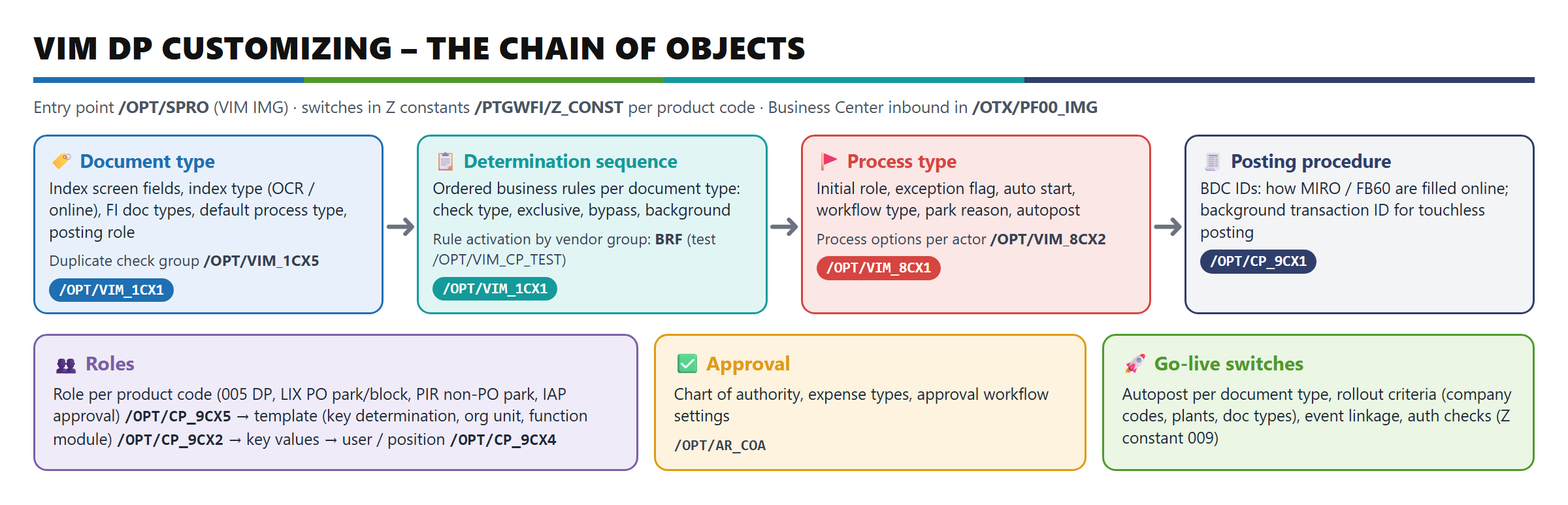
Object | Transaction | Key settings |
|---|---|---|
DP document types | /OPT/VIM_1CX1 | Index type (OCR / online / none), invoice type, archive document type, SAP FI document types, default process type, posting / rescan roles, duplicate check group, index screen field status (required, input, display, hide) |
Determination sequence | /OPT/VIM_1CX1 (per document type) | Ordered steps with check type (table field, check function, constant, required field), exclusive, bypass possible, background |
Duplicate check groups | /OPT/VIM_1CX5 | Check by function module (baseline extended check /OPT/VIM_CHK_INVOICE_DUPLICATE; PO-only and non-PO-only variants /OPT/VIM_CHECK_DUPLICATES_PO and _NPO) or by index data fields |
Process types | /OPT/VIM_8CX1 | Initial role, is exception, auto start, workflow type, park reason, online and background posting IDs, autopost flag or function module, retry |
Process options | /OPT/VIM_8CX2 | Buttons per process type and actor (from actor → to actor), e.g. 2012 Apply Rules, 2000 Change Document Type |
Posting procedures (BDC IDs, e.g. 2100 online, 2200 background) | (not /OPT/CP_9CX1 – that transaction defines the process options, incl. custom buttons) | How MIRO / FB60 are filled for online posting and which background procedure posts |
Roles | /OPT/CP_9CX5 | Role per product code, responsible party, role function module, key determination, object type |
Role templates | /OPT/CP_9CX2 | Template type: function module, org unit, key determination; one active template per product code and role |
Role determination | /OPT/CP_9CX4 | Key values → agent (agent type US user or S position) |
Business Rule Framework | /OPT/SPRO; test /OPT/VIM_CP_TEST | Vendor groups (WHITE, GREY, BLACK), check types (RANDOM, CONDITION, COUNT, PERIODIC …), schema assignment |
Chart of authority | /OPT/AR_COA | Approvers, limits, coders, expense types (page 02 Part 5) |
Waiting process types | /OPT/VIM_RULERUN | Re-run waiting rules in dialog (normally a background job) |
- Auto coding for non-PO invoices (default G/L account and cost center per vendor) and tax code determination (simple tax table) are further DP settings that raise the touchless rate.
- Labels of index screen fields can be changed per field; custom fields need the enhancement concept of page 04.
Part 3 – Incoming documents and capture integration
In current releases incoming documents enter through the Business Center inbound framework. It records every document in a registration table, decides how it is handled, and hands it to VIM, which creates the DP document (status Document Registered).
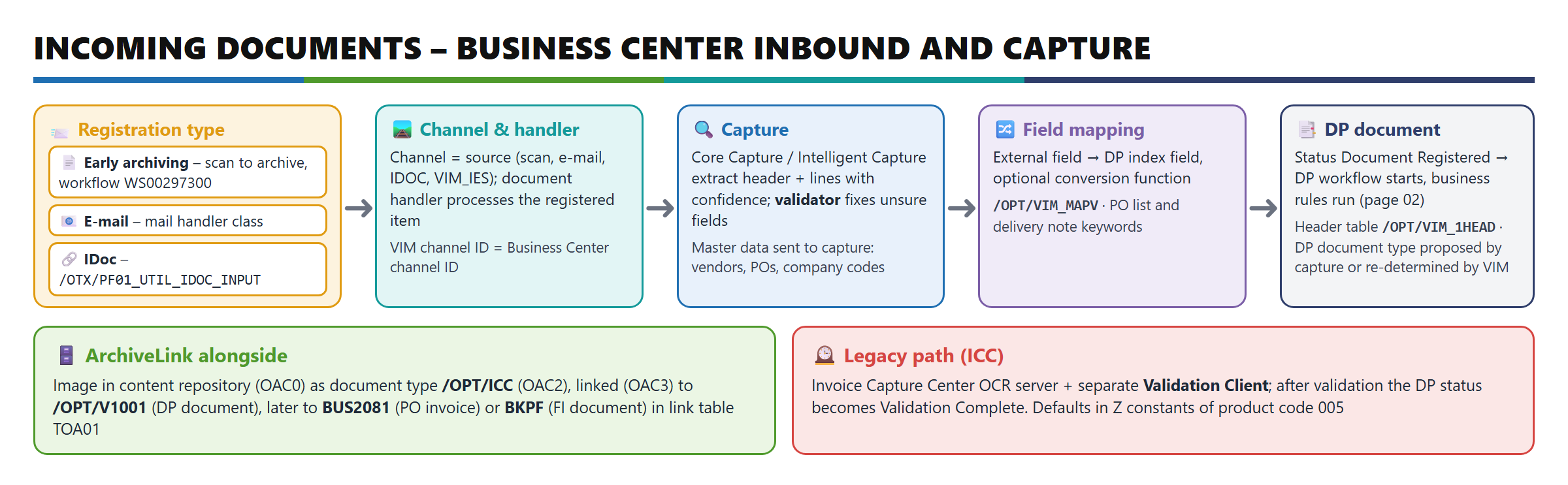
Inbound object | Meaning | Examples |
|---|---|---|
Registration type | How the document physically arrives | Early archiving (scan to archive, workflow WS00297300), incoming e-mail (mail handler class), IDoc (function module /OTX/PF01_UTIL_IDOC_INPUT) |
Channel | Business meaning of the source; selects mapping and process | Scan, e-mail, IDOC, VIM_IES (capture service); the VIM channel ID must match the Business Center channel |
Document handler | Program that processes the registered document | Capture, IDoc, Ariba, Brazil NF-e handlers |
Field mapping | External field name → DP index field, optional conversion function | /OPT/VIM_MAPV; keywords for PO list and delivery note list |
3.1 Capture products and validation
Capture product | Type | Validation | Status |
|---|---|---|---|
Core Capture for SAP Solutions | SaaS, AI / machine learning, multi-tenant OpenText cloud | In the SAP UI; corrections train the engine | Current |
Intelligent Capture for SAP Solutions | On-premise capture server | Validation client / SAP UI | Current |
Information Extraction Service (IES) | Extraction service called over HTTP from Business Center | In SAP (Business Center apps) | Earlier generation |
Invoice Capture Center (ICC) | On-premise OCR for invoices | Separate ICC Validation Client; DP status Validation Complete afterwards | Legacy |
Business Center Capture (BCC) | OCR inside Business Center | SAP UI | Legacy |
- Capture results (header fields, line items, confidence) come back to SAP and are mapped into the DP index data; the DP document type can be proposed by the capture engine or re-determined by VIM rules.
- Capture defaults for VIM sit in Z constants of product code 005 (default DP document type, vendor and PO recognition, the workflow template to start).
- Training loop: a field corrected by the validator can be marked for training so the engine learns the vendor layout; with Core Capture the machine learning uses these corrections.
- Data to train extraction comes from SAP master data: vendor list, PO data and company codes are sent to the capture product so it can recognise them on the invoice.
Part 4 – Archiving with ArchiveLink
The invoice image never lives in the SAP database. It is stored in a content repository on OpenText Archive Center (on-premise) or Core Archive (cloud), and SAP keeps only a link through ArchiveLink.
ArchiveLink object | Transaction | VIM content |
|---|---|---|
Content repository | OAC0 | Repository ID pointing to Archive Center / Core Archive (HTTP content server protocol) |
Document types | OAC2 | VIM defaults: /OPT/ICC (scanned invoice, PDF or TIF), /OPT/PDF (history log PDF), /OPT/HTM, /OPT/OTHER, /OPT/NFE |
Links | OAC3 | Document type ↔ business object ↔ repository ↔ link table: /OPT/V1001 (DP document), BUS2081 (PO invoice), BKPF (non-PO / FI document); link table e.g. TOA01 |
Workflow for early archiving | SOA0 / OAWD | Document type starts the inbound workflow when a document is uploaded or scanned |
Attachments in approval | SM30 table /ORS/ARCH_ATTACH | File extension → ArchiveLink document type for extra attachments |
- When VIM posts, it links the same archive object to the SAP invoice, so the image opens from MIR4, FB03 and the payment documents – one image, several links.
- Retention and legal hold are archive features; data archiving of VIM tables themselves (old DP documents) has its own data archiving configuration.
- ArchiveLink basics (content repositories, link tables TOA01–TOA03, OAWD) are SAP standard; the OpenText side adds the archive server and viewers.
Part 5 – E-invoicing, EDI and supplier networks
Every electronic invoice removes OCR errors and is the fastest way to raise the touchless rate. VIM accepts structured invoices next to scanned ones and processes them with the same rules.
Source | How it reaches VIM |
|---|---|
EDI / IDoc | Standard INVOIC IDoc into the IDoc registration (/OTX/PF01_UTIL_IDOC_INPUT) on channel IDOC; a function module (Z constant EDI_IMAGES_FM) renders a PDF image for the user |
OpenText Business Network (Trading Grid e-Invoicing) | Managed EDI and e-invoicing network with a PEPPOL access point; translates supplier formats and delivers them to SAP, e.g. as IDocs |
SAP Business Network (Ariba Network) | VIM has a dedicated integration and document handler for invoices from the Ariba Network |
Country e-invoicing mandates | OpenText's e-invoicing service exchanges status with government platforms; SAP Document and Reporting Compliance covers the SAP side; VIM has country rules (e.g. Brazil NF-e handler) |
Supplier Self Service | Supplier portal / Fiori apps where suppliers submit invoices and check their status |
- Architect point: decide per country whether the mandate is met by SAP Document and Reporting Compliance, by the OpenText network or by a third party, and let VIM consume the result – do not build the mandate inside VIM.
Part 6 – Activation, rollout criteria and authorizations
Topic | Setting |
|---|---|
Rollout criteria | Allowed company codes, plants (PO only) and SAP document types for which the parked and blocked workflows start – lets you go live country by country |
Event linkage | Workflow events for parked documents (SWETYPV) and the blocking event must be active, otherwise the parked / blocked workflows never start |
MIRO integration | VIM BAdI in invoice verification delivered behind a switch (business function activated in SFW5); FI business transaction events activated in FIBF for product /OPT/VIM |
Authorization checks | VIM-specific checks are switched on by Z constant (product code 009); RFC checks use VIM authorization objects; posting still needs the SAP authorizations for MIRO / FB60 |
Background user | The workflow batch user (WF-BATCH) needs every authorization used in background posting |
Workflow customizing | SWU3 automatic workflow customizing, agent assignment of the VIM tasks (general task or roles), deadline monitoring job |
- Workflow fundamentals (events, agents, SWI1 / SWIA / SWPR for monitoring and restart) are taught in CORE ABAP › 12 Workflow.
Part 7 – Integration with S/4HANA MM and FI
VIM is a layer in front of MM invoice verification and FI accounts payable – it reuses their configuration and posts their documents. A VIM consultant therefore has to know the MM and FI settings that decide whether an invoice can post.
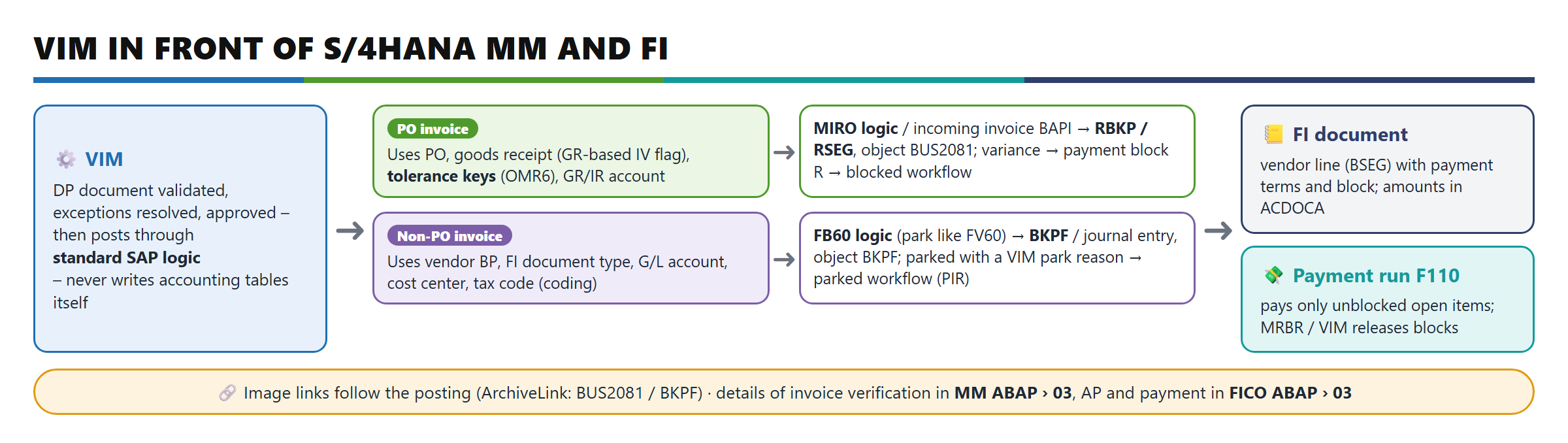
SAP setting / object | Why VIM depends on it | Learn more |
|---|---|---|
PO, GR-based invoice verification flag, goods receipts | Decide 2-way vs 3-way match and the GR exceptions | MM ABAP › 02, 03 |
Tolerance keys for invoice verification (OMR6) | Price / quantity tolerances → blocked invoices or VIM tolerance exceptions | MM ABAP › 03 |
Payment block reasons, payment run F110 | Blocked invoices are not paid until VIM / MRBR releases them | FICO ABAP › 03 |
Vendor master (ECC: XK01, LFA1 / LFB1 · S/4HANA: business partner BP, CVI fills LFA1 / LFB1) | Vendor validation, bank details, VAT ID, payment terms | FICO ABAP › 03 |
FI document types, tax codes, G/L accounts, cost centers | Non-PO coding and posting | FICO ABAP › 02, 03 |
Accounting document (ECC: BKPF / BSEG · S/4HANA: universal journal ACDOCA) | Every posted invoice ends there; VIM reports read the SAP documents | FICO ABAP › 02 |
- Further integrations documented by OpenText: SAP S/4HANA Central Finance (central processing of invoices for several source systems), SAP SRM purchase orders, return to vendor, extended withholding tax and down payments.
- Multi-system landscapes can run VIM reporting remotely over several ERP systems (remote VIM Analytics).
Part 8 – Reporting and monitoring
Report / tool | Transaction | Purpose |
|---|---|---|
VIM Analytics (VAN) | /OPT/VIM_VA2 (variants /OPT/VIM_VA21 AP basic, VA22 AP advanced, VA23 procurement, VA24 monitor; VA25 / VA26 remote) | All invoices with their VIM process, current agent, status and age; drill-down to DP document and SAP invoice |
Current Liability Report | /OPT/VAN_LIABILITY | Value of invoices received but not yet posted |
Automation Report | /OPT/VIM_ATM | Touchless / automation rate and which fields were changed |
Central Reporting: Summary | /OPT/VIM_SUMM | Overview of documents per status and process |
Central Audit Report | /OPT/VIM_AUDIT | Full history of a document across processes |
Key Process Analytics | /OPT/VIM_KPA1 | Cycle times of the main process steps |
Exception Analysis | /OPT/VIM_EXCP1 | Exceptions by type, frequency and duration |
Productivity Report | /OPT/VIM_PROD1 | Work per agent and role |
Aging Report | /OPT/VIM_AGING | Open invoices by age bucket |
VIM Workplace | /OPT/VIM_WP | Operational inbox and document search |
Admin tool | /OPT/VIM_7AX8 | Administer DP documents and workflows |
Notifications | /OPT/REMINDER | Reminder e-mails for waiting work items |
- Central Reporting needs its data collection infrastructure (background jobs); the KPI dashboard and BW / BW/4HANA content are optional parts configured separately.
- The original VIM Analytics report (/OPT/VIM_ANALYTICS) is legacy – replaced by the VAN report /OPT/VIM_VA2 since VIM 7.5 SP1.
- Monitoring routine for support: workflow errors (SWI1, SWPR), stuck background postings, waiting process types, capture interface errors and inbound registrations that did not create a DP document.
Part 9 – Fiori apps for VIM
VIM ships its own Fiori apps (OpenText, not SAP-delivered apps); their OData services are activated with /IWFND/MAINT_SERVICE and the tiles added to the launchpad. Names below are from VIM 16.3; later releases add apps and reach feature parity with SAP GUI.
App | Mode | Users |
|---|---|---|
Approve Invoices (also bulk approval) | Classic and Simple | Approvers |
My Approved Invoices | Classic | Approvers |
Resolve Invoice Exceptions | Classic | Exception roles (AP, buyer) |
Confirm Quantity and Price | Classic | Buyers, receivers |
Enter Cost Assignment (Advanced / Simple) | Classic / Simple | Coders, requesters |
Validate Invoices, Process Invoices | Simple Mode | Validators, AP processors |
Web GUI apps (VIM Workplace, VAN report) | Classic | AP power users through SAP GUI for HTML tiles |
Newer apps (23.4 and later) | – | Accounts Payable Workplace, invoice cockpit, Fiori analytics |
- VIM approval tasks can also appear in SAP My Inbox next to other workflow tasks.
- SAP's own Fiori apps (Manage Supplier Invoices, Supplier Invoices List) still show the posted invoices; the VIM apps cover everything before posting and the exception handling.
Part 10 – Interview questions
Q1. Where do you configure VIM?
In its own IMG /OPT/SPRO for document processing, PO and non-PO processes and approval, in /OTX/PF00_IMG for the Business Center inbound, /OTX/PS08_IMG for Simple Mode, and in Z constants (/PTGWFI/Z_CONST) per product code. Direct transactions exist for the main objects such as /OPT/VIM_1CX1 and /OPT/VIM_8CX1.
Q2. Describe the chain of DP configuration objects.
Document type → determination sequence of business rules → process type → initial role and process options → posting procedures; roles are resolved by templates (key determination, org unit, function module) and role determination tables.
Q3. How does a scanned invoice become a DP document?
It is scanned into the archive (early archiving) and registered by Business Center; the channel and document handler send it to capture; the extracted fields are mapped into index data; VIM creates the DP document and starts the DP workflow.
Q4. What are channels in VIM?
The source of a document (scan, e-mail, IDoc, capture service). The channel selects the field mapping and process; the VIM channel ID must match the Business Center inbound channel.
Q5. Which ArchiveLink settings does VIM need?
A content repository (OAC0) on Archive Center or Core Archive, document types such as /OPT/ICC and /OPT/PDF (OAC2) and links (OAC3) to business objects /OPT/V1001, BUS2081 and BKPF with a link table such as TOA01.
Q6. How do electronic invoices and PEPPOL reach VIM?
Through a network such as OpenText Business Network (with PEPPOL access point) or SAP Business Network, delivered to SAP as structured data, for example an INVOIC IDoc; VIM's IDoc registration creates a DP document on channel IDOC and renders a PDF image for users.
Q7. What are rollout criteria?
The company codes, plants and SAP document types for which the parked and blocked invoice workflows start. They allow a phased go-live and keep VIM away from units not yet in scope.
Q8. Which MM and FI settings must a VIM consultant understand?
PO and GR-based invoice verification, tolerance keys (OMR6), payment block reasons and F110, the vendor master (ECC XK01 · S/4HANA business partner), FI document types, tax codes and account assignment – VIM posts through MIRO and FB60 logic, so they decide whether a posting succeeds.
Q9. Name VIM reports and what they show.
VAN report /OPT/VIM_VA2 (all invoices and their VIM status), current liability, automation report, and central reporting: summary, audit, key process analytics, exception analysis, productivity and ageing.
Q10. Which Fiori apps does VIM offer?
OpenText's own apps: Approve Invoices, My Approved Invoices, Resolve Invoice Exceptions, Confirm Quantity and Price, Enter Cost Assignment, and in Simple Mode Validate and Process Invoices; power-user transactions as SAP GUI for HTML tiles; approvals also in My Inbox.
Q11. What must be active for the blocked invoice workflow to start?
The VIM MIRO integration (BAdI behind its business function switch), the blocking event linkage, and rollout criteria that include the company code, plant and document type of the invoice.
Q12. What is the difference between ICC and Core Capture?
ICC was an on-premise OCR server with its own Validation Client (legacy). Core Capture for SAP Solutions is OpenText's SaaS capture with AI / machine learning, configured and validated from the SAP UI, without storing the ERP content in the cloud.
🏠 Start Here · ◀ 02 · Processing · 04 · Development ▶ · Sections: CORE ABAP | OOPS ABAP | ABAP on HANA | Clean Core | RAP | ABAP Points | SAP Fiori | SAPUI5 | Mobile Development (MDK) | BTP Foundations | BTP Development | CAP | SAP Build | ABAP on BTP | Integration Suite | SAP Business AI | SAP BASIS | Security | SAP SDLC
Functional: FICO ABAP | TRM ABAP | VIM | SAP BIS | SD ABAP | MM ABAP | PP ABAP | QM ABAP | PM ABAP | PS ABAP | EWM | TM ABAP | GTM ABAP | EHS ABAP | HR ABAP | BW | SAP Datasphere | SAP Business Data Cloud | SAP MDG | SAP Analytics Cloud | SAP Ariba | SAP CX | SAP IBP