Everything you click in the SAP BTP cockpit can be automated – and in a real landscape it should be, so that DEV, TEST and PROD look the same and every change is reviewed. This page is the administrator's view of the four automation tools: the btp CLI for imperative account administration, the Terraform provider for SAP BTP for landscape as code, the platform REST APIs (SAP Cloud Management service, SAP Service Manager, XSUAA, usage data) and SAP Automation Pilot for day-2 operations. Running example: the global account with directory SALES and the subaccounts SALES-DEV, SALES-TEST and SALES-PROD (region eu10) that host the sales order app on BTP. The account model, entitlements and quotas themselves are on page 01, Cloud Foundry and Kyma administration on page 02, alerting and Cloud ALM on page 04; the developer-level introduction to the same tools is BTP Development › 05. Versions and plans are as of November 2026.
Part 1 – Choosing the automation tool
Why it matters: a global account with three stages, a dozen services and role collections per stage is about a hundred cockpit actions. Done by hand, DEV and PROD drift apart, nobody knows who changed what, and rebuilding a deleted subaccount takes days. SAP's own guidance (SAP BTP Administrator's Guide, Tools for Account Administration): the cockpit to start and explore, the btp CLI and APIs for automation and integration, Automation Pilot for pre-built operational actions, and the Terraform provider for scalable, repeatable configuration – and if the company already uses Terraform or OpenTofu for AWS, Azure or Google Cloud, use it for BTP too.
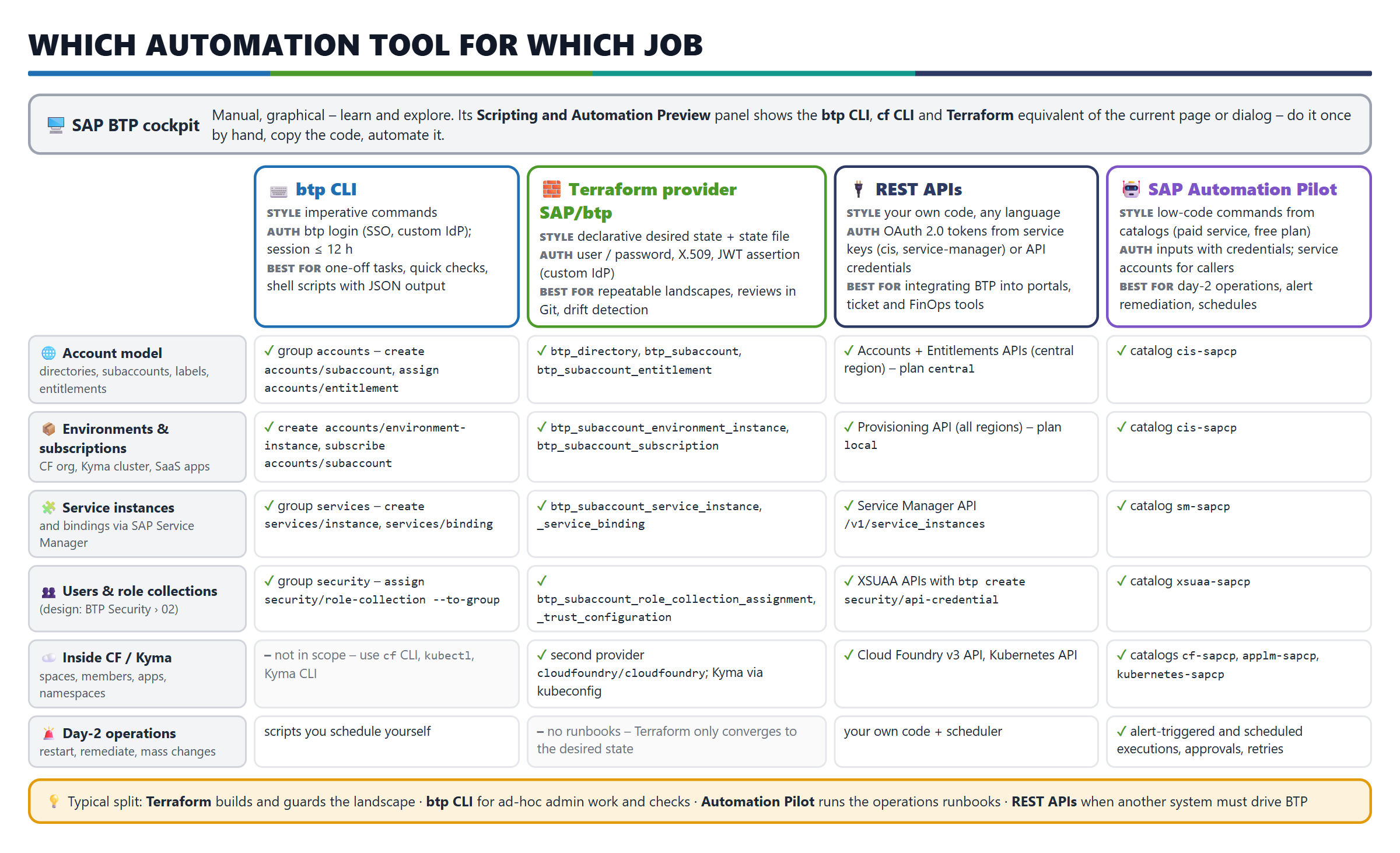
Tool | Approach | Strength | Limit |
|---|---|---|---|
SAP BTP cockpit | Manual, graphical | Overview, exploring new services, one-off changes | No automation, no review trail beyond the audit log |
btp CLI | Imperative: you say what to do, step by step | Fast, scriptable (JSON output), covers accounts, security, services and destinations | Scope is account administration only – Cloud Foundry and Kyma content need the cf CLI, Kyma CLI or kubectl; scripts must handle order, waiting and errors themselves |
Terraform provider for SAP BTP | Declarative: you describe the target state, Terraform computes the difference | Repeatable stages, reviews in Git, drift detection, import of existing landscapes | Learning curve, state file to protect, open source without official SAP support |
REST APIs | Your own code in any language | Integrate BTP into portals, ticket or FinOps tools | You build authentication, polling of asynchronous jobs, error handling and rate-limit retries |
SAP Automation Pilot | Low-code commands from catalogs, triggered manually, on a schedule, by an alert or by API | Day-2 operations: remediation, health checks, mass operations; integrated with SAP Cloud ALM | Paid service (standard plan, free tier plan), not a desired-state tool |
1.1 Scripting and Automation Preview in the cockpit
The quickest way to learn the syntax: the cockpit's Scripting and Automation Preview panel (Source Code button in the cockpit header) shows the btp CLI, cf CLI and Terraform equivalent of the page you are on and updates as you navigate. Tabs: CLI, CLI Setup (login commands), Terraform (data and resource blocks) and Terraform Setup (provider block). In dialogs a Source Code button shows the command for exactly the values you just entered – do it once in the UI, copy the code into your script or Terraform module.
Part 2 – btp CLI: installation, login, configuration and targets
2.1 How the btp CLI works
The client on your desktop is thin: the command definitions live on the btp CLI server ( https://cli.btp.cloud.sap/). The server delegates authentication to the authorization server and forwards trust to the platform services, which check your authorization for every command. That is why most new commands arrive without a client update – and why the Terraform provider for SAP BTP talks to the same CLI server (provider attribute cli_server_url). Each client version is supported for at least one year; clients up to 2.49.0 still propose the old server URL https://cpcli.cf.eu10.hana.ondemand.com – switch to the new one.
OS | Install | Note |
|---|---|---|
Windows (amd64) |
| Manual: download from SAP Development Tools, unpack, put btp.exe on the PATH |
macOS (amd64, arm64) |
| Uninstall scripts exist next to the install scripts |
Linux (amd64, arm64) |
| Behind a proxy set |
- Run
btpwithout arguments to see client and server version, the configuration file and the current target (same asbtp --info).
2.2 Login
Login is always on global account level. You need a role collection in the global account (for example Global Account Viewer or Administrator, page 01). The session token is stored in the local configuration and survives restarts; the maximum session length is 12 hours, btp logout ends it earlier.
Login variant | Command | When |
|---|---|---|
Single sign-on in the browser (recommended) |
| Interactive admin work; MFA happens in the browser |
Custom identity provider |
| Platform users come from your SAP Cloud Identity Services tenant (BTP Security › 01) |
User and password |
| Scripts and technical users; with two-factor authentication the token is appended to the password |
Default IdP with S-/P-user | Log on with the user ID (S-user or P-user) if several accounts share one e-mail address (SAP Note 3085908) | SAP ID service as platform IdP |
- Do not pass
--passwordon the command line – it lands in the shell history. Let the CLI prompt, or feed it from the pipeline's secret store. - With a custom IdP, user commands need the origin key:
--of-idp <origin>forlist / get / delete security/userandassign / unassign security/role-collection. - Restriction with custom platform IdPs: at most 10 parallel sessions per user and identity provider across all tools (cockpit, CLIs).
2.3 Configuration file and settings
After login the CLI writes config.json to C:\Users\<user>\AppData\Roaming\SAP\btp\ (Windows), ~/Library/Application Support/.btp/ (macOS) or ~/.config/.btp/ (Linux). To work in two global accounts or subaccounts in parallel, give each terminal its own file with --config <folder> on every call or the environment variable BTP_CLIENTCONFIG (older clients: SAPCP_CLIENTCONFIG).
Setting ( | Effect |
|---|---|
--format json | All output as JSON – the recommended setting for scripts (or |
--login.sso browser |
|
--login.securestore true | Session stored in the OS secure store (macOS / Windows only) |
--target.hierarchy true |
|
--verbose true | Tracing for support – caution: also prints the content of parameter files (secrets) to the terminal; never in CI logs or shared environments |
btp list configshows the settings,btp reset config --allrestores the defaults.
2.4 Targets: global account, directory, subaccount
After login the global account is the target. btp target --subaccount <id> (or --directory <id>, --global-account <subdomain>) sets a default context so you can omit the ID in later commands. Targeting a subaccount also targets its parents (target hierarchy): a command runs in the innermost targeted entity where it is available – btp update accounts/directory without an ID updates the parent directory of the targeted subaccount. To force the parent level, pass -dir or -ga without a value, e.g. btp list security/user -dir. btp target without parameters lets you navigate interactively; btp target --hierarchy lists all global accounts with their trees.
Part 3 – btp CLI: command reference and scripting the SALES landscape
3.1 Syntax
|
- Help on every level:
btp help,btp help all,btp help list,btp help accounts,btp help assign security/role-collectionor--helpat the end of any command.btp enable autocompleteinstalls tab completion for actions, objects and parameters. - Positional parameter first, then keyed parameters: in
btp assign security/role-collection "Subaccount Viewer" --to-user …the role collection name is positional. A value that starts with-must be written with=:--user="-name-". - JSON parameters (
--parameters,--labels) can be passed inline or as a file path – a file avoids the different quoting rules of bash, PowerShell and cmd. - Long-running commands (create subaccount, environment instance, service instance) run in the background;
--wait(default 10m, 1m–10h) makes the command block until the job is done – essential in scripts.
3.2 Commands an administrator uses most
Task | Command | Who |
|---|---|---|
Account tree, regions |
| GA admin / viewer |
Directory | btp create accounts/directory --display-name SALES --features DEFAULT,ENTITLEMENTS,AUTHORIZATIONS | GA admin |
Subaccount | btp create accounts/subaccount --display-name … --region eu10 --subdomain … [--directory <id>] [--labels JSON] [--used-for-production true] | GA or directory admin |
Labels |
| GA admin / viewer |
Entitlements |
| GA admin |
Environment |
| Subaccount admin |
SaaS subscription |
| Subaccount admin |
Service instance / binding |
| Subaccount admin or Subaccount Service Administrator |
Role collections |
| Admin of that level |
Destinations |
| Subaccount admin |
API credentials | btp create security/api-credential --name <n> [--read-only] [--certificate <pem>] | Admin of that level |
Delete / restore |
| GA or directory admin |
Force deletion: --force-delete deletes a subaccount with all content (apps, instances, subscriptions, members). It is only allowed if the subaccount is not flagged USED_FOR_PRODUCTION and the global account setting Enable subaccount force deletion is on. The subaccount then enters a pending deletion period of several days – access is blocked but costs may still be billed – and btp restore accounts/subaccount cancels the deletion during that period.
3.3 Script: build SALES-DEV with the btp CLI
A bash sketch of what the cockpit wizard does, in the order the platform needs it. IDs are printed by the create commands (or read with btp list accounts/subaccount); in a real script you parse them from the JSON output.
|
- SALES-PROD is created the same way plus
--used-for-production true– the flag tells SAP operations that incidents are mission-critical and blocks force deletion. - Subaccount creation waits for the auto-assigned base entitlements by default;
--skip-auto-assign-plansleaves them out,--disable-wait-for-auto-assign-plansreturns earlier – keep the defaults in scripts for consistent results. - The subdomain must be unique in the region, uses only a–z, 0–9 and hyphens (max. 63 characters) and cannot be changed later – agree a naming convention first (page 05).
- The script is not idempotent: run twice, it fails on the existing directory. That is the main reason to move landscape building to Terraform and keep the CLI for checks and one-off changes.
Part 4 – Terraform provider for SAP BTP: authentication, resources and the SALES landscape
4.1 What it is
- Registry source SAP/btp (registry.terraform.io/providers/SAP/btp), code and issues at github.com/SAP/terraform-provider-btp; version 1.28.1 as of November 2026. Built by SAP as open source under Apache 2.0 – there is no official SAP support; problems go to GitHub issues.
- Scope: administration inside a global account – directories, subaccounts, entitlements, environment instances, subscriptions, service instances and bindings, users and role collections, trust to custom IdPs, destinations, security settings. Cloud Foundry content uses the separate provider cloudfoundry/cloudfoundry (version 1.19.0 as of November 2026); Kyma uses the Kubernetes / Helm providers with the kubeconfig the BTP provider can download.
- Samples: github.com/SAP-samples/btp-terraform-samples; tutorial "Get Started with the Terraform Provider for SAP BTP" in the SAP Developer Center. The basic
init → plan → applycycle is introduced in BTP Development › 05.
4.2 Provider configuration and authentication
Only globalaccount (the global account subdomain) is required. Credentials should never be in .tf files – they come from environment variables of the pipeline or a secret store.
Flow | Attributes / variables | Use and limits |
|---|---|---|
Username and password |
| Simplest; two-factor authentication is not supported and SAP Universal ID does not work – use the S-/P-user ID or a technical user in a custom IdP |
X.509 certificate |
| Technical user with a client certificate configured in SAP Cloud Identity Services – no password to rotate |
JWT bearer assertion |
| Password-less CI/CD, e.g. GitHub Actions OIDC tokens trusted by the IdP |
btp CLI session |
| Local work only – not supported in CI/CD; the older |
- Precedence: an attribute set in the provider block wins over the environment variable (with a warning), and an explicitly chosen flow ignores the variables of other flows.
idp/BTP_IDPonly modifies a flow.cli_server_urldefaults tohttps://cli.btp.cloud.sap(change only in a private cloud). - The technical user is a platform user like any other: it needs role collections (e.g. Global Account Administrator to create subaccounts, Subaccount Viewer to read assignments). Setting up the custom IdP, the user and its certificate: BTP Security › 01.
4.3 Resources, data sources, actions and functions
Area | Resources (selection) | Notes |
|---|---|---|
Account model |
| Directory |
Runtimes and apps |
| Environment: |
Services |
| Since 1.22.0 by name: |
Security |
| Assignment to |
Connectivity |
| Destination design: BTP Security › 03 |
Other |
| – |
- Data sources read what already exists:
btp_globalaccount_with_hierarchy,btp_regions,btp_subaccounts,btp_subaccount_environments(which environments and landscapes a region offers),btp_subaccount_service_plan,btp_subaccount_users,btp_whoamiand many more. - Provider functions (Terraform 1.8 or later):
provider::btp::extract_cf_api_urlandextract_cf_org_idread the CF API URL and org ID from the environment instance'slabels;extract_kyma_api_server_url,extract_kyma_kubeconfig_urlanddownload_kyma_kubeconfigdo the same for Kyma. - Actions (one-off operations that change no state):
btp_add_me_as_subaccount_admin,btp_restore_subaccount,btp_update_global_account. List resources (Terraform 1.14 or later, in.tfquery.hclfiles) discover existing objects, e.g. all subaccounts filtered bylabels_filter.
4.4 The SALES landscape as code
|
Cloud Foundry content in a second configuration. A provider can only be configured with values known before the apply, so the CF provider cannot use the API URL of an org created in the same run. The usual pattern is a second configuration (or pipeline stage) that receives cf_api_url and cf_org_id as variables:
|
- Other CF resources:
cloudfoundry_org_role,cloudfoundry_space_quota,cloudfoundry_security_group,cloudfoundry_service_instance,cloudfoundry_service_credential_binding, evencloudfoundry_appandcloudfoundry_mta– but application deployment normally stays with the CI/CD pipeline and the MTA (BTP Development › 05).
Part 5 – Terraform in operation: state, drift, import, limitations and pipelines
5.1 State
- The state file maps every resource in the code to the real object (subaccount GUID, instance ID …). Lose it and Terraform no longer knows the landscape; leak it and you leak secrets – fields marked sensitive (for example
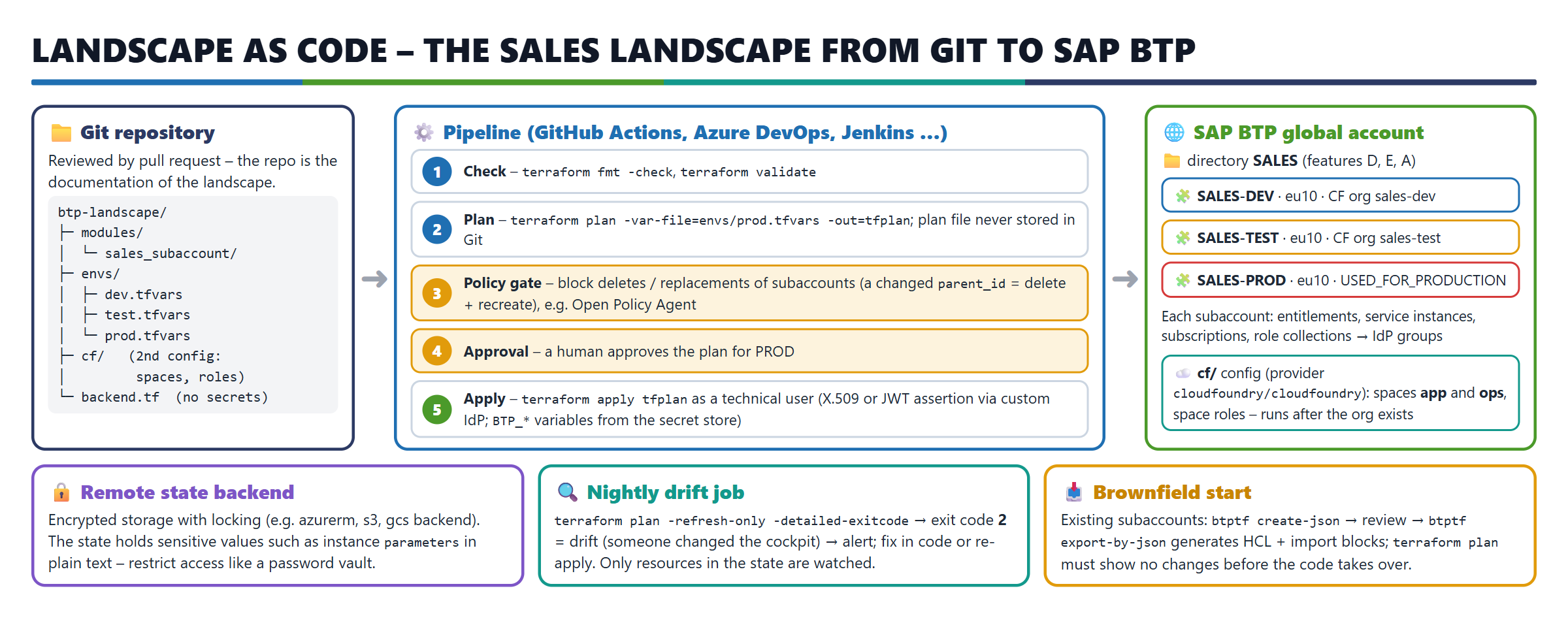
parametersof a service instance) are masked in the CLI output but stored in plain text in the state. - Use a remote backend with encryption and locking (e.g. the azurerm, s3 or gcs backend), one state per stage or per directory, access only for the pipeline and the platform team.
- Debugging sensitive values:
terraform plan -out=tfplanandterraform show -json tfplanreveal them – such files must be in.gitignoreand deleted afterwards.
5.2 Drift detection
Drift = someone changed in the cockpit what the code defines. terraform plan -refresh-only shows it; with -detailed-exitcode the exit code is 0 (no changes), 1 (error) or 2 (changes) – ideal for a nightly pipeline job that raises an alert. Only objects that Terraform created or imported are watched; manually created objects stay invisible.
Resource | Drift detection |
|---|---|
| Yes |
btp_*_role_collection_assignment | Yes since provider 1.26.0 – the executing user needs read access in that scope (e.g. Subaccount Viewer); global-account role collections do not grant read access inside subaccounts |
btp_subaccount_service_instance | With restrictions – values in |
btp_*_api_credential | No |
5.3 Bringing an existing landscape under Terraform
- Import single objects with an
importblock (Terraform 1.5 or later) orterraform import; each resource page in the registry shows the import ID, e.g. the subaccount ID forbtp_subaccount. - Terraform Exporter for SAP BTP (
btptfCLI, github.com/SAP/terraform-exporter-btp, version 2.0.1 as of November 2026) generates the HCL and the import blocks for a whole subaccount, directory or CF org. Recommended flow:btptf create-json -s <subaccount-id>writes an inventory JSON → review and remove what Terraform should not manage →btptf export-by-json -s <subaccount-id>generates the configuration (btptf exportdoes it in one step;--imports-onlycreates only import blocks and provider configuration). The target can also be set once interraform.tfvars(subaccount_id,directory_idororg_id). - Review the generated code (it contains every defaulted attribute), pin the provider version, then
terraform planmust show no changes before the import is applied and the code takes over.
5.4 Limitations to know
Limitation | Consequence / workaround |
|---|---|
Moving a subaccount to another directory is not supported | A changed |
No two-factor authentication for username / password | Use a technical user (custom IdP) with X.509 or JWT assertion |
Open source, no SAP support contract | Pin versions, test upgrades in DEV, follow the GitHub releases |
Secrets in state and plan files | Encrypted backend, no plan files in Git, restricted access |
Changes made outside Terraform | Drift job; agree that the cockpit is read-only for coded objects |
5.5 Pipeline: landscape as code for SALES
- Repository: a module (e.g.
sales_subaccount) plus one.tfvarsfile per stage; the CF configuration as a separate folder; no credentials in the repo. - Pipeline stages:
terraform fmt -checkandterraform validate→terraform plan -var-file=…with the plan saved as an artifact → policy gate that fails on deletes or replacements of subaccounts (SAP's provider guide suggests tools like Open Policy Agent) → manual approval for PROD →terraform apply tfplan. - Credentials: technical user with X.509 certificate or a JWT assertion from the CI system's OIDC token (
BTP_ASSERTION), injected from the secret store; never a personal admin user. - Plus a scheduled drift job and the rule "change by pull request only" for everything in the code. Developers keep self-service: they request a new entitlement by pull request instead of a ticket.
Part 6 – Platform REST APIs: Cloud Management service, Service Manager, XSUAA and usage data
All tools above sit on public REST APIs, listed on the SAP Business Accelerator Hub (package SAP Core Services for SAP BTP). Call them directly when another system – a self-service portal, ServiceNow, a FinOps tool – must drive BTP, or when you need data the CLI does not offer.
6.1 SAP Cloud Management service (cis)
API | Purpose | Region |
|---|---|---|
Accounts | Directories and subaccounts of the global account (paths | Central region |
Entitlements | Entitlements and quota assignments across global account, directories, subaccounts | Central region |
Provisioning | Environment instances ( | All regions |
Events | Audit-style events of administrative operations ( | All regions |
- Central region = eu10 Europe (Frankfurt), except for global accounts in China (Shanghai) and the Government Cloud (US), which use the landscape domain of their own central region.
cis plan | Gives | Grant type |
|---|---|---|
central | Manage global account, directories, subaccounts, entitlements (scopes such as | Password (default) or client credentials |
local | Environments and subscriptions of the subaccount ( | Password (default) or client credentials |
| Read-only variants – e.g. for reporting and FinOps | Client credentials only |
- Steps: entitle a cis plan to the subaccount (page 01) → create an instance, with parameter
{"grantType": "clientCredentials"}for a client-credentials token (and optionallydirectoryIdso the instance acts for one directory with feature A) → create a binding / service key → request a token from theuaa.urlof the key → call the endpoint URLs listed in the key (accounts_service_url,entitlements_service_url,provisioning_service_url,events_service_url,saas_registry_service_url…).
|
- Asynchronous jobs: a
202 Acceptedresponse means a job was started; poll the URL in theLocationheader until itsstatusis final – the same waiting the CLI does with--wait. - Rate limiting: every endpoint has its own limit per caller (user, tenant or OAuth client); exceeding it returns HTTP 429 with error code 11006 (details 11007). No headers tell you the remaining quota – build retries with back-off. Example from the documentation: more than five GET calls to
/accounts/v1/globalAccountswithin three seconds.
6.2 SAP Service Manager API
SAP Service Manager is the central registry of service brokers and platforms in a subaccount; its API (and the services group of the btp CLI) creates instances and bindings independent of Cloud Foundry or Kyma – the cockpit shows them under environment Other.
service-manager plan | Allows |
|---|---|
subaccount-admin | Manage brokers, platforms, instances and bindings of the subaccount; read offerings and plans |
subaccount-audit | Read-only access to the same objects |
container | Manage instances and bindings in a reduced scope – only what this container created |
service-operator-access | Credentials for the SAP BTP service operator in a Kubernetes cluster |
- The binding contains
sm_url(e.g.https://service-manager.cfapps.eu10.hana.ondemand.com) and OAuth credentials – client secret by default, X.509 with--parameters '{"credential-type":"x509"}'. Endpoints:GET /v1/service_instances,/v1/service_bindings,/v1/platforms… - The Accounts API can also create the Service Manager binding of a subaccount (
POST /accounts/v1/subaccounts/{subaccountGUID}/serviceManagementBinding).
6.3 Authorization (XSUAA) and usage APIs
- Role and user administration by API:
btp create security/api-credential --name sales-rbac [--read-only]on global account, directory or subaccount level returns a client ID (sb-…) and a secret – or uses your certificate with--certificate. With it you call the REST APIs of the SAP Authorization and Trust Management service (package authtrustmgmnt on the Business Accelerator Hub). Role design itself: BTP Security › 02. - Usage and cost data: the Resource Consumption APIs of the SAP Usage Data Management service (base
https://uas-reporting.cfapps.<landscapedomain>/reports/v1, e.g./monthlyUsage,/monthlyDirectoryUsage,/cloudCreditsDetails) feed FinOps reports – interpretation of costs: page 05. - Multitenant SaaS subscriptions of your own apps: SAP SaaS Provisioning service (
saas-registry) APIs.
Part 7 – SAP Automation Pilot
SAP Automation Pilot is a BTP service for operations automation: it runs commands – versioned, low-code runbooks built from ready-made steps – manually, on a schedule, through its API or automatically when an alert arrives. It reaches BTP account management, Cloud Foundry, Kubernetes, SAP HANA Cloud, Integration Suite, Cloud Transport Management and third-party tools (Jira, GitHub, Jenkins, Dynatrace …). Commands can be written by hand or with the generative-AI command assistant, and they can be exposed to AI agents as tools through MCP servers.
7.1 Setup, plans and roles
- Plans: standard (application) and free (application, free tier: community support, no SLA). Metric: API calls in blocks of 1,000; e.g. an HttpRequest command consumes 1 quota per 10 seconds of requested timeout, script commands about 1 per 5 seconds of runtime. In a trial account the free plan is available in ap21 (Singapore) and us10 (US East).
- Setup: the global account admin entitles the plan to the subaccount (page 01) → the subaccount admin subscribes (Service Marketplace › Automation Pilot › Create, plan under Subscriptions) → assign role collections; users must log on again before new role collections take effect.
Role collection | Typical holder |
|---|---|
| Platform team that owns and administers the tenant |
| Operators who build and run commands |
- Behind them are the role templates Observer (Read), Maintainer (Read + Write; attribute
AutomationPilotCatalogsWritelimits it to catalogs), Executor (Read + Execute; attributesAutomationPilotCatalogsExecuteandAutomationPilotExecutionActions, e.g. only PAUSE, RESUME, COMMENT), SecurityMaintainer (Security) and GenAI. Caution: Read cannot be limited per catalog, so catalog-restricted users can still wrap other catalogs' commands.
7.2 Concepts
Entity | Meaning |
|---|---|
Tenant | Created by the subscription (ID like T003054R1); all content belongs to it |
Catalog | Container of commands and inputs; provided catalogs from SAP are read-only but usable as steps in your own catalogs |
Command | Versioned automation: input keys → ordered executors (each runs another command, with conditions, retries, waits, pause-for-input, validation) → output keys. Types: primitive, composite, provided, custom |
Input | Reusable key-value set, e.g. the technical user and CF API endpoint of SALES-PROD; sensitive values are masked |
Dynamic expression | jq-based |
Execution | One run of a command; takes a snapshot of command and inputs at trigger time; can be paused, resumed, retried, aborted; status change listeners run cleanup or notification commands |
Scheduled execution | Recurring trigger, e.g. weekly health check |
Service account | Non-human identity for the Automation Pilot API, Alert Notification, AI agents; permissions Read, Write, Execute, GenAI, MCP or Remote Work Processor – never Security |
Operator | Remote work processor in your own network (Kubernetes or standalone) for private targets; alternatively route through the Cloud Connector |
Content connector | Backs up and restores your catalogs, commands and inputs to a GitHub repository – treat runbooks as code too |
7.3 Provided catalogs an administrator uses
Catalog | Content |
|---|---|
cis-sapcp | SAP Cloud Management service: directories, subaccounts, entitlements |
sm-sapcp | SAP Service Manager: service instances and bindings in any runtime |
xsuaa-sapcp | Users, role collections and custom IdP trust at subaccount level |
| Cloud Foundry operations and application lifecycle, e.g. RestartCfApp (rolling or quick restart), StartCfApp, RestageCfApp |
| Monitoring; push metrics to SAP Cloud ALM health monitoring and start remediation from Cloud ALM |
hanacloud-sapcp | SAP HANA Cloud lifecycle, configuration, upgrades, observability |
| Cloud Transport Management, Integration Suite, destinations |
| Notifications and tickets |
| Generic HTTP calls with OAuth 2.0, scripts, helpers |
7.4 Alert-driven remediation for the sales order app
Goal: when the sales order app in SALES-PROD crashes repeatedly at night, restart it automatically, document it and wake nobody unless the restart fails.
- 1. Build a custom command
RestartSalesOrderAppin your catalog: executor 1 = RestartCfApp (catalog applm-sapcp) with input keysregion,resourceGroup(space) andresourceName(app); executor 2 = notify through Alert Notification or e-mail; a status change listener on Failed creates a ticket. - 2. Store the technical credentials for SALES-PROD in an input, not in the command.
- 3. In Automation Pilot › Executions choose Build Event Trigger, type Alert Notification, select the command and inputs; values such as
subAccount,resourceGroup,resourceNameare resolved from the event. Copy the Event Trigger URL. - 4. Create a service account with Execute permission (API token or basic authentication).
- 5. In SAP Alert Notification service add an action of type SAP Automation Pilot with the URL and the service account, and a subscription with conditions that match the app's crash event (Alert Notification set-up: page 04).
- 6. Test in SALES-TEST first; use the executor options dry run and pause-for-input for a human approval step while the team builds trust in the automation.
Part 8 – Admin checklist and common mistakes
Area | Do this |
|---|---|
Identities | Technical users in a custom IdP for every pipeline and script (X.509 or JWT assertion); no personal admin accounts in automation; separate users per stage |
Least privilege | Read-only where possible: cis |
Secrets | Never in Git, scripts or |
Landscape | Everything stage-related in code with labels (stage, app, cost centre); USED_FOR_PRODUCTION flag on PROD; subdomain naming agreed before the first subaccount |
Safety nets | Policy gate against subaccount deletes; global account setting force deletion off; know |
Versions | Pin provider versions (SAP/btp, cloudfoundry/cloudfoundry) and the btp CLI client; test upgrades in DEV |
Drift | Nightly |
Operations | Runbooks as Automation Pilot commands backed up to GitHub; alert-triggered remediation tested in TEST |
- Mistake: changing
parent_idto reorganise directories – Terraform deletes and recreates the subaccount. Move by CLI or cockpit and re-import instead. - Mistake:
btp update accounts/subaccount --labelswith only the new label – it removes all labels not included in the JSON. - Mistake: assuming a global account admin can read inside subaccounts – role collection assignments in a subaccount need a subaccount-level role (e.g. Subaccount Viewer), also for Terraform drift detection.
- Mistake: forgetting the central region – Accounts and Entitlements APIs are called in eu10 even if the subaccounts run in us10.
- Mistake: a script without
--waitthat creates a subaccount and immediately assigns entitlements to it – the subaccount is still being created.
Part 9 – Interview questions
Q1. btp CLI or Terraform – when do you use which?
The btp CLI is imperative: good for one-off tasks, quick checks with JSON output and small scripts. Terraform is declarative: you describe DEV, TEST and PROD once, review changes in Git, see the plan before anything happens, detect drift and rebuild a lost subaccount. For landscapes I use Terraform; for ad-hoc admin work and troubleshooting the CLI. Both talk to the same btp CLI server.
Q2. How does a btp CLI login work and what is a target?
btp login (preferably --sso, with --idp for a custom IdP) logs on to the global account and stores a session token in config.json for up to 12 hours. btp target --subaccount <id> sets the default context; commands run in the innermost targeted entity where they are available, and -dir or -ga without a value forces the parent level.
Q3. How do you run the btp CLI or Terraform in a CI/CD pipeline?
With a technical user from a custom identity provider – never a personal user; the provider's username / password flow does not support two-factor authentication. For Terraform the best options are an X.509 client certificate or a JWT bearer assertion (e.g. the pipeline's OIDC token via BTP_ASSERTION); username and password only from the secret store via BTP_USERNAME / BTP_PASSWORD. The btp CLI session login (USE_BTPCLI_SESSION) is for local use only.
Q4. Which resources would you use to build a subaccount for an app with Terraform?
btp_subaccount (name, subdomain, region, parent_id, usage, labels), btp_subaccount_entitlement per service plan, btp_subaccount_environment_instance for the Cloud Foundry org, btp_subaccount_subscription for SaaS apps, btp_subaccount_service_instance / _service_binding for services, btp_subaccount_role_collection_assignment to IdP groups. Spaces and space roles come from the cloudfoundry/cloudfoundry provider in a second configuration.
Q5. What is drift and how do you detect it?
Drift is a difference between the real landscape and the code, usually from manual cockpit changes. A scheduled terraform plan -refresh-only -detailed-exitcode returns exit code 2 when something changed. Limits: only resources in the state are watched, service instance parameters are not tracked, API credentials have no drift detection, and role collection assignments need read authorization in the target scope.
Q6. A customer has 40 manually built subaccounts. How do you move them to Terraform?
With the Terraform Exporter for SAP BTP: btptf create-json per subaccount, review the inventory, btptf export-by-json to generate HCL plus import blocks, clean up and modularise the code, pin versions, and apply only when terraform plan shows no changes. From then on changes go through pull requests and the drift job.
Q7. What are the risks of the Terraform state file?
It holds sensitive values in plain text and it is the only link between code and real objects. Store it in an encrypted remote backend with locking, restrict access, keep plan files out of Git, and back it up – especially before state surgery such as moving a subaccount.
Q8. Why can't you just change parent_id to move a subaccount into another directory?
The provider does not support moving; a changed parent_id forces delete and recreate of the subaccount with all its content. Move it with the cockpit or btp move accounts/subaccount, remove it from the state, adjust the code and import it again. A policy gate in the pipeline should block such replacements.
Q9. Which APIs and plans do you need to create subaccounts from a self-service portal?
The Accounts and Entitlements APIs of the SAP Cloud Management service (cis) in the central region, via a cis instance with plan central (client-credentials grant via the grantType parameter), its service key for the token, then asynchronous handling (202 + Location polling) and retries for HTTP 429. Environments and subscriptions in the subaccount use the Provisioning API with plan local; read-only reporting uses central-viewer.
Q10. What is SAP Automation Pilot and how does it differ from Terraform?
A BTP service that runs low-code operational commands built from SAP-provided catalogs (Cloud Foundry, HANA Cloud, Service Manager, Cloud Management, Cloud ALM …) – manually, scheduled, via API or triggered by SAP Alert Notification service. Terraform converges a landscape to a desired state; Automation Pilot executes runbooks such as restart, scale, back up or collect diagnostics. Terraform builds the house, Automation Pilot does the maintenance.
Q11. How would you automate the restart of a crashing app at night?
A custom Automation Pilot command that calls RestartCfApp, notifies the team and opens a ticket on failure; credentials in an input; an Alert Notification event trigger URL plus a service account with Execute permission; an Alert Notification action of type SAP Automation Pilot subscribed to the app's crash events. Tested in TEST first, optionally with a pause-for-approval step.
Q12. How do you keep automation itself secure?
Technical users per pipeline and stage with only the role collections they need, certificate or assertion instead of passwords, secrets in a vault, read-only plans and credentials for reporting (central-viewer, subaccount-audit, read-only API credentials), no verbose CLI output in logs, encrypted state, approval gates for PROD and audit of administrative events through the Events API and the audit log (BTP Security › 04).
🏠 Start Here · ◀ 02 · Environments · 04 · Operations ▶ · Sections: CORE ABAP | OOPS ABAP | ABAP on HANA | Clean Core | RAP | ABAP Points | SAP Fiori | SAPUI5 | Mobile Development (MDK) | BTP Foundations | BTP Admin | BTP Development | CAP | SAP Build | ABAP on BTP | Integration Suite | SAP Business AI | SAP BASIS | Security | SAP SDLC
Functional: FICO ABAP | TRM ABAP | VIM | SAP BIS | SD ABAP | MM ABAP | PP ABAP | QM ABAP | PM ABAP | PS ABAP | EWM | TM ABAP | GTM ABAP | EHS ABAP | HR ABAP | BW | SAP Datasphere | SAP Business Data Cloud | SAP MDG | SAP Analytics Cloud | SAP Ariba | SAP CX | SAP IBP