Every call from SAP BTP into the company network passes through a short chain: the app asks the Destination service where the target is and how to log on, the Connectivity service carries the request into a TLS tunnel, and the Cloud Connector in your network decides whether the request may reach a back end – and as which user. Each link is a control point, and two of them (the Cloud Connector and the back-end trust) are operated by you, not by SAP. This page is the administrator and security-architect view: hardening the Cloud Connector host and its administration, exposing only what is needed through access control, controlling who may change destinations and which authentication types are allowed, setting up principal propagation end to end, running the certificate lifecycle, and the private-connectivity options. Running example: the subaccounts SALES-DEV, SALES-TEST and SALES-PROD hosting the sales order app on BTP, which reads and creates sales orders in an on-premise SAP S/4HANA system. The basics – what a destination, the Connectivity service, the Cloud Connector and SAP Private Link service are, the list of destination types and authentication types, the connectivity proxy headers and the common errors – are on BTP Foundations › 03 and › 04 (Part 5–6); identity and trust on page 01, role collections on page 02, SAP Credential Store and the SAP Audit Log service on page 04. Facts as of November 2026.
Part 1 – The connectivity attack surface and who secures what
Why it matters: the Cloud Connector is, in SAP's words, a security-critical component that handles inbound access from SAP BTP applications to an isolated network – comparable to a reverse proxy. A mapping that exposes / with all sub-paths, a destination with a powerful technical user, or a leaked service key of the Destination service can turn one compromised cloud app into a path to the ERP system. The goal of this page: every hop authenticated and encrypted, every back end reachable only for the resources the app needs, and every call executed as the real user.
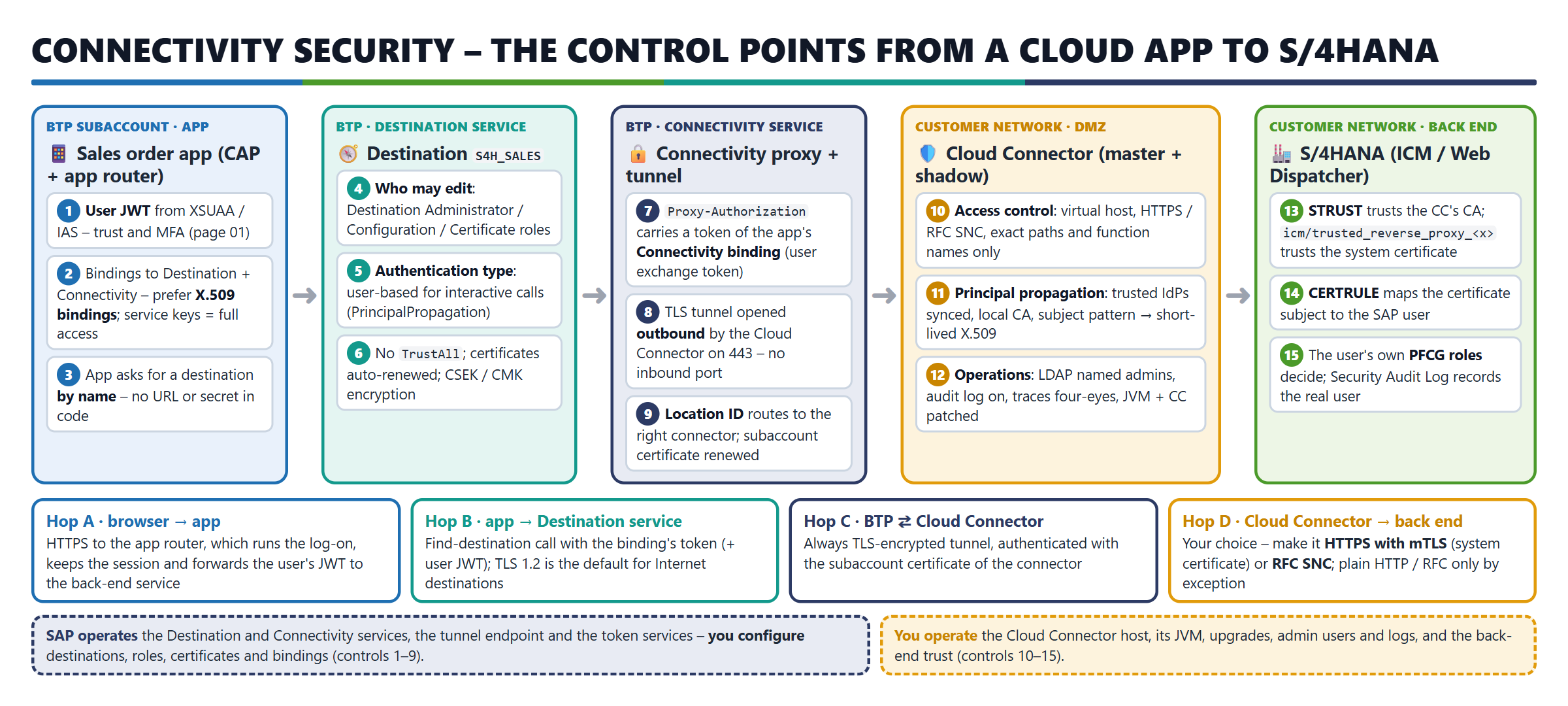
Component | Operated by | What you configure and secure | Taught where |
|---|---|---|---|
Destination service | SAP | Destinations (subaccount or instance level), authentication type, certificates, SAML trust key, role assignments, service keys | Parts 5, 7 |
Connectivity service (connectivity proxy, tunnel endpoint) | SAP | Bindings of the app; location IDs; in Kyma the Connectivity Proxy module | Part 8; BTP Foundations › 04 |
Cloud Connector | Customer – on a host in your network | OS, JDK, upgrades, admin users, UI certificate, access control, principal propagation, trust stores, audit log, HA | Parts 2–4, 6 |
Back end (S/4HANA, ECC, other) | Customer | TLS / SNC, trust in the Cloud Connector, user mapping, authorizations of the propagated user, audit | Part 6; Security › 03 |
SAP Private Link service | SAP + hyperscaler | Endpoint approval in your Azure / AWS / Google Cloud account, TLS and authentication on top | Part 8 |
- Cloud Connector is customer software. SAP cannot update it automatically – checking the release notes and upgrading it is your job (SAP security recommendation BTP-SCC-0001). The same applies to the Java VM it runs on (BTP-SCC-0011).
- SAP's security recommendations are a numbered catalogue (IDs such as BTP-SCC-0008 or BTP-DES-0015, each with a priority Critical / Recommended / Advanced). This page cites the connectivity ones where they apply; the full checklist approach is on page 05.
Part 2 – Installing and hardening the Cloud Connector host
2.1 Where to place it
The Cloud Connector needs two things: Internet access to the SAP BTP region host (directly or through an HTTPS proxy) and direct, transparent network access to the internal systems it exposes. Within those limits the company chooses the network zone:
Option | Operated by | When |
|---|---|---|
DMZ | Central IT | SAP's recommendation for access to highly secure on-premise systems – combined with back ends that accept requests only from trusted Cloud Connectors |
Intranet zone | Line of business | Smaller scenarios; the back-end firewall must still allow only the required ports from the connector host |
- Firewall direction: the connector opens the tunnel outbound; all connections to the Connectivity service hosts are TLS on port 443. No inbound port from the Internet is needed. The region hosts and their IP addresses are listed in the Cloud Connector prerequisites – SAP announces planned IP changes at least four weeks ahead (see BTP Admin › 04 for the notification).
- Internal ports: the connector → back end ports depend on the protocol, e.g. HTTPS port of the ICM, RFC gateway port
33<NN>or RFC SNC gateway port48<NN>(NN = instance number). - Separate production: one connector can serve several subaccounts, but SAP recommends different Cloud Connector instances for productive and non-productive scenarios. In the example: one HA pair for SALES-PROD, one instance for SALES-DEV and SALES-TEST.
2.2 Host and operating-system hardening
Control | What to do | Why |
|---|---|---|
Dedicated machine | Run only the Cloud Connector on the host | No other software that could be used to reach the configuration or the secure store |
Minimal OS access | Only the few people who administer the connector get OS (root / admin) access | OS users can read certificates and keys in the secure store ( |
Separate identities | The connector's UI | Segregation of duties – nobody can change the audit level and delete the audit files alone |
Service user | Windows: a dedicated OS user for the | Limits what a compromised process can do; basis for the four-eyes trace control (Part 3.4) |
Disk encryption | Encrypt the hard drive | Configuration and keys stay unreadable if the disk is copied |
OS audit log | Switch on OS-level auditing of file operations | Detects tampering with configuration and audit files |
JDK | A full JDK, kept patched: SapMachine 21 (from Cloud Connector 2.17.0) or 25 (from 2.19.0), or SAP JVM 8 – check the product availability matrix | Expired CA certificates and JVM vulnerabilities affect the connector directly (BTP-SCC-0011) |
Upgrades | Follow the release notes; only one version per major release is offered and supported (SAP Note 3302250); test upgrades in a non-productive connector first | Security fixes only arrive with new versions (BTP-SCC-0001) |
- Sizing (minimum / recommended): dual-core / multi-core CPU, 4 GB / 16 GB RAM, 2 GB / 20 GB free disk; reserve 1–20 GB for configuration, audit and trace files.
2.3 High availability
Productive connectors run as master + shadow. The master pushes its configuration to the shadow; the shadow pings the master and takes over the tunnel when the master is unreachable.
- Master and shadow talk to each other outside SAP BTP: a network break between them can cause a temporary double-master situation with undefined behaviour – put both in a stable, reliable network.
- The UI certificates secure master ⇄ shadow; replacing a UI certificate breaks this trust – disconnect the shadow first and reconnect it afterwards.
- LDAP logon and client-certificate logon must be configured on the shadow too (Shadow Configuration); client-certificate logon in HA needs a separate HA port.
Part 3 – Cloud Connector administration: users, UI, audit and traces
3.1 Named administrators instead of the built-in Administrator
After installation the administration UI runs on https://<host>:8443 (change with the changeport tool) with the single user Administrator, who must change the initial password at first logon. The connector does not check password strength, and a shared admin account makes the audit log useless. SAP therefore recommends LDAP-based user management with named users (BTP-SCC-0022); once active, the built-in Administrator can no longer log on.
LDAP role (default name) | Authorization | Give it to |
|---|---|---|
sccadmin | Unrestricted – all operations and settings | Two or three connector owners |
sccassocadmin | All subaccount settings (unless the subaccount is managed) plus certain cross-subaccount settings such as certificates and back-end trust | Senior operators |
sccsubadmin | All subaccount-related settings (unless managed) | Operators of one landscape |
sccsupport | Read-only UI plus support tasks (trace levels, thread dump) | Support team |
sccdisplay | Read-only UI | Auditors |
sccmonitoring | Monitoring APIs (e.g. for SAP Solution Manager) | Technical monitoring user |
- Configure: Configuration › User Interface › User Administration › Switch to LDAP; up to 3 LDAP user stores (the first that authenticates the user wins – never let several stores authenticate the same user with different roles); use Secure (LDAPS) and set the LDAP trust store to *Use LDAP trust store only* rather than *Trust all*; role names can be overridden in *Custom Roles*.
- Always run Test LDAP Configuration before Activate – activation restarts the connector, and a wrong configuration locks everybody out. Fallback: run
useFileUserStore(Windows) or./useFileUserStore.sh(Linux) in the installation directory. - Client-certificate logon (optional, Configuration › User Interface › Authentication): add the issuing CA to the *Authentication Allowlist*, choose the OID that holds the user name (e.g. CN), and untick *User/Password Fallback Enabled* for strict mode; revert with
useBasicAuthentication. Not allowed for SAP-operated connectors (e.g. S/4HANA Cloud Private Edition).
3.2 UI certificate and cipher suites
- Replace the self-signed UI certificate: Configuration › User Interface › UI Certificate › generate a CSR (subject and Subject Alternative Names matching the host name), have it signed by the company CA, upload the response, restart. Do the same on the shadow.
- Cipher suites: the default set comes from the JVM. Disable the ones that do not meet your standard (BTP-SCC-0019) in Configuration › User Interface › Cipher Suites; the table shows SAP's assessment per cipher. If wrong settings block the UI, run
resetCiphers(from version 2.17.0). - High-security setups: SAP suggests limiting UI access to
localhost, i.e. administration only from the host itself or a jump server. - Security Status (Connector menu) lists open security recommendations for the installation and per subaccount – a quick self-check, not a replacement for the controls.
3.3 Connecting a subaccount securely
- The person connecting the connector needs the Cloud Connector Administrator role in the subaccount (in the role collections Subaccount Administrator, Cloud Connector Administrator and Connectivity and Destination Administrator). Prefer the authentication data file (cockpit › Connectivity › Cloud Connectors › Download Authentication Data) – it is valid only for a few minutes, so no password is typed or stored.
- With a custom platform IdP and MFA (page 01), append the one-time passcode to the password when the dialog asks for user and password.
- Location ID: optional routing identifier, unique per subaccount; lets several connectors serve one subaccount (e.g. per data centre). The destination's
CloudConnectorLocationIdmust match exactly. - Visibility on the cloud side: cockpit › Connectivity › Cloud Connectors shows connected connectors and exposed virtual hosts – it requires a role with the permission
readSCCTunnels(e.g. Cloud Connector Administrator; Subaccount Viewer contains the read-only Cloud Connector Auditor role).
3.4 Audit log, traces and alerts
Setting | Values / where | Recommendation |
|---|---|---|
Audit level (subaccount and cross-subaccount scope) | Security (default: every denied request + critical configuration changes) · All (also every allowed request) · Off | Never Off in production (BTP-SCC-0021); All where policy requires end-to-end traceability – SAP's security guidelines recommend it for productive scenarios |
Audit files |
| Archive them centrally before cleanup; check integrity with the |
Audit Viewer | Filter by audit type, pattern (glob), time range; download as GZIP CSV | Search |
Traffic traces (Tunnel Traffic Trace, ABAP Cloud SNC Traffic Trace, CPIC trace level 3) | Off by default; write payload to unencrypted trace files | Only for incidents, switch off afterwards (BTP-SCC-0020); enforce the four-eyes principle |
Alerting | E-mail configuration + observation settings | Configure e-mails at least for certificates (BTP-SCC-0007); also forward to your monitoring (BTP Admin › 04) |
Four-eyes principle for traces: create a file writeHexDump in the scc_config directory, owned by an OS user other than the one running the connector (Linux: not scctunnel, not in sccgroup), readable but not writable for the connector, with the content allowed=false. From then on the connector refuses to activate payload traces until that owner sets allowed=true – so the OS owner and a connector administrator must act together.
- Switch on audit logging in the connected back ends too (Security Audit Log in S/4HANA), so a request can be followed from the cloud user to the ABAP user.
- Secure store: changes are appended to
SSFS_SCC.DAT; Configuration › Shrink Secure Store removes obsolete entries. Include thescc_configdirectory in the encrypted backup.
Part 4 – Access control: exposing only what the cloud needs
Access control (subaccount › Cloud To On-Premises › Access Control) is a strict allowlist with no default entries: a request passes only if its virtual host and port are mapped and the path or function module is listed as a resource. Everything else is denied and written to the audit log as Access Denied.
4.1 HTTP system mapping – the security-relevant fields
Field | Secure choice | Notes |
|---|---|---|
Protocol (connector → back end) | HTTPS (BTP-SCC-0008) | Independent of the cloud side – an |
Internal host / port | Real address resolvable from the connector, no proxy | A ping (HEAD on |
Virtual host / port | A neutral alias, e.g. | Hides physical host names from the cloud (BTP-SCC-0014); the virtual name cannot be edited later |
Allow Principal Propagation | On only for mappings used with user-based destinations | From version 2.15 |
Principal Type | X.509 Certificate | The short-lived user certificate is forwarded in header |
System Certificate for Logon | Off (SAP's recommendation) | If on, the system certificate also logs on when no principal arrives – i.e. as a technical identity; off lets principal propagation and basic authentication share one mapping |
Host In Request Header | Use Virtual Host or Use Internal Host | With internal host, the virtual host is sent in |
4.2 Resources – paths and function modules
Resource type | Option | Matches | Risk |
|---|---|---|---|
URL path | Path only | Exactly the path (query string ignored) | Lowest |
URL path | Path and all sub-paths | Every path that starts with the string – | Higher; never |
Function module (RFC) | Exact name | Exactly one function module | Lowest – SAP's recommendation |
Function module (RFC) | Prefix | Every function module starting with the prefix | Keep prefixes as specific as possible (BTP-SCC-0016) |
- Paths are case sensitive. *Upgrade Allowed* permits protocol upgrades (e.g. to WebSocket) – leave it off unless the scenario needs it. *Suspend* disables a resource without deleting it (useful for incidents).
- OData services need sub-paths (entity sets,
$metadata,$batch), so expose the service root of each released API with sub-paths – not/sap/opu/odata/as a whole, which would open every OData service of the system.
4.3 RFC, LDAP and TCP
- RFC: choose RFC SNC (BTP-SCC-0015) – SNC partner name of the ABAP system, SNC library and identity of the connector in Configuration › On Premise › SNC, quality of protection *Maximum Protection* if supported. Principal propagation over classic RFC is only possible with SNC.
- Authority lists (RFC only): *Maintain Authority Lists* restricts a mapping to allowed clients and blocks named users per client – e.g. allow only client 100 and block a powerful RFC user.
- WebSocket RFC (from 2.19): RFC over HTTPS to the back end; secured by TLS, supports the same principal types and system-certificate option as HTTP.
- LDAP: use LDAPS (BTP-SCC-0017) – plain LDAP transmits user credentials unencrypted. TCP: prefer TCP over TLS; only map the ports the scenario needs.
4.4 Back-end trust store
Configuration › On Premise › Backend Trust Store is the allowlist of CA certificates (DER or PEM) the connector accepts in back-end TLS server certificates. The trust store can be switched off to trust all server certificates – SAP strongly recommends never doing that in production, and to limit the trusted root CAs to the ones you need (BTP-SCC-0018).
4.5 The SALES-PROD mappings
Virtual host : port | Protocol | Resources | Principal |
|---|---|---|---|
s4h-sales:443 | HTTPS (mTLS) | Sales order and business partner API service roots, each with sub-paths; nothing else | X.509, Allow PP on, System Certificate for Logon off |
| RFC SNC | Exact function module names the app needs | X.509 via SNC |
- Review rule: every resource has an owner and a ticket; quarterly, compare the resource list with the APIs the app really calls (connector audit log at level All, or the app's logs).
Part 5 – Destinations: who may change them and which authentication to allow
A destination is a security object: it holds the target URL, often credentials or a key store, and decides whether the back end sees a technical user or the real user. Whoever can edit it can redirect traffic or read secrets – so access to destinations is administered like access to passwords.
5.1 Roles for destinations and certificates
Task (subaccount level, cockpit) | Role (one of) |
|---|---|
Create, edit, delete destinations | Destination Administrator · Destination Configuration Administrator |
View destinations | Destination Viewer · Destination Configuration Viewer |
Manage destination certificates | Destination Administrator · Destination Certificate Administrator |
View certificates | Destination Viewer · Destination Certificate Viewer |
Generate or renew the subaccount key pair (Destination Trust) | Destination Administrator · Destination Subaccount Trust Administrator |
Download the subaccount trust certificate | Destination Viewer · Destination Subaccount Trust Viewer |
Destinations of a service instance | The instance variants (e.g. Destination Administrator Instance) plus Org Manager, Space Manager or Space Developer of the space |
- Default role collections: Subaccount Administrator (Cloud Connector Administrator + Destination Administrator), Subaccount Viewer (Cloud Connector Auditor + Destination Viewer), Destination Administrator, Cloud Connector Administrator, Connectivity and Destination Administrator. For least privilege build custom role collections from the split roles – e.g. a certificate team that manages certificates but cannot change URLs (role design: page 02).
- The hidden admin path: anyone with a binding or service key of a Destination service instance has full access to the destinations and certificates managed by that instance through the REST API, including private keys in uploaded key stores. Treat service keys like administrator passwords: create them rarely, prefer X.509 bindings, delete unused keys, rotate (page 04).
- Infrastructure as code: destinations can be managed with the Terraform resource
btp_subaccount_destination_generic(destination_configurationis a sensitive JSON attribute); keep passwords out of the repository (BTP Admin › 03).
5.2 Choosing the authentication type – SAP's recommendations
Scenario | Recommended | Avoid | Rec. ID |
|---|---|---|---|
Interactive user → on-premise HTTP | PrincipalPropagation | BasicAuthentication with a shared user | BTP-DES-0003 |
Interactive user → cloud system (S/4HANA Cloud, SuccessFactors …) | OAuth2SAMLBearerAssertion or SAMLAssertion (or OAuth2JWTBearer) | OAuth2Password | BTP-DES-0003 |
Interactive user → on-premise RFC | PrincipalPropagation; no | Fixed RFC user | BTP-DES-0014 |
Technical job → on-premise RFC | BasicAuthentication with a dedicated, minimal RFC user | Dialog or admin users | BTP-DES-0008 |
Technical call → Internet RFC (WebSocket) | ClientCertificateAuthentication | Passwords | BTP-DES-0008 |
Technical call → OAuth-protected API | OAuth2ClientCredentials with mTLS to the token service ( | Client secrets in production | BTP-DES-0007 |
Any password-based type | Strong passwords, regular rotation | SAP Assertion SSO (deprecated) | BTP-DES-0003 |
- OAuth2TechnicalUserPropagation (on-premise, Cloud Foundry only) sends the client-credentials identity of an OAuth client through the connector, which turns it into a short-lived certificate – a technical user without a stored password (subject-pattern condition
${user_type}= Technical). - Mutual TLS is only used if
tokenService.KeyStoreLocationis set – otherwise the client secret is sent. OAuth with X.509 client certificates is supported for ProxyType Internet.
5.3 Hardening properties and settings
Property / setting | Secure value | Rec. ID |
|---|---|---|
TrustAll | Not set / | BTP-DES-0015 |
HostnameVerifier |
| – |
TLS version (Internet destinations) | TLS 1.2 is the default; do not configure older versions | BTP-DES-0001 |
|
| BTP-DES-0010 |
| Not maintained – deprecated; use client certificates instead | BTP-DES-0004 |
SAP-generated destination certificates | Enable automatic renewal | BTP-DES-0002 |
HTML5.DynamicDestination | Only on destinations really used by dynamic tiles – it lets any logged-on user call the destination | BTP-WZS-0002 |
Encryption at rest | Customer-specific encryption keys (default) or customer-managed keys via SAP Data Custodian Key Management Service – all properties except | – |
The hardened SALES-PROD destination as Terraform (no credentials stored – the user comes from the token):
|
- The URL uses
http://because the hop to the connector is already inside the TLS tunnel; the mapping in the connector sets HTTPS for the hop to S/4HANA (Part 4.1). - Check Connection in the cockpit only proves reachability – test principal propagation with a real user (Part 6.4).
Part 6 – Principal propagation setup, end to end
Principal propagation forwards the logged-on cloud user to an on-premise system: the app passes the user's JWT to the connectivity proxy, the Cloud Connector validates it against the trusted identity providers, issues a short-lived X.509 certificate for that user, and the back end logs the user on with that certificate – no password, no shared technical user, the user's own PFCG roles and an audit trail with the real name. The concept and the per-side summary are on BTP Foundations › 04 Part 5.4; this Part is the administrator runbook.
6.1 Cloud Connector side
Step | Where | What to configure |
|---|---|---|
1. Trust | Subaccount › Cloud to On-Premises › Principal Propagation | Synchronize the trusted IdPs of the subaccount (empty by default) and tick *Trusted* only for the ones you want; switch on Automatic Trust Synchronization – especially when XSUAA signing keys rotate automatically |
2. System certificate | Configuration › On Premise › System Certificate | PKCS#12 with private key and full chain (or CSR); used for mTLS to the back end – mandatory for identity propagation over HTTPS |
3. CA certificate | Configuration – CA certificate settings | Local CA (PKCS#12, CSR or self-signed; RSA only, key usage |
4. Subject pattern | Configuration › On Premise › Principal Propagation | Ordered rules (condition → pattern), last rule is the fallback; e.g. |
5. Sample certificate | Same screen › Generate Sample Certificate | Download it to build the mapping rule in the back end |
6. Mapping | Access Control › system mapping | Allow Principal Propagation, principal type X.509 Certificate, System Certificate for Logon off |
Subject-pattern setting | Values |
|---|---|
Variables for conditions |
|
Variables for the subject |
|
How | Business user: first of |
Certificate Validity (min) | 0–43200 (30 days); a generated certificate can be reused within its validity for performance |
Expiration Tolerance (h) | 0–336 (14 days); how long a principal may be used after the cloud token expired |
- Security impact: never build the subject from attributes the user can change (for example a self-service profile field) – an attacker could inject another user's name. Prefer a stable, IdP-controlled identifier such as the login name or user UUID that matches the SAP user mapping.
- Keep Certificate Validity short (minutes, not days) and Expiration Tolerance at 0 unless a long-running process really needs it – both extend how long a stolen certificate or token is useful.
6.2 S/4HANA side (HTTPS)
Step | Transaction / parameter | Detail |
|---|---|---|
1. Trust the CAs |
| Import the issuer of the system certificate and the principal-propagation CA certificate, add to certificate list |
2. Trust the connector as reverse proxy |
| Subject and issuer of the system certificate; kernel 7.42 or lower: |
3. Request client certificates |
|
|
4. Map certificate → user |
| Import the sample certificate, create the rule (e.g. CN → user ID); older releases: |
5. Logon procedure per service |
| Services must allow *Logon Through SSL Certificate*; where basic authentication is also needed, list it first in the alternative logon procedure |
6. Web Dispatcher | Its profile and server PSE | Same trusted-proxy parameters, system certificate in its trust list, forward the client certificate to the ABAP system |
- Strict mode of certificate block management (
CRCONFIG) for CRL checks in the SSL_SERVER profile cannot be used with X.509 identity propagation. - STRUST, X.509 logon and CERTRULE basics: Security › 03 Secure ABAP Coding & System Security.
6.3 RFC with SNC
- ABAP:
SNC0– create an entry (any system ID) with the connector's SNC name and tick *Entry for RFC activated* and *Entry for certificate activated*; map users withCERTRULEorEXTID_DN. - Cloud Connector: SNC library, own SNC name and quality of protection in Configuration › On Premise › SNC (same SNC product as the back end, identity associated with the connector's OS user); system mapping with protocol RFC SNC and the ABAP system's SNC partner name (from
snc/identity/as). - Destination: type RFC, ProxyType OnPremise, Authentication PrincipalPropagation, no
jco.client.user/jco.client.passwd.
6.4 Testing and variants
- Test with two users with different PFCG roles: both must see only their own data, and the Security Audit Log must show the real user names. A call that works for everyone usually means a fallback (basic authentication or System Certificate for Logon) is in play.
- Token variants: besides the recommended user exchange token, the connector accepts tokens of the corporate IdP embedded in the XSUAA token, IAS tokens and OIDC tokens (Cloud Connector 2.13 or newer, trust synchronised). With IAS-based apps the two-header variant is used (BTP Foundations › 04).
- Cloud to cloud: user propagation to S/4HANA Cloud or SuccessFactors uses OAuth2SAMLBearerAssertion – trust is the subaccount's Destination Trust certificate imported in the target (Part 7).
- Kerberos (Service for User and Constrained Delegation) is available for back ends that need it.
Part 7 – Certificates and mTLS: the lifecycle you must run
Connectivity security depends on a dozen certificates in three places. None of them is dangerous while valid – outages happen when one expires unnoticed or is renewed with a different issuer. Keep an inventory with owner and expiry date.
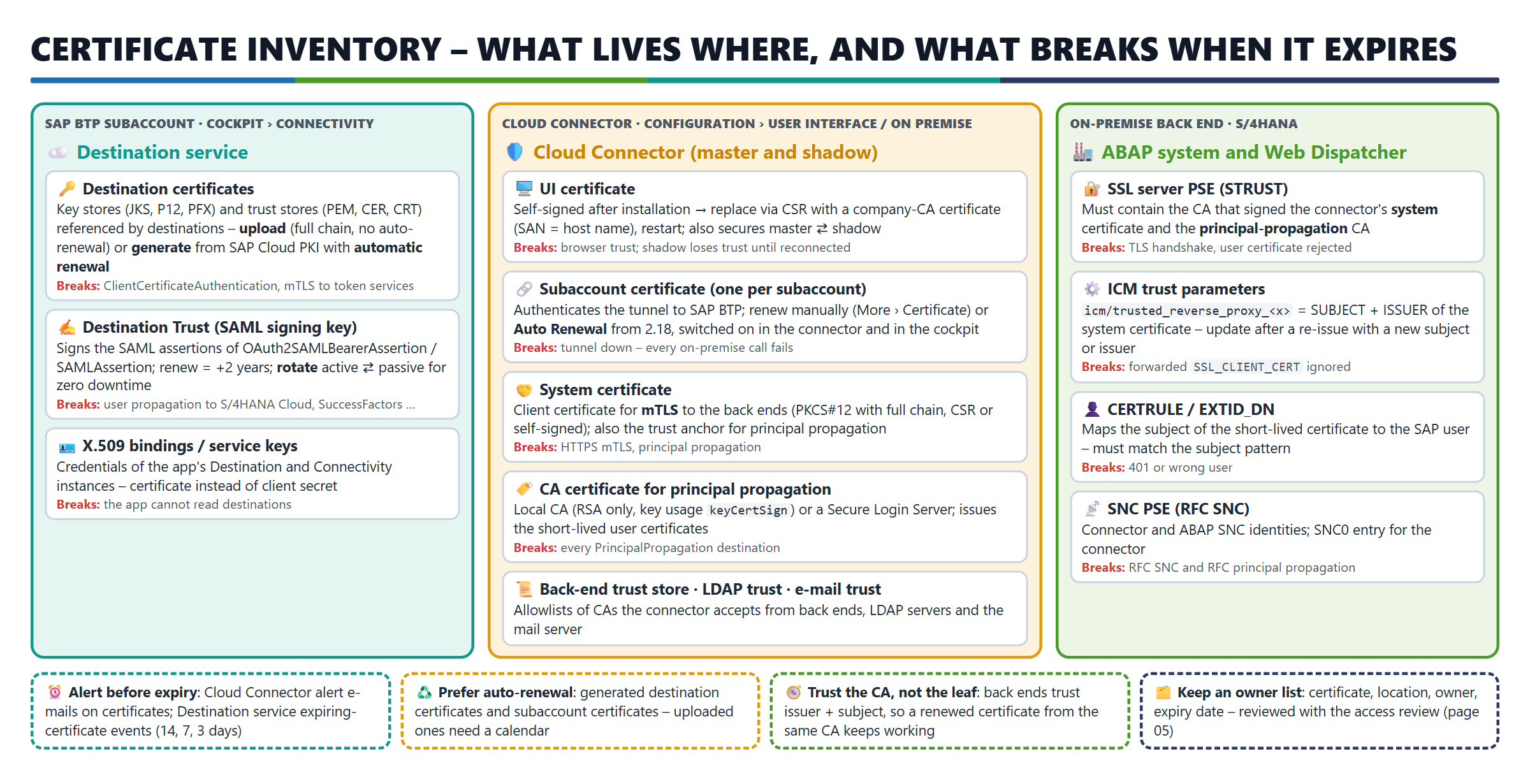
7.1 Cloud Connector certificates
Certificate | Renewal | Pitfall |
|---|---|---|
Subaccount certificate | Manual: subaccount overview › More › Certificate (works even after expiry); Auto Renewal from version 2.18 – switch it on per subaccount in the connector and in cockpit › Connectivity › Cloud Connectors; first attempt n + 7 days before expiry (n = alert threshold) | Auto renewal is not offered in regions on Alibaba Cloud or Google Cloud (as of November 2026) |
System certificate | Import the new one; it replaces the old | Import the full chain; if subject or issuer change, update |
CA certificate (principal propagation) | Import / CSR / self-signed | New CA → import into STRUST of every back end before switching |
UI certificate | CSR in the UI, restart | Breaks master ⇄ shadow trust – reconnect the shadow |
7.2 Destination certificates and SAML trust
- Destination Certificates (cockpit › Connectivity): upload JKS, PFX, P12 (key stores) or PEM, CER, CRT (single certificates) with the full chain – uploaded certificates are not renewed automatically. Or generate one from SAP Cloud PKI with *Enable automatic renewal*; with your own CSR the private key never leaves your machine.
Validity of a generated certificate | First renewal attempt |
|---|---|
1 day | 12 hours before expiry |
2–14 days | 1 day before |
15–31 days | 3 days before |
32–154 days | 7 days before |
155–365 days, or years | 30 days before |
- Renewal keeps subject and validity duration, so a target that trusts the root CA + subject keeps working – configure the trust that way. Applications using a renewed certificate must fetch it again.
- Destination Trust (cockpit › Connectivity › Destination Trust): *Generate Trust* creates the subaccount's SAML signing certificate; export the
.pemplus *Assertion Entity ID* and *Signing Key Name* for the target system. *Renew* extends by 2 years but switches immediately – in production use rotate: create a passive certificate, configure it in all targets, rotate passive ⇄ active, then delete the old one. - Certificates without automatic renewal raise expiring-certificate events 14, 7 and 3 days before expiry – route them via SAP Alert Notification service (BTP Admin › 04).
- Key stores are not supported in FIPS-based environments. Key management in general (SAP Credential Store, customer-managed keys) is on page 04.
Part 8 – Private connectivity and Kubernetes
8.1 SAP Private Link service
Private Link keeps traffic between a BTP app and a service in your own Azure, AWS or Google Cloud account on the hyperscaler backbone instead of the Internet (concept: BTP Foundations › 03). It is supported for the Cloud Foundry and Kyma runtimes; destinations use ProxyType PrivateLink.
Control | What to do |
|---|---|
Restrict who can request | Azure: Private Link service › Access security › *Restricted by subscription* with SAP BTP's subscription IDs; AWS: endpoint service › *Allowed Principals* with SAP BTP's account IDs (current IDs in SAP Note 3811111) |
Approve only your endpoint | Compare the endpoint name shown by |
Network scope | Binding a CF app creates a space-scoped application security group for the private endpoint IP – only apps in that space can reach it |
Still authenticate and encrypt | Private is not trusted: keep HTTPS, server-certificate validation (no TrustAll – BTP-DES-0015 explicitly covers PrivateLink destinations) and proper authentication |
Audit | Relies on Cloud Foundry audit logging and identity management |
- Alternative for a self-managed SAP system in your VPC / VNet: install a Cloud Connector there – same controls as Parts 2–4.
8.2 Kyma and Kubernetes
- Connectivity Proxy: traffic between a workload and the HTTP and RFC/LDAP proxies inside the cluster is not encrypted (SOCKS5 can be TLS if the client starts TLS); in a self-installed proxy these two servers are disabled by default. Connector ⇄ cluster ingress is TLS; enable mutual TLS end to end where required. Its configuration secrets are base64 only – protect them with cluster RBAC and encryption at rest.
- Transparent Proxy: destinations are exposed through Destination custom resources whose scope is
namespacedby default (clusterWideopens them to every namespace) – enforcement needs a CNI plugin that supports NetworkPolicy. Apply least-privilege RBAC to Destination and Transparent Proxy resources. - Service channels (on-premise → cloud): RFC to an ABAP Cloud system or TCP to a service in a Kyma / Kubernetes cluster exposed by a
ServiceMapping; they are part of the connector's audit categories (ServiceChannelConfiguration) – review them with the access control list.
Part 9 – Running example: connectivity security checklist for SALES-PROD
# | Check | Where to verify | Expected |
|---|---|---|---|
1 | Separate connector for production, HA pair | Connector › subaccount list; High Availability | Only SALES-PROD; shadow connected |
2 | Host hardened | OS | Dedicated VM, disk encrypted, OS audit on, few OS admins, dedicated service user |
3 | Connector and JDK current | About screen, release notes | Supported version, patched JDK |
4 | Named admins | Configuration › User Interface | LDAPS user store, roles split; built-in Administrator inactive |
5 | UI certificate and ciphers | Configuration › User Interface | Company CA, SAN matches host; weak ciphers disabled |
6 | Audit and traces | Audit settings; trace settings; | Level Security or All; files archived; traces off; four-eyes file present |
7 | Access control | Cloud To On-Premises › Access Control | HTTPS / RFC SNC only, virtual hosts, no |
8 | Back-end trust store | Configuration › On Premise | Switched on, only the company CA |
9 | Principal propagation | Principal Propagation tab; subject pattern | Only own IdP trusted, auto-sync on, short validity, tolerance 0 |
10 | Destination roles | Cockpit › Security › Role Collections | Few Destination Administrators; no unused service keys |
11 | Destination settings | Cockpit › Connectivity › Destinations (export JSON) | No TrustAll, no stored passwords for user scenarios, DynamicDestination only where needed |
12 | Certificates | Inventory; alerting | Auto-renewal on where possible, alerts for the rest |
13 | Back end | STRUST, RZ10, CERTRULE, SICF, Security Audit Log | Only the connector trusted as reverse proxy; real users in the audit log |
- Map the findings to SAP's recommendation IDs (BTP-SCC-…, BTP-DES-…) – the overall subaccount checklist, SAP Cloud ALM's monitoring of security recommendations and incident response are on page 05.
- Typical audit findings: a test connector also connected to PROD; resources
/with all sub-paths left from a go-live; a destination with BasicAuthentication and a dialog user with broad roles; TrustAll copied from DEV; an expired subaccount certificate discovered by users.
Part 10 – Interview questions
Q1. Why is the Cloud Connector considered secure even though it gives cloud apps access to the intranet?
It opens only an outbound TLS tunnel on port 443 – no inbound firewall port; it exposes nothing by default and uses a strict allowlist of virtual hosts, URL paths and function modules; physical host names stay hidden behind virtual hosts; it can encrypt the internal hop with HTTPS or SNC, forward the real user, and writes an audit log. Its security still depends on how you harden and configure it.
Q2. Where would you install the Cloud Connector and how would you harden the host?
For sensitive back ends in the DMZ, operated by central IT, on a dedicated machine with disk encryption, OS-level audit logging, a dedicated service user and very few OS administrators. Separate instances for production and non-production, a master and shadow pair in a stable network, and a patched JDK and connector version.
Q3. How do you secure the Cloud Connector administration UI?
Change the initial password, then switch to LDAP (LDAPS) user management with named users and the roles sccadmin, sccsubadmin, sccsupport, sccdisplay and so on, so the audit log shows who changed what. Replace the self-signed UI certificate with a company-CA certificate, disable weak ciphers, optionally use client-certificate logon or limit access to localhost.
Q4. What is the risk of "Path and all sub-paths" and how do you use it safely?
It is a prefix match: every path starting with the string is allowed, and / exposes the whole server. Use Path only where possible; for OData services expose only each service root with sub-paths, never the generic OData root, and review the list regularly. For RFC prefer exact function names.
Q5. What does the "System Certificate for Logon" option do and what does SAP recommend?
If on, the connector's system certificate is used to authenticate at the back end when no principal is sent – effectively a technical identity. SAP recommends keeping it off, so the system certificate only establishes mTLS trust and principal propagation and basic authentication can share a mapping.
Q6. Walk through the setup of principal propagation to S/4HANA over HTTPS.
Connector: synchronise and trust the subaccount's IdP, import a system certificate for mTLS and a CA certificate for the short-lived user certificates, define the subject pattern, allow principal propagation with principal type X.509 on the mapping. S/4HANA: import the CAs in STRUST, set icm/trusted_reverse_proxy_<x> to the system certificate's subject and issuer, request client certificates on the HTTPS port, map users with CERTRULE from the sample certificate, allow certificate logon in SICF. BTP: destination with ProxyType OnPremise and PrincipalPropagation.
Q7. Which settings of the subject pattern matter for security?
Which attribute identifies the user – it must be stable and not changeable by the user, otherwise an attacker could impersonate someone; the certificate validity (0–43200 minutes) and the expiration tolerance (0–336 hours), which should be short; and conditions such as user type that separate business and technical users.
Q8. Who can read the credentials stored in destinations?
Users with destination or certificate administrator roles in the cockpit – and anybody holding a binding or service key of the Destination service instance, which gives full REST API access to its destinations and certificates. So service keys are rare, X.509-based, rotated and audited, and user-based authentication types avoid stored passwords altogether.
Q9. Which authentication type do you choose for an interactive app calling on-premise S/4HANA, and which for S/4HANA Cloud?
On-premise: PrincipalPropagation via the Cloud Connector. S/4HANA Cloud: OAuth2SAMLBearerAssertion with the subaccount's Destination Trust certificate configured in the target, or another user-based OAuth flow. Technical integrations use OAuth2ClientCredentials, preferably with mTLS to the token service, or client certificates – never shared dialog users.
Q10. How do you avoid outages caused by certificates?
Keep an inventory: Cloud Connector UI, subaccount, system and CA certificates, destination key and trust stores, the Destination Trust key, and the back-end PSEs. Turn on automatic renewal for subaccount certificates and generated destination certificates, configure alerts for the rest, rotate the SAML trust key with the passive certificate, and let targets trust the CA and subject instead of the single certificate.
Q11. How does SAP Private Link service change the security picture?
Traffic to services in your own hyperscaler account stays on the provider's backbone, and a space-scoped security group limits which apps reach the endpoint. You must still restrict and approve connection requests carefully (only SAP BTP's accounts, only the expected endpoint name) and keep TLS, certificate validation and authentication on the connection.
Q12. An auditor asks you to prove that only the sales order app can reach S/4HANA and only as the logged-on user. What do you show?
The connector's access control list (one virtual host, HTTPS, the API service roots only), the mapping with principal propagation and System Certificate for Logon off, the trusted IdP list, the destination configuration (PrincipalPropagation, no stored user), the role collections that may change destinations, the connector audit log at level All with denied requests, and the S/4HANA Security Audit Log showing individual users mapped via CERTRULE.
🏠 Start Here · ◀ 02 · Authorizations · 04 · Platform security ▶ · Sections: CORE ABAP | OOPS ABAP | ABAP on HANA | Clean Core | RAP | ABAP Points | SAP Fiori | SAPUI5 | Mobile Development (MDK) | BTP Foundations | BTP Admin | BTP Security | BTP Development | CAP | SAP Build | ABAP on BTP | Integration Suite | SAP Business AI | SAP BASIS | Security | SAP SDLC
Functional: FICO ABAP | TRM ABAP | VIM | SAP BIS | SD ABAP | MM ABAP | PP ABAP | QM ABAP | PM ABAP | PS ABAP | EWM | TM ABAP | GTM ABAP | EHS ABAP | HR ABAP | BW | SAP Datasphere | SAP Business Data Cloud | SAP MDG | SAP Analytics Cloud | SAP Ariba | SAP CX | SAP IBP